New Idea

Calendar Link for meeting invites

  • June 10, 2021
  • 13 replies
  • 438 views

Does the capability exist, natively, to create a calendar link integrated with Outlook that can be shared externally for customers to schedule meetings with CSMs based on the CSMs availability (Like HubSpot’s Calendar Tool)? Or, is the only way via an API integration using a service like Calendly?

13 replies

sai_ram
Forum|alt.badge.img+1
  • Expert ⭐️⭐️
  • June 10, 2021

@gangel its a great ask, thank you for sharing this here. Currently this is not possible, I am sharing this with the product team for more visibility.

@ALl, please leave your vote to show your interest on this request.


  • Expert ⭐️
  • August 5, 2021

Hello @gangel 

We are having calendly API integration in our roadmap. I will keep you posted once it is prioritised.


jean.nairon
Forum|alt.badge.img+4
  • Expert ⭐️
  • August 12, 2021

Hi @gangel

It is possibly to add a Hubspot meeting link to emails in Gainsight. If you’re users have a meeting link, what I would recommend is that you load the links to the Gainsight user table. To do this, create a new field on the user object called Hubspot meeting link.

Once the field is created, you will need to go into each user record and copy/paste their links into Gainsight. Or you can mass upload the data via CSV and S3. 

After loading the meeting links, you can use this new field in any email template to send to the customer. Each customer could receive the meeting link for their CSM. For example, if the email is going to an account that is managed by a CSM named John Smith, you can load his specific link in the email that is sent to his customers.


The above is possible with any calendar link and you don’t fully need the integration. I suspect however that this will be a bit easier once the integration is completed. 


andreammelde
Forum|alt.badge.img+3
  • Helper ⭐️⭐️
  • January 5, 2022

@sai_ram can we update this post to an idea since the capabilities don’t exist so we can add votes?


@chethana where is this on the roadmap for the integration?


anirbandutta
Forum|alt.badge.img+2
  • Expert ⭐️
  • January 6, 2022

@sai_ram can we update this post to an idea since the capabilities don’t exist so we can add votes?


@chethana where is this on the roadmap for the integration?

Done @andreammelde , @chethana - pl vote up


heather_hansen
Forum|alt.badge.img+15
  • VIP ⭐️⭐️⭐️⭐️⭐️
  • January 6, 2022

In case anyone is curious - I’ve done this by creating a field on the User record for Calendly (or Outreach) token, and then, built out the dynamic link in the email template.  You can’t know for sure a meeting was booked, but you can report on clicks.


saltamash
Forum|alt.badge.img+8
  • Helper ⭐️⭐️
  • January 13, 2023

Hi @heather_hansen 


Were you able to shorted the link with something like “click here” instead of full meeting URL? I have calendar link in my user object but am currently struggling with 2 things.

  1. The link is not clickable
  2. I don’t see a way to shorted the URL 

I am using the template via Gainsight assist. Thanks.


heather_hansen
Forum|alt.badge.img+15
  • VIP ⭐️⭐️⭐️⭐️⭐️
  • January 13, 2023

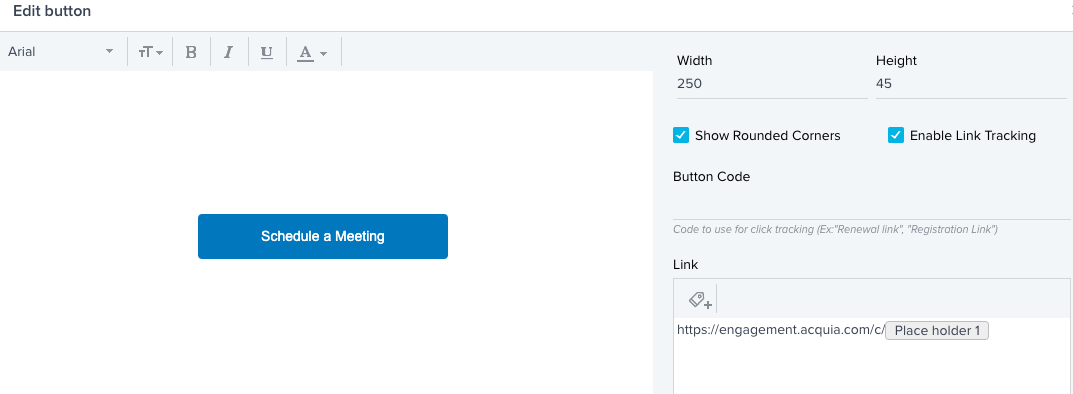
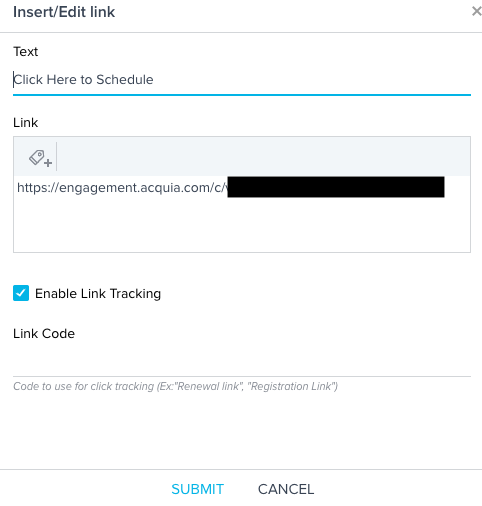
@saltamash Yes.  I’ve done it with buttons and a link.


saltamash
Forum|alt.badge.img+8
  • Helper ⭐️⭐️
  • January 16, 2023

This is perfect. Thank you @heather_hansen 


aaronhatton
Forum|alt.badge.img+4
  • Helper ⭐️⭐️
  • May 1, 2023

I recently wrote a blog post on how to achieve something similar to this ask. I hope it helps!


Wihoward
Forum|alt.badge.img+6
  • Helper ⭐️
  • December 18, 2023

@aaronhatton was interested in your blog but the link is broken. Has that been moved since the site migration?


aaronhatton
Forum|alt.badge.img+4
  • Helper ⭐️⭐️
  • January 8, 2024

Hey @Wihoward - looks like we had a small issue with the post. I like to think it’s because it was so popular!

Here’s a working link (it may change back to the old link once the issue is resolved):


dayn.johnson
Forum|alt.badge.img+8
  • VIP ⭐️⭐️⭐️⭐️⭐️
  • January 8, 2024

@aaronhatton, fantastic walkthrough for adding tokens in a JO email!