New Idea

Inline adding of screenshots in Timeline Activities

Related products:None
  • July 23, 2020
  • 20 replies
  • 313 views

Hey there!


A colleague of mine had the idea, that it would be amazing to be able to add screenshots in line while creating a timeline activity. This would be amazing to establish a connection between text and images, so it would be crystal clear which screenshot goes with which paragraph of the text.

Cheer!

Tim

20 replies

nitisha_rathi
  • Expert ⭐️⭐️
  • July 30, 2020

Hi, This is on the short-medium term roadmap.


Jef Vanlaer
Forum|alt.badge.img+3
  • Helper ⭐️⭐️
  • January 29, 2021

This would be a very nice improvement indeed. It would also come in very handy in the Summary Section of the C/R360.


Forum|alt.badge.img+4
  • Contributor ⭐️⭐️⭐️
  • August 25, 2021

Has this been picked up by GS for the roadmap? This came up with my CSMs today and as far as I know this still isn’t possible within Timeline


timellis
Forum|alt.badge.img
  • Contributor ⭐️⭐️⭐️
  • August 27, 2021

Has this been picked up by GS for the roadmap? This came up with my CSMs today and as far as I know this still isn’t possible within Timeline

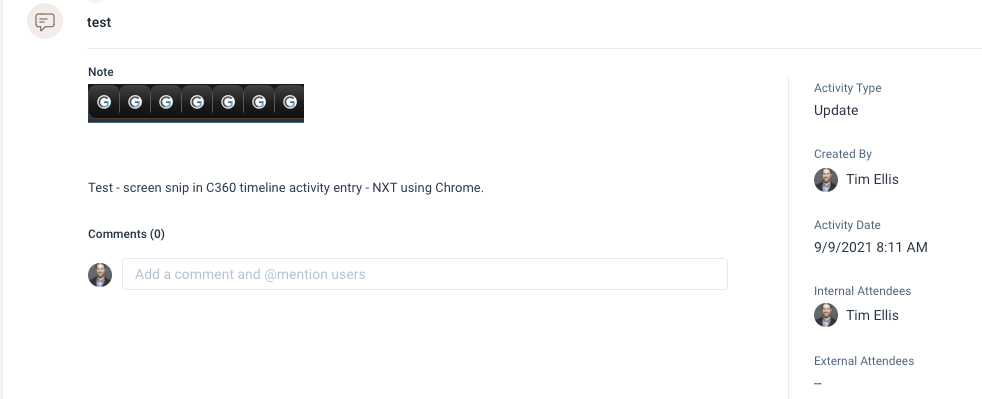
This bothered me as well but it seems this may have recently changed.  I tried it just now and was able to past screen snippets into timeline entries on NXT.


Forum|alt.badge.img+4
  • Contributor ⭐️⭐️⭐️
  • September 2, 2021

@timellis I’m not sure if I’m missing something or not. I tried the same thing but can’t get the screenshot to appear in line with the text. You can add it as an attachment, but copy+paste doesn’t work into the description. There is no option to add image in line with the text. We are in NXT as well.


soumitrasahu
  • Helper ⭐️⭐️
  • September 9, 2021

Yes, currently, that option is not there. We will look into this and will update once we prioritise it.

@timellis @Jef Vanlaer @dan_kenner Could you be able to give us some scenarios or use cases when you would like to add an image inline instead of attaching it?


timellis
Forum|alt.badge.img
  • Contributor ⭐️⭐️⭐️
  • September 9, 2021

@timellis I’m not sure if I’m missing something or not. I tried the same thing but can’t get the screenshot to appear in line with the text. You can add it as an attachment, but copy+paste doesn’t work into the description. There is no option to add image in line with the text. We are in NXT as well.

It seems to work for me on the C360.  My environment is NXT, Chrome, MacOS.


timellis
Forum|alt.badge.img
  • Contributor ⭐️⭐️⭐️
  • September 9, 2021

Yes, currently, that option is not there. We will look into this and will update once we prioritise it.

@timellis @Jef Vanlaer @dan_kenner Could you be able to give us some scenarios or use cases when you would like to add an image inline instead of attaching it?

Being able to see screenshots etc. as you’re taking notes in a meeting is critical.  Attaching them separately loses sequencing and context of where they are in the meeting.  Also, I like to take screen shots of participant lists in a webex meeting and paste them in to meeting notes for easy reference.  It’s not practical to open up a separate attachment do do that.  Think of what a user who is taking notes in a webex/zoom meeting might want to be able to do - that’s a primary use case for me.


Jef Vanlaer
Forum|alt.badge.img+3
  • Helper ⭐️⭐️
  • September 9, 2021

Completely agree with the points made by @timellis . Also, an image says more than a 1000 words, so having the images visible on the Timeline notes will make it a lot easier to scan past activities for interesting points.


timellis
Forum|alt.badge.img
  • Contributor ⭐️⭐️⭐️
  • September 15, 2021

I think I figured it out!  The image only saves if you put some text BELOW the image before saving it.  The image doesn’t save if there is no text below it.  


soumitrasahu
  • Helper ⭐️⭐️
  • September 20, 2021

@Jef Vanlaer @timellis Thank you so much for mentioning the use cases. Currently, we do not support it but we are looking into building a proper support of adding images inline. We will post an update once we have prioritised this.


timellis
Forum|alt.badge.img
  • Contributor ⭐️⭐️⭐️
  • September 20, 2021

@soumitrasahu @Jef Vanlaer @dan_kenner I have it working so I think this may be an undocumented feature :wink: There does seem to be a strange quirk however to get it to function properly: you need to include some amount of text BELOW the image before saving it for it to save properly.  If there is no text below the image, the image disappears without any type of error notification.  Please give it a try and let me know if this works for you as well.


Forum|alt.badge.img+4
  • Contributor ⭐️⭐️⭐️
  • October 14, 2021

@timellis That seemed to work, though copy+paste doesn’t work still. I can only drag in the image once it’s saved on my desktop. This isn’t a huge deal just something I’ll need to clarify with our CSMs.


Thanks again!


timellis
Forum|alt.badge.img
  • Contributor ⭐️⭐️⭐️
  • October 15, 2021

@dan_kenner copy+paste works for me but only via right click (not keyboard shortcut).  I’m using a Mac and Chrome browser so I use (cmd+ctrl+shift+4) to do a screen snip and then right click on the timeline entry to paste it. 


  • Contributor ⭐️⭐️
  • February 2, 2022

Using images seems to be a basic requirement. Without this ability notes are terribly incomplete.


anirbandutta
Forum|alt.badge.img+2
  • Expert ⭐️
  • February 17, 2022

@soumitrasahu any developments on this track?


soumitrasahu
  • Helper ⭐️⭐️
  • February 17, 2022

@Richards @anirbandutta This is in our roadmap and we will update the dates once we prioritise it.


bhavik.shah
Forum|alt.badge.img
  • Contributor ⭐️⭐️⭐️
  • August 31, 2023

@soumitrasahu - Last update was about a year ago. Do you have anything new to share on Gainsight’s plan to add this feature?


timellis
Forum|alt.badge.img
  • Contributor ⭐️⭐️⭐️
  • September 29, 2023

@soumitrasahu - Last update was about a year ago. Do you have anything new to share on Gainsight’s plan to add this feature?

I’ve been using this feature almost daily.  I can take screen snips and paste them in the body of timeline entries inline with text.  See my comments above for instruction.  What specifically are you looking for GS to add?


Forum|alt.badge.img+1
  • Contributor ⭐️
  • May 30, 2024

@soumitrasahu Any updates on this on adding attachments to emails or notes successfully? 
 

@soumitrasahu i see @timellis posted a work around for this but there is still a limitations with uploading images/screenshots or emailing images/screenshots. As well as different users have success with copy and paste vs click and drag on my side. We have security complications which make work arounds challenging. So the ability to simple add screenshots to meetings notes, emails or in singularity is functional for us.