

jean.nairon
Expert ⭐️
July 9, 2020
New Idea

Ability to edit the page layout of a related low volume object

Related products:CS C360 & R360 & P360
  • July 9, 2020
  • 29 replies
  • 928 views

On the C360, you can add low volume objects as a related list. If you include the GSID in the report, you are provide with 2 actions: view/edit. I have created another idea to more easily add this functionality: 


https://community.gainsight.com/cs-ideas-21/simpler-ability-to-view-low-volume-object-on-the-c360-38559


Once the GSID is added, a user can click the eyeball to view the record. The page layout that is presented for the object is sorted by field type and then field name. Here’s an example: 
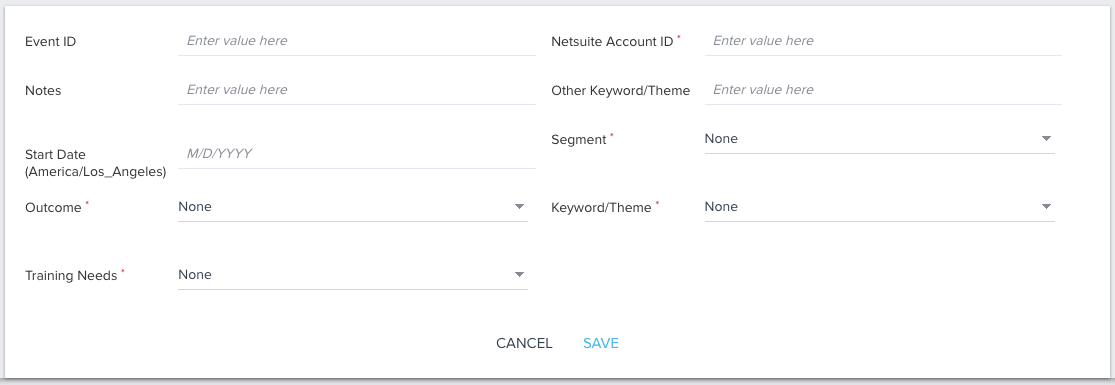


There is no way to adjust this page layout. It would be more helpful and intuitive for CSMs if this page layout was sortable. 

29 replies

HollySimmons
Helper ⭐️
July 22, 2021

@rakesh_lingala to add to this, I want to be able to hide certain fields from the edit page, or at the very least make them uneditable. 

Also when you have a look-up field, I’d like to mirror the flexibility that we have when adding one to a CTA layout, in that you can specify which fields to search by, filter to specific records (i.e. those attached to the Company) and choose which field to display. Currently (in edit mode) it shows the GSID: 


Finally a comment that I don’t really consider the initial request implemented, you still can’t choose the layout of the fields on this page - we have to add numbers/letters before the field names to make them alphabetical to have any option of our own order. This then feeds in elsewhere e.g. reporting, and I’m constantly having to rename fields because of this. 

pgeorge
Gainsight Employee ⭐️
August 6, 2021

@HollySimmons Field Level permissions is a part of our Mid term roadmap. We will soon have the capability along with layout capabilities for Low Volume objects/

anirbandutta
Expert ⭐️
March 1, 2022

@pgeorge any updated timeline we can share here?


It's an opportunity for engagement
Contributor ⭐️⭐️⭐️
March 7, 2022

+1 to all of this, we would like to have this capability as well.

Contributor ⭐️⭐️⭐️
April 26, 2022

+1 on hiding fields that aren’t necessary or choosing which fields can be edited and which can’t. Right now, everything is visible and everything is editable.

bradley
Expert ⭐️
July 11, 2022

@anirbandutta can this be changed from ‘implemented’ to something else? The ‘solution’ implemented made the existing experience marginally less annoying, but didn’t actually satisfy the request. Having the ability to customize these with at least the same flexibility that we can customize CTA layouts would be huge for us.

matthew_lind
VIP ⭐️⭐️⭐️⭐️⭐️
July 12, 2022

Concurring with @bradley , a status of “Partially Implemented” seems more true to what’s been delivered thus far.

Having the ability to determine which fields appear, and in which order, without artificially alphabetizing them via changes to the field name, would guide end users into the ideal workflows and processes, with guardrails to prevent inadvertent data issues and “guiderails” to increase efficiency.

Making people their best....currently disguised as a CS Ops Architect. How can I contribute to your success?
Contributor ⭐️⭐️⭐️
September 13, 2022

+1 for the ability to rearrange and select which fields should show/not show

cmultanen
Helper ⭐️
October 19, 2022

+1, I would love to have more customization when it comes to low volume object visibility. The current implemented fix is not really sufficient.

jenlpro
Helper ⭐️
April 26, 2023

+1 here!!! Would love to customize my page layouts. Our previous admin numbered all of the fields in the system to control their location and I could never figure out why they did this, until I’m now attempting to add a new field and having to re-number all of the display names 😭