

jean.nairon
Expert ⭐️
July 9, 2020
New Idea

Ability to edit the page layout of a related low volume object

Related products:CS C360 & R360 & P360
  • July 9, 2020
  • 29 replies
  • 928 views

On the C360, you can add low volume objects as a related list. If you include the GSID in the report, you are provide with 2 actions: view/edit. I have created another idea to more easily add this functionality: 


https://community.gainsight.com/cs-ideas-21/simpler-ability-to-view-low-volume-object-on-the-c360-38559


Once the GSID is added, a user can click the eyeball to view the record. The page layout that is presented for the object is sorted by field type and then field name. Here’s an example: 
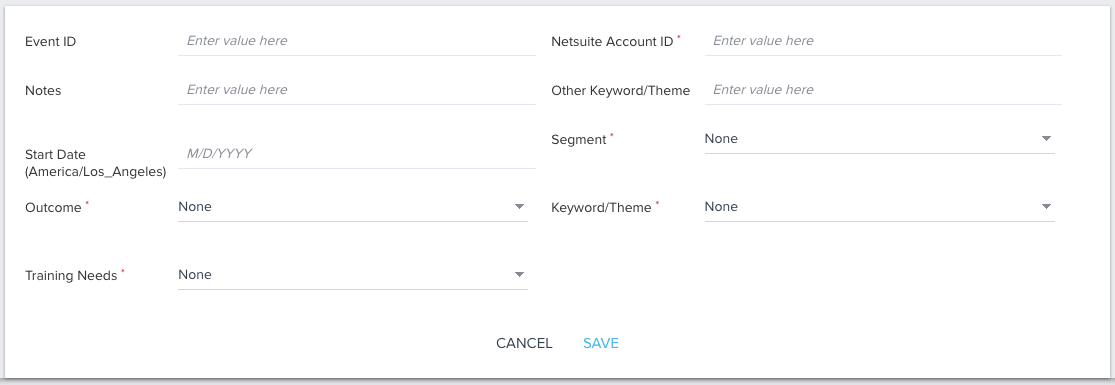


There is no way to adjust this page layout. It would be more helpful and intuitive for CSMs if this page layout was sortable. 

29 replies

anirbandutta
Expert ⭐️
June 22, 2023
Implemented→Partially Fixed
It's an opportunity for engagement
mindy
Helper ⭐️
September 13, 2023

I have a new use case that has upgraded this issue from annoying to actually detrimental.


We are using the same low volume object to collect different metrics across different products and these are manually entered. What I WANT to do is show the subset of fields that relates to product A on the edit/add record layout for relationships of product A and show the fields that relate to product B on the edit/add record layout for relationships of product B. Instead, everything is going to show and be editable. It’s a terrible UI for the user for sure. More than that I’m also worried it’s going to affect our data collection with people entering (bad) data into fields that don’t apply to the relationship simply because I have no control over those fields showing.


I hope that this is still being looked at! Because “partially fixed” is still too lenient on this. No part of the request to be able to customize this layout was fixed. The only thing that changed was the order logic that we can’t control.

Contributor ⭐️⭐️⭐️⭐️⭐️
September 26, 2023

I just upvoted. The original request is not partially fixed - rather, the workaround through the comments might be fixed. Would still love to see the list view order be customizable.


Contributor ⭐️
November 22, 2023

Hi @pgeorge,

Is there any update on this feature? I would like to add to this, what I think it would be a nice to have as well:

  1. Hide any field that don’t want it to be shown when editing a record manually from within a C360 report.
  2. Be able to change the field label name of any field in this view previously mentioned. (see screenshot below)
  3. Be able to customize the layout and position of fields.

Thanks!


matthew_lind
VIP ⭐️⭐️⭐️⭐️⭐️
January 11, 2024

Adding to the chorus of folks seeing a customized layout when editing records in low-volume objects. Because Saleforce does this very elegantly, my Gainsight users are surprised to hear Gainsight cannot.

  • The inability to hide fields causes users a lack of focus on the most essential information to be entered.
  • The practical inability to order fields prevents a logical flow of data entry. Yes, there is a forced alphabetization work-around, but this creates oddities elsewhere (in report building, for example) where the field names and their forced rename for alphabetization is non-desirable.
Making people their best....currently disguised as a CS Ops Architect. How can I contribute to your success?
Contributor ⭐️⭐️⭐️
January 17, 2024

Hi @pgeorge 

Is there an update on feature?

As per requirement we added many fields to the object but not all are necessary for the CSM’s.

Currently unhide to use these fields in rules and hide them again.However it has become a quite a big issue.We can’t seem to manage this any longer.

With current arrangement of these fields alphabetically CSM’s need to find the field to be udpated.There are dependent fields in our layout.Its good to have them next to each other but becuase of the current feature they need to find the fields to udpate them.


Irregular updates are causing data issues.CSM’s are not happy to be enabled mutliple times.I hope Gainsight fixes this before it could become risk.


liam_nicholls
Helper ⭐️
February 13, 2024

We have made use of the low volume objects to capture data and get people off spreadsheets!

It’s great functionality, however we do find some limitations with not being able to configure any of the layout. 


Field ordering would be great. Current we created fields, and then later change the field label and use numbers as a prefix to control order.


Horizontal lines or some means to group like fields together would be great. 


It seems that it’s a two column layout without a means to change to one column. When using a rich text box, the text field is in one column and I’m told it’s not easy to read text in those fields.


I’ve come across issues with people entering data into standard string field on a low volume object and the saved data being truncated due to the 255 character limit. I understand why the 255 char limit is in place, however the limit does not stop people from entering the data in the first place. So the issue is when you save the record, the data is truncated.

March 5, 2026

We are hosting a Virtual Customer Advisory Meeting - Customizing the page layout of related low volume objects.

You can register for the roundtable using this form. We will reply with a calendar invitation. If you cannot use Google Forms due to company restrictions you can email productops@gainsight.com to sign up. 

Sriprashant V | Senior Analyst - Product Operations, Gainsight
Prateek Parashar
Gainsight Employee ⭐️
March 12, 2026

Hello All,

This is Prateek. I’m continuing my user research on this feature through March and early April. If you weren’t able to join the VCAM session, no worries at all.

Please feel free to reach out to me at pparashar@gainsight.com, and I’m happy to find a time that works best for you 

Looking forward to connecting.

Best regards,
Prateek

Prateek Parashar