

sarahmiracle
VIP ⭐️⭐️⭐️⭐️⭐️
August 11, 2023
Released

Allow for "fluid" layout in new email template builder

Related products:CS Journey Orchestrator
  • August 11, 2023
  • 15 replies
  • 152 views

What happened to Fluid layout in email template builder?

There are so many valid use cases for wanting a “fluid” style for your email. It was what I used most often because it looked like a casual email between a CSM and their customer even if it was automated through a journey. The “fixed” layout style (which we seem to be stuck with in the new template builder) looks crafted and commercialized. 

Creating this as an Idea as I’ve heard it’s not possible to do a “fluid” layout in the new builder, but I hope I am mistaken and can be corrected!

Notes:

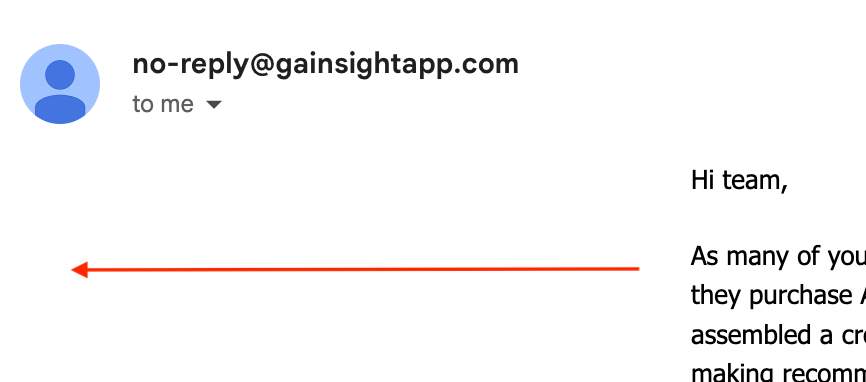
  • I have 0pt border on email template body and email content area (no padding)
  • Email still sends to me in a “centered” way
 

15 replies

sarahmiracle
VIP ⭐️⭐️⭐️⭐️⭐️
August 11, 2023

Also note that when I built this I chose “custom” as my build option

Customer Success Systems Admin @ Amplitude, 3x Gainsight CS Ops Product Council Member
sarahmiracle
VIP ⭐️⭐️⭐️⭐️⭐️
August 11, 2023

@PavanCh might you have any insight here?

Customer Success Systems Admin @ Amplitude, 3x Gainsight CS Ops Product Council Member
darkknight
Expert ⭐️
August 13, 2023

This is crazy. Why would they remove this??

Jeff Kirkpatrick
Contributor ⭐️⭐️
August 14, 2023

I believe that removing the width of the text box on a custom layout is a workaround for this - the ‘x’ button next to 630px. That seems to act about the same as the ‘fluid’ layout on the old builder. That said, there should still be a simpler option to stick with the old ‘fluid’ builder, we used that for the majority of our emails.

sarahmiracle
VIP ⭐️⭐️⭐️⭐️⭐️
August 14, 2023

Thanks @Hawleynr ! This does seem to do the trick, but note that this also has its own unintended consequence. I’ve heard that doing this removes the "re-active-ness" of the email and will add the need to scroll on smaller screens. Not ideal 😓

Customer Success Systems Admin @ Amplitude, 3x Gainsight CS Ops Product Council Member
ssamarth
Gainsight Employee ⭐️
August 15, 2023

Thanks @Hawleynr @sarahmiracle for the feedback.

We gave the user the flexibility to customize width of email content area. Incase no width needs to be defined user can click on ‘x’ button.  

@sarahmiracle can you elaborate on the unintended behaviour you observed.


ssamarth
Gainsight Employee ⭐️
August 15, 2023
No Status→Under Consideration
sarahmiracle
VIP ⭐️⭐️⭐️⭐️⭐️
August 16, 2023

thanks @ssamarth I believe clicking the “x” to remove the width (although, it doesn’t remove it per se, it sets it to 996px). This is expected, yes?

Customer Success Systems Admin @ Amplitude, 3x Gainsight CS Ops Product Council Member
sarahmiracle
VIP ⭐️⭐️⭐️⭐️⭐️
August 16, 2023

sorry my comment was fully complete before I posted!

thanks @ssamarth I believe clicking the “x” to remove the width will do the trick!

although, it doesn’t remove it per se, it sets it to 996px. This is expected, yes?

Customer Success Systems Admin @ Amplitude, 3x Gainsight CS Ops Product Council Member
ssamarth
Gainsight Employee ⭐️
August 16, 2023

@sarahmiracle clicking the “x”  will remove any upper limit on width. It will then show pixel width based on screen size in the editor (996 px is the width visible based on your device screen) . For recipient’s screen it will auto adjust.