dayn.johnson
VIP ⭐️⭐️⭐️⭐️⭐️
May 10, 2024
Released

Dynamic JO needs additional data types if we are not allowed to do Custom Field Mapping.

Related products:CS Journey Orchestrator
  • May 10, 2024
  • 32 replies
  • 639 views

Title says it all. This issue (lack of Custom Field Mapping) was addressed in a post that’s hidden behind the private Dynamic JO beta group walls. It has not been solved, and it is (and will continue to be) a major pain point until a solution is implemented. @vmallya, is this something that’s on the roadmap to be re-released in dynamic JO, since the feature was present in advanced JO and was removed? Seems to be a pretty common use case.

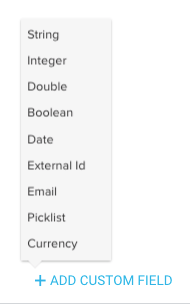
When building case fields in the dynamic JO, we’re only allowed to choose from three data types (number, boolean, string). 
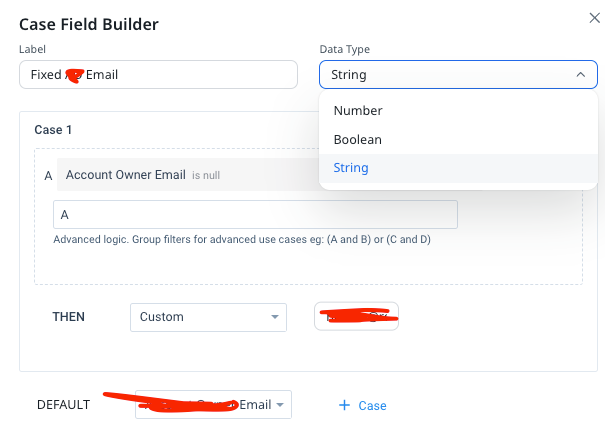


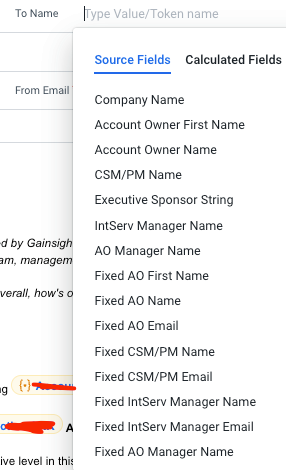
This becomes an issue when we then try to map those case fields to an email field in the template. Those fields (as strings) are only available in the name fields.
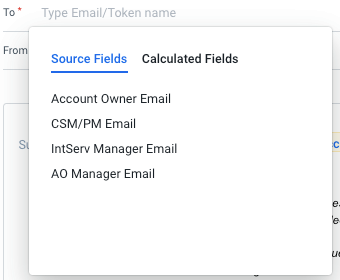


For comparison’s sake, in advanced JO, this was never an issue, since we were able to quickly map those strings to an email data type (or any other data type available in the Custom Field Mapping).
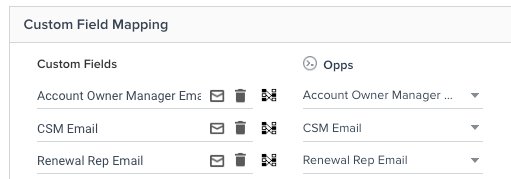


Would it be possible to add additional data types in the Dynamic JO Case Field Builder? This feels like we’re taking one step forward and two steps backward with this new release.

The workaround (I’ll report back once I’ve tried it) will be to re-source the email data and merge it with the case field to turn those case data strings back into an email data type.

* As a note, this workaround was presented in the aforementioned post that circulated in the private dynamic JO beta group (I’ll share the contents of that post in a comment below for reference), and the issue was marked as solved, but the fact that this is still such a big pain point (and that the feature was effectively hamstrung while working to improve the JO platform, even though it was addressed nine months ago) is concerning.

Bottom line: creating a case expression to fix a null email so an email doesn’t fail should be easy.

32 replies

dayn.johnson
VIP ⭐️⭐️⭐️⭐️⭐️
May 10, 2024

SOLVED

Sender Email not showing as option under From Email


In my DD I have Sender Email, which is created through a case expression. It shows as available in other fields, but doesn’t show up as an option in the “From Email” field. 


Only Recipient Email is showing as an option under From Email: 

QZErYR5jMItRovB7PZbeLw0kx4XqFQe2v-QSGM5cmoIinko9pG64klXaxMUp-EvU6oEwjvSf8ETgQXp7LaGgo_ypkmbgzY_jP08BF1mz2MwNYWvLO0xJ7D1SDIrb0RWgba8BgHoZoxlm8qds6wOvRLg


You can see that Sender Email is available as a field under From Name, so it is in the data:
 

jPIJZK0By_Zy1yWiLBhtAJsypH0_fKpdups2ogfiy5__IzA_L-WeGFGEzlGJN--EMhQ7JCS0xTaxk_jjajRqjJ1Aykz1AR_oSEYnZQCp7BsQhqxbNT7e9HbEt2XdfZiHdbMEOGoeFUqD3nsc9rmzQa0


Have I done something wrong here? Does it need to have a specific name to show up as an option under From Email?

Best answer by eriklangston

@vmallya @HMM Not sure if this is solved but we currently have a similar scenario where we needed to send from a different user based on account criteria.  I was able to rename the email field in a transform to “Sender Email” and then use the transform filters as the “case criteria.  Create a transform for each “case”.  Then did a union and made sure the email fields were labeled the same.  That allowed me to use different user emails as a sender email in the JO

Transform for IC:

5tt2Ok95gLFQj7lw5WcYPEqCe6SDhvsbULCOx8moqdt0Ccj3mtrjlfXWPog8Uthx_hslo-7bLGz55SfzJ09rZ1SlTM49Wju_FVGZupdDuudd7OVa4mRoNRfS9xz8lAtZIV6ghajBk71dKkIich41YRw

Transform for CSM:

PWCfAttORFq4bGOg0wsG62MoHIFLIrfbn4CGeFA80m-LWB_jDOU-yhmDuUyneRJj-DObs_fcXLBNFtnqQ6lsR5LC0sYRkv_JMioFUi3TGQeO9D7Ya0TaWo_M-n3Gkgb3BZq93kQH5hbAjguJhXJZb7U


Union:

iac6gojxWUl4WuDwyayVGPWXZi7yYO2LsK1ykyYmY1jodIYrbhkMKWB0uKY4DoZ8bR7CsG6k_j8t9bJK9XC_yl9idVeI7AlATseCo8nwZRfuUCcKR3pXzR2SU2RWDTTbXlPvEttEf7RT4if_KDqOn1EhE05lpVVFyLOjGNQFoXbmHmXbev9ulZlfc6EGdbk6S8dnA2Qvq0BDdzuL5GYIezZuWcXeALnD8Fa4h-3K2EM2EKA8_FpYXLpkZLRP3nDqwfv0WO72or5O2lzVpTHseO4XPvazLeNx7DXGy4w0KnSfI8


Email in JO:

6tBnOlaO1zm9YeuhDiXJd43jy_6KQip6pQZlJylx88Kj7mQ8eIjvFZCPxe96xqVjZnCrcE1Myx-2_V6uDDCdmPROwdiInY-qT02ovFSqdXGKho2kD28euj08VLrGWr4Ggfbs0O0u-Eh2fGL8FE2GSDEHi @HMM 

What’s the data type of that field? Dynamic JO doesn’t have the naming issue like Simple Programs. I am using a field called “CSx Email” that I add to the From Email field and it works fine.

My best guess is your case statement field is not an email data type (it’s a string) and that is why it’s not supported here.

Try with a field of email data type.

Not that it shouldn’t be fixed though, I also use case statements to generate fallback senders when there’s no CSx. Deffo a use case that needs to be supported.

Thanks @alizee ! I thought that might be the issue as well, but it seems to only allow me to choose String, Boolean and Number. So not sure where to go from here. I haven’t worked with DD in the past. Am I missing something on how to make this an email data type?

imDHYI2eMVngmsjdYb6fcIntdWJbJ9x4YeXdaY0S5wE7PuIyiWhavlAVbx5rQRbYXyobizSE41CujB1PZuLym-1eWKvPrM91_HIHS1YKYufsT0kBDDOaAWRPTUYM35KhGnREqoXJAjzzZn2j17DS7us

Hi @HMM 

Yep, the case statement doesn’t support email as a data type nor others that would be useful like URL... I think that’s because we no longer have to map our fallback email to the “recipient email address” which possibly was acting as a “converter” to email data type.

@vmallya This needs to be brought back. But I would personally think we should have an “Email” case statement data type. This would all things considered be smarter to avoid the accidental mapping of string values (which are not email) into that field. But I understand that’s got nothing to do with JO itself. 


HMM

Thanks for the help @alizee
Unfortunately, we can’t use the new experience for most of our programs without the ability to create the sender email through a transform. 😕

In the old experience the sender email is transformed as a string and we’ve never had issues with this sending. If this were to GA without the ability to use a transform for the sender we would be in trouble with our current setup @vmallya.

@HMM - we’ll look into this and work on a solution for GA. Thank you.ER

@vmallya @HMM Not sure if this is solved but we currently have a similar scenario where we needed to send from a different user based on account criteria.  I was able to rename the email field in a transform to “Sender Email” and then use the transform filters as the “case criteria.  Create a transform for each “case”.  Then did a union and made sure the email fields were labeled the same.  That allowed me to use different user emails as a sender email in the JO

Transform for IC:

ePL3-cRLPr4vQBEWqdngNzoNSp2S8JnUwkBSZJB0zuurfDr5N6-Aib1WOaPkBhkwKCgYUJnh3Ccy1bI6_qtWQRrAZb-s-WsWeqoq4aYAqOEs-GA5QaaboMuKkDmw9JznQm63vXoZAP1JdXHAalFtxrY

Transform for CSM:

axIVInE1i9Gm7vFpbJe9jB_sGy9uydknYPsL7If3Z5BPkhcNCL2s0wmrI47ar4Y6ZZZk_Z_u49D2RNPrMv6POaEreJ774IUWJw1BZT8Me9JOirBl723JXg83LbAvumTSD0fSb3-7DWmoCCd_RbZiho8


Union:

uq9YBYj1bEA0OKOWPiE4Dal3qU_69EdBDnWW4IlpxTcKdnpUka78dw5wEOT35TqX-xfRWXuvijsIipmcpFmN20K8PSYsF72ZLOav75yoCYyBwMXvhizGOHnxUbfrGZBhaQl365o6pIjnLHyYKzkbeqYtMik7J-JNzZC5ZkcbjjhXZ85Q6guMLUCKbbYd1O-Ra-f3ocF5bHEgRjBaQRGH8lhrqmIJBJvNjwo_EUg4o6ur6_LEef9JvKCdJWS4hG4gPgIUG21P_F0zT8eN0jMjLGK0T-Twe47A6vnEiSBibOkZlU


Email in JO:

ibrwIxynulD0UVwA8rfUayulatFfIs1vU4CBESwqSbsNFvBuMwwGAB_JUHrqIwkCtJNWd9fnMbMxE2cl-74JQRJttqloL2qZk8qeicTfd6AVYDk2yuKGK1bnbQMjKFzbCe_2OWIMVoboOWghWVKUFc0

Interesting @eriklangston ! Thanks for this info. I haven’t tried it with a union! Normally I do a Transform with a case expression where it’s basically “if level = tech touch then use Tech Touch email, else use CSM email”. And that output is named Sender Email. That hasn’t worked so far though. 

In this scenario, how does the JO know which email to use? I would like to try to replicate your approach!

Edit: Sorry, the transform filters part didn’t immediately click in my mind. I think I get it now. Trying it out!

It works! It was showing the new Sender Email option but wouldn’t let me select it. However, I tried it in a brand new program and it worked, so I will just need to delete and re-add the dataset on my existing program. Thanks again @eriklangston ! This was a big concern of mine :)

@HMM yep, glad it worked.  I treat each transform as a “case” statement.  So whatever criteria you would put in the case you use the filters for the transform.  Then you have a transform for each case. I had an issue with my program using it as the sender then i checked the Mandatory fields in the Program setting and it had defaulted the Sender Email to the Recipient setting. make sure to check this and its not set to your sender email field

AsA6PeOu_d8dL_X-I4TYDohB0TkaZS6KWUyS11GlMW9-ICy_bImO4228baZzBVPvs9ZjgYhITSOXzNnFJN1cNIxWU2fuQZtzro-kuXLcLG4SDix2s8_B6HYWwcZjfB2rmXHRNyahneTrhaRd87kzgv4

Staff CS Content & Comms Manager, 2x Gainsight CS Ops Product Council Member
Stuart
Helper ⭐️⭐️
May 13, 2024

Thanks for posting @dayn.johnson!


Hey @Snigdha Adiraju, following on from April’s meeting, I wanted to highlight this is a great example of not having parity between old + new a in feature migration and making utilization harder, not easier, in (some) admin use cases.


Thanks!

vmallya
Gainsight Employee ⭐️
May 15, 2024
New IdeaDiscovery
Vijay | PM | JO | Gainsight
sarahmiracle
VIP ⭐️⭐️⭐️⭐️⭐️
May 22, 2024

Adding my +10000 for this request. It is an extremely common use case to leverage case statements in order to yield a specific sender email for a participant. Some common examples below:

  • If CSM is Null, use Email X. If CSM !=Null, use CSM Email
  • If CSM is Null, use Account Executive Email. If CSM !=Null, use CSM Email
  • If Geo if AMER, use Email X. If Geo is APAC/APJ, use Email Y
  • If ARR is <$100k, use Email X. If ARR >$100k, use Email Y
  • If Segment is Digital, use Renewal Specialist Email. If Segment is Mid-Market or Enterprise, use CSM Email.

The list goes on and on. It was so easy to accomplish this in old JO, and nearly every program I launched at my previous org needed to use this logic. If this isn’t possible in Dynamic JO, then it is unusable.

Customer Success Systems Admin @ Amplitude, 3x Gainsight CS Ops Product Council Member
romihache
VIP ⭐️⭐️⭐️⭐️⭐️
May 23, 2024

Huge blocker to use the new JO. We admins use cases like Sarah's examples above day in, day out.

Thanks @dayn.johnson for taking the time to submit this idea!

Continuous improvement is better than delayed perfection
dayn.johnson
VIP ⭐️⭐️⭐️⭐️⭐️
May 23, 2024

Adding my +10000 for this request. It is an extremely common use case to leverage case statements in order to yield a specific sender email for a participant. Some common examples below:

  • If CSM is Null, use Email X. If CSM !=Null, use CSM Email
  • If CSM is Null, use Account Executive Email. If CSM !=Null, use CSM Email
  • If Geo if AMER, use Email X. If Geo is APAC/APJ, use Email Y
  • If ARR is <$100k, use Email X. If ARR >$100k, use Email Y
  • If Segment is Digital, use Renewal Specialist Email. If Segment is Mid-Market or Enterprise, use CSM Email.

The list goes on and on. It was so easy to accomplish this in old JO, and nearly every program I launched at my previous org needed to use this logic. If this isn’t possible in Dynamic JO, then it is unusable.


Love these examples, @sarahmiracle! Thanks for chiming in!

Staff CS Content & Comms Manager, 2x Gainsight CS Ops Product Council Member
saltamash
Helper ⭐️⭐️
June 14, 2024

This! Thanks for posting @dayn.johnson and for the examples @sarahmiracle . I was on a call with support team yesterday for precisely this issue and had to go back to building a program in the old JO :( 

alizee
VIP ⭐️⭐️⭐️⭐️⭐️
June 14, 2024

For my part, the workaround for the email topic is working just fine and is probably smarter than the old way of doing things (as far as I’m concerned so it doesn’t bother me anymore).  

With that said, case statement fields MUST be revamped not just in JO - in HRE / Query / DD (and all the UIs that use that engine). 

The most expensive part of building is the mistakes. That's true in construction. Not so much in CSOps. So ask questions, make mistakes and learn. All views expressed here are my own.
dayn.johnson
VIP ⭐️⭐️⭐️⭐️⭐️
June 18, 2024

Suppose I should have named this post “Data Designer needs...” rather than “Dynamic JO needs...”

Whoops. 🤣

Staff CS Content & Comms Manager, 2x Gainsight CS Ops Product Council Member
dayn.johnson
VIP ⭐️⭐️⭐️⭐️⭐️
June 20, 2024

This new patch release ([NXT] V6.41.4) has me wondering. If all of these fields are now available for the event source type in dynamic JOs… why are they not available for queries and data designs? 🤔


Staff CS Content & Comms Manager, 2x Gainsight CS Ops Product Council Member