
New Idea

Email Blacklist visbility

Related products:None
  • July 23, 2020
  • 2 replies
  • 95 views

angela_domenichelli
Forum|alt.badge.img+12

As a Gainsight Admin, I need visbility into the email blacklist so I can ensure all client communications are received.

Today, we only know when client’s are on the Blacklist because the CSM reaches out when using Email Assist and they see an email will bounce message.  The admin uses the Email Validator tool, but cannot see when or which emails triggered the email address to be added to the blacklist (it could be even for another company that uses Send Grid and from anytime in the past).  

We would like to view reports of which email addresses from our contacts are currently on the blacklist.  We would also like to clean-up this list and proactively remove email addresses from the blacklist when creating a CTA that include a high number of CSMs using email assist.

2 replies

cameron_wright
Forum|alt.badge.img+2
  • Gainsight Employee ⭐️⭐️
  • July 23, 2020

I love this idea Angela! That would be helpful for sure. 


anthonysabato
Forum|alt.badge.img+2

If I can add, I believe the blacklists are not on Sendgrid’s end but the receiving ISPs which is the real issue. If GS shows as blacklist and you remove it from using Email Validator tool, I bet its just going to get blocked again immediately because of the ISP. It has been my long standing thought that GS should work with Sendgrid to clear these up since these emails are operating on a shared IP pool. We are not in the business of handling email deliverability issues (I’ve had that job in the past) and I wouldn’t expect us as a customer to handle that in a shared environment. If you purchased a dedicated domain then you would be solely responsible to handle those cases. I’m sure there is more here than I can provide, I thought there was an article that described how Email Assist vs JO emails are using shared IP pools but I cannot find it to save my life (surprise its hard to find anything here).

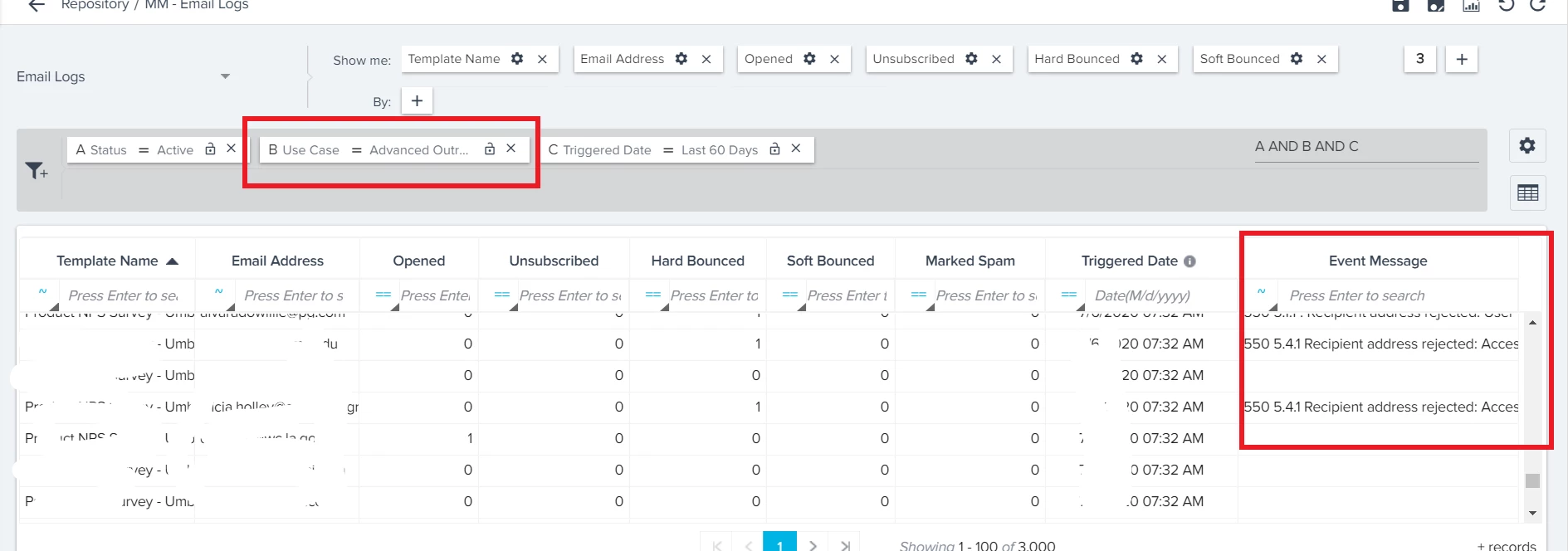
I facilitate my needs, I use a report off the Email Logs object to identify blocks, filter on Use Case field and add Event Message to your show me. Anything 5 above i.e. 550 is a hard bounce, 4’s are soft meaning can be tried again. I hope this helps.