Open

Formula Field Parity across features

Related products:CS Reports
  • June 26, 2023
  • 7 replies
  • 109 views

alizee
Forum|alt.badge.img+13
  • VIP ⭐️⭐️⭐️⭐️⭐️

Hi there,

I’ve had this on my mind for a while and we currently do not have feature parity when it comes to formula fields.

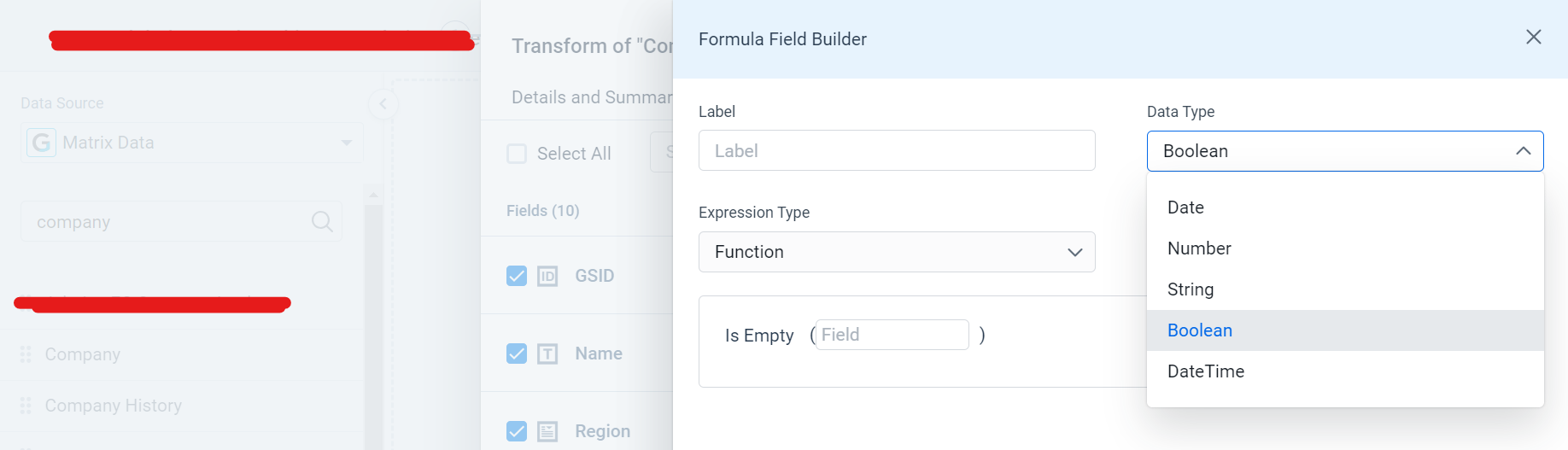
In data designer we can create the following categories of formulas:

  • Date 
  • Number 
  • String 
  • Boolean 
  • Datetime 

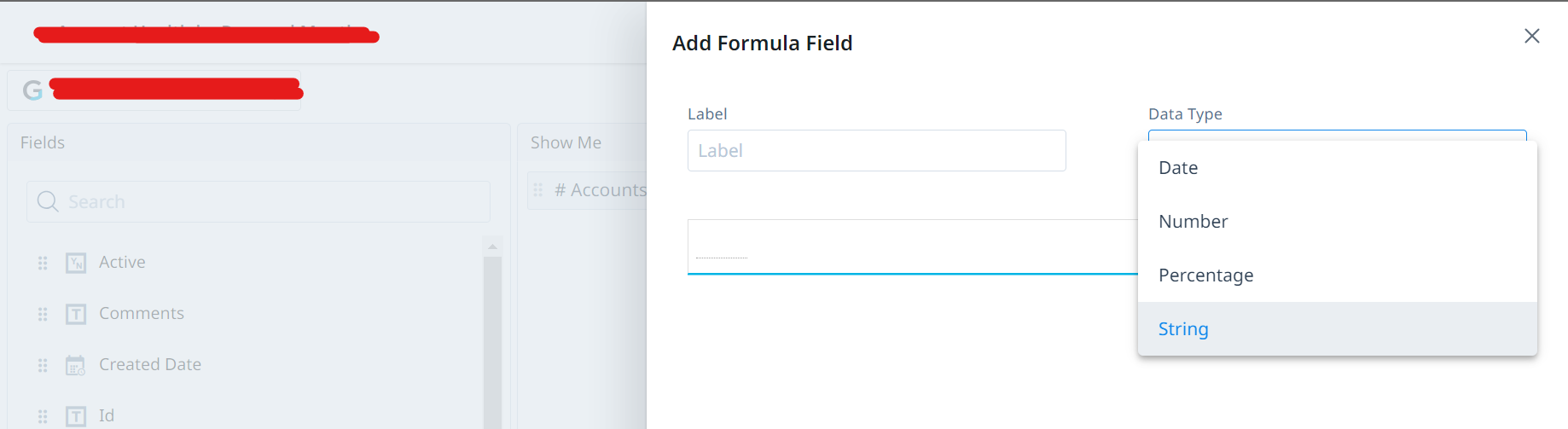
In reports we can create the following categories of formulas:

  • Date
  • Number
  • Percentage
  • String 


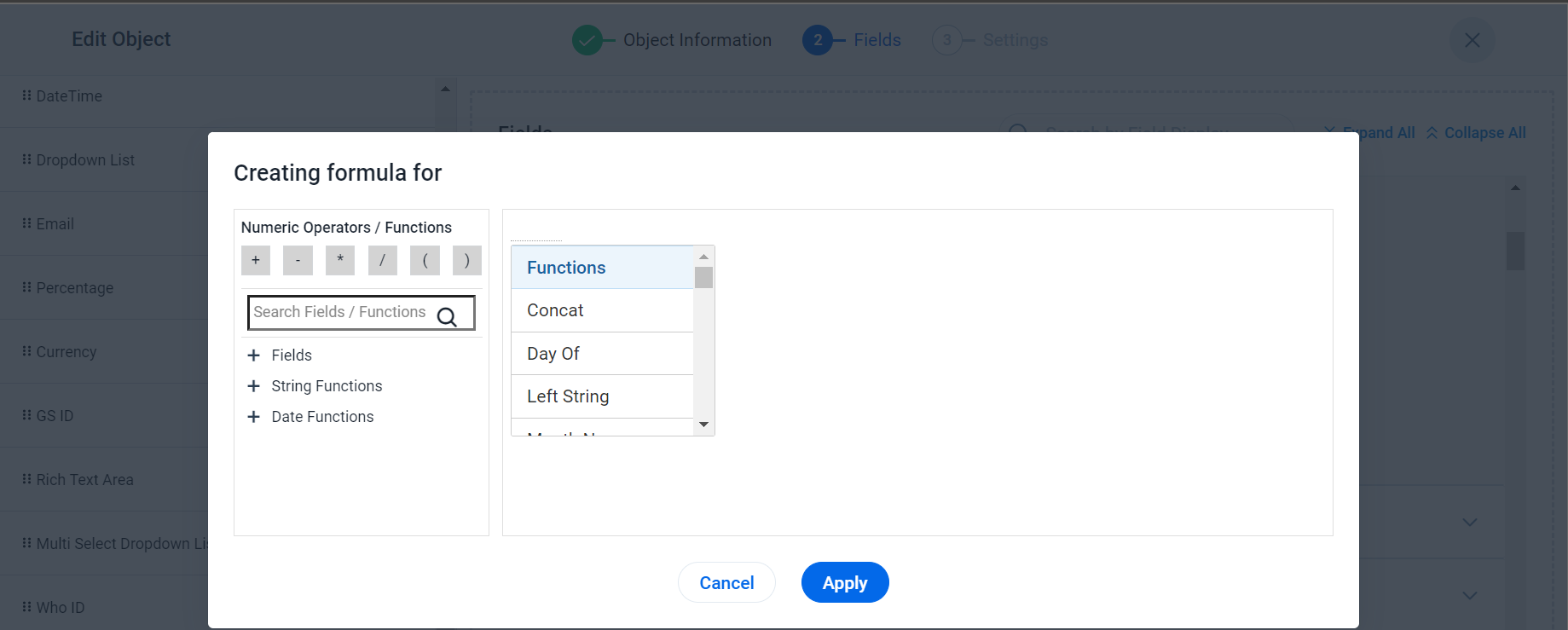
In objects, it’s yet another story as we apparently can only create the following categories (which are not classified the same as anywhere else:

  • Fields
  • String functions
  • Date functions


Can we please have unified way to build formulas wherever we are, in fields, in reports, in data designer, in horizon rules, in the future Journey Orchestrator (dare I say in bionic rules 😅 - nah just kidding)? 

Thanks!

7 replies

saltamash
Forum|alt.badge.img+8
  • Helper ⭐️⭐️
  • June 27, 2023

Thanks for the post @alizee. I’ve always wanted to write something similar but never found time for it. Though I understand why the options in report builder are limited/different, I’d want to have same formula builder experience in Data Management, Data Designer & Rules Engine 


alizee
Forum|alt.badge.img+13
  • Author
  • VIP ⭐️⭐️⭐️⭐️⭐️
  • September 14, 2023

ALSO

WHY can we not create formulas that result in a currency data type? I want to calculate MRR… and I need it be a currency data type for obvious reasons… 😭


bradley
Forum|alt.badge.img+8
  • Expert ⭐️
  • September 14, 2023

I link your post here @alizee and it’s in the comments too, but I also created an extension of this thread here that maybe should have just been a comment on this post but oh well:


rakesh
Forum|alt.badge.img+2
  • Lets put your data to work!
  • September 27, 2023

Hi @alizee and everyone,


I’ll address each aspect of it differently

  • In Reporting and GDM, the formula is stored and the data is calculated on the fly - so some formulae that are compute intensive - we will not want to give them here since the reports would time out. Where as in Data Designer / Rules / JO, its pre-computed, i.e. data is calculated and stored in store. Hence we can give more here on principal. 
  • UX - We have improved our Horizon formula builder - @Aayaan from our design team lead that and we are using the same formula builder across Reporting and DD. So its literally the same component and same experience.
  • Enhancing Formula builder for currency and percentage data types - This is an enhancement we want to take in the medium term. 

anirbandutta
Forum|alt.badge.img+2
  • Expert ⭐️
  • September 27, 2023
No StatusAcknowledged

alizee
Forum|alt.badge.img+13
  • Author
  • VIP ⭐️⭐️⭐️⭐️⭐️
  • October 9, 2023

Hi all - just wanted to add something here:

  • Calculated fields in Data Designer can leverage data from lookups. 
  • Calculated fields in Data Management cannot. We are migrating to relationships and this would really, really be needed where we fetch an established value for the company but need to calculate something at relationship level (I’m going for the workaround route but still wished it would be a thing). 

Thanks!

A


darkknight
Forum|alt.badge.img+5
  • Expert ⭐️
  • November 12, 2025

@rakesh I’ve discovered another formula parity problem.  In Data Management we can do a Date Diff with a resulting Month (as well as Quarter, Week, Year)


But in Rules Engine, we can only do Days, Hours, Milliseconds, Minutes, Seconds:
​​​​​


Parity gaps like this are frustrating, especially when you run into issues like I just did (and opened a support ticket (#436774) where in some cases when I pull a Date Diff (MONTH) formula field from Data Management into a rule, it previews at the “correct” value (matches the value I see when I pull the field into a report) but when I run the rule, it deprecates the value of that field by 1.  (Assuming some sort of rule rounding error, but not sure why that would happen with an formula that is external to the rule)

I was going to try and just create the formula directly in the Rule to get around this issue, but discovered the parity gap.