

darkknight
Expert ⭐️
June 1, 2025
Open

Group Send - give admin control over filter defaults

Related products:CS Gainsight Home
  • June 1, 2025
  • 19 replies
  • 343 views

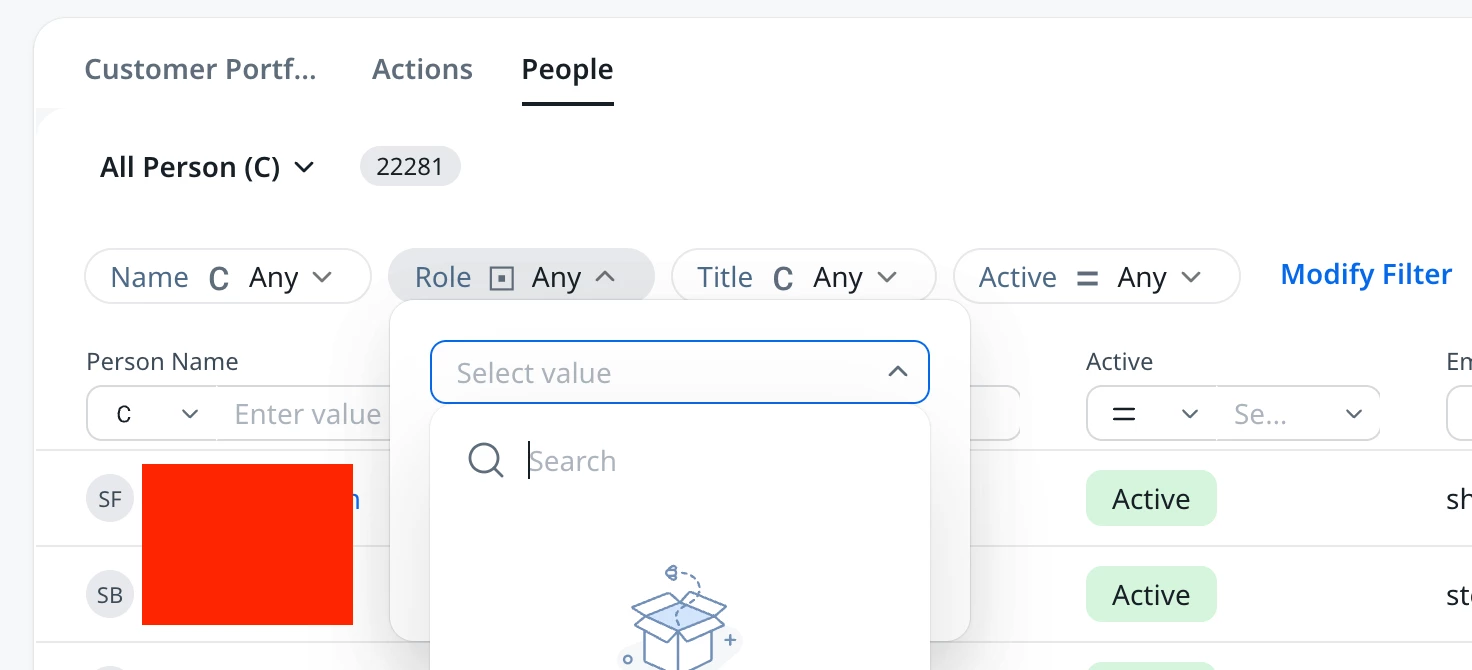
Right off the bat, when testing with Group Send, I notice that in the layout config, admins do not have control over the default filter values.   When looking at the People section from user’s Home, it defaults to “Name”, “Role”, “Title”, and “Active.”
 

We do not currently use “Role” as a field option, so this will confuse end users (especially when it’s blank).  Admins must have the ability to curate the default filters to our standard fields and requirements.

Also, “Name” should be adjusted to “Company Name” to clarify that it’s not a search for the individual user names, but for the Company.  


19 replies

dayn.johnson
VIP ⭐️⭐️⭐️⭐️⭐️
June 2, 2025

Admins must have the ability to curate the default filters to our standard fields and requirements.

Also, “Name” should be adjusted to “Company Name” to clarify that it’s not a search for the individual user names, but for the Company.  

☝ this. All of this!

Field aliases are a must, especially when we’ve got multiple name fields. Tagging this idea about Group Send working with User Groups, it’d be awesome if pooled CSx teams were able to leverage extra fields to have all the info necessary when utilizing this feature to respond to scaled customers receiving pooled account support.

Staff CS Content & Comms Manager, 2x Gainsight CS Ops Product Council Member
bradley
Expert ⭐️
June 3, 2025

Especially frustrating given that a portion of this (ability to rename filters) was pointed out for Home THREE + years ago: 


@jake_ellis This is an example of what we talked about the other day in terms of platform extensibility from a business customization side. Also, it completely ignores an opportunity to learn from prior feedback - in theory, it should be easier to incorporate that into a new feature than have to rework something already live.

darkknight
Expert ⭐️
June 3, 2025

Very good point ​@bradley - the platform needs to be more extensible beyond a design that maps to Gainsight’s business case and can accommodate any customer’s business case. 

I realize I’m just reiterating what you said so eloquently.  Just putting it into “for Dummies” language which is where I live mentally.  🤣

Jeff Kirkpatrick
ssamarth
Gainsight Employee ⭐️
June 4, 2025

@darkknight 

Thanks for the feedback!

  1. We’ve provided a few commonly used filters out of the box, but users can add any additional filters they need. These will remain sticky for each user.

  2. We’re exploring how to handle field aliases at the filter component level. We’ll share more updates as we get further along. ​@pgeorge 

dayn.johnson
VIP ⭐️⭐️⭐️⭐️⭐️
June 4, 2025
  1. We’ve provided a few commonly used filters out of the box, but users can add any additional filters they need. These will remain sticky for each user.

    • Question – can these sticky additional filters be made available for admins to assign and push to all users?

  2. We’re exploring how to handle field aliases at the filter component level. We’ll share more updates as we get further along. ​@pgeorge 

    • Question – could this be similar to aliases in Report builder?


Staff CS Content & Comms Manager, 2x Gainsight CS Ops Product Council Member
ssamarth
Gainsight Employee ⭐️
June 5, 2025

@dayn.johnson 
Q1→ Currently only users (CSMs) can add/delete sticky filters as per the need

Q2→ Still exploring. Any feedback/suggestion is welcome cc ​@pgeorge 

dayn.johnson
VIP ⭐️⭐️⭐️⭐️⭐️
June 5, 2025

@dayn.johnson 
Q1→ Currently only users (CSMs) can add/delete sticky filters as per the need

  • Could the ability for admins to be able to include these additional sticky filters in Group Send be considered for the roadmap? Not having this ability feels like a miss, since our CSMs expect these filters to be ready to go. Asking them to set up Group Send filters before they use it feels like the tool will be difficult to get our CSMs using if we can’t include the data they require, which is a shame since it looks to be incredibly valuable. 

Q2→ Still exploring. Any feedback/suggestion is welcome cc ​@pgeorge 

As to field aliases, my initial thought was how we can change filter names in reports (first screenshot).

However, the Global Filter setup in dashboards also works (second screenshot).

Show Me field display names
Global filter setup


Staff CS Content & Comms Manager, 2x Gainsight CS Ops Product Council Member
sarahmiracle
VIP ⭐️⭐️⭐️⭐️⭐️
June 5, 2025

I will reiterate that admin-defined filters are a must. Our users need this to be as easy and seamless for them as possible. They rarely spend time messing with filters. Customization from an admin perspective is what we need. We know our users best, let us curate their experience for them.

Customer Success Systems Admin @ Amplitude, 3x Gainsight CS Ops Product Council Member
ssamarth
Gainsight Employee ⭐️
June 6, 2025

@sarahmiracle ​@dayn.johnson 
 

  1. Admins can always set the Global Filter on GS Home (from the Admin section of GS Home). This ensures that only the relevant records for each CSM are visible in the People Widget.
  2.  Once those global filters are applied, users can further refine the view within the People Widget using these widget level filters. These widget level filters are optional & can be freely added or removed by CSM on their needs.. 
darkknight
Expert ⭐️
June 6, 2025

@ssamarth with respect, you’re not hearing your customers.

Admins need to be able to control which filters appear in the widget for End Users to use.  As ​@sarahmiracle said, our end users do not spend much time with filters.  They also do not understand the Gainsight data structure, and on those occasions where end users have tried to do their own filtering on dashboards, etc., without fail they end up filtering incorrectly.

This becomes an even MORE critical issue when bulk emailing customers.

We know our end users and their needs. Gainsight does not. Please stop gatekeeping our ability to provide them with the simple, clear and curated experience they need.

Jeff Kirkpatrick