

darkknight
Expert ⭐️
June 1, 2025
Open

Group Send - give admin control over filter defaults

Related products:CS Gainsight Home
  • June 1, 2025
  • 19 replies
  • 343 views

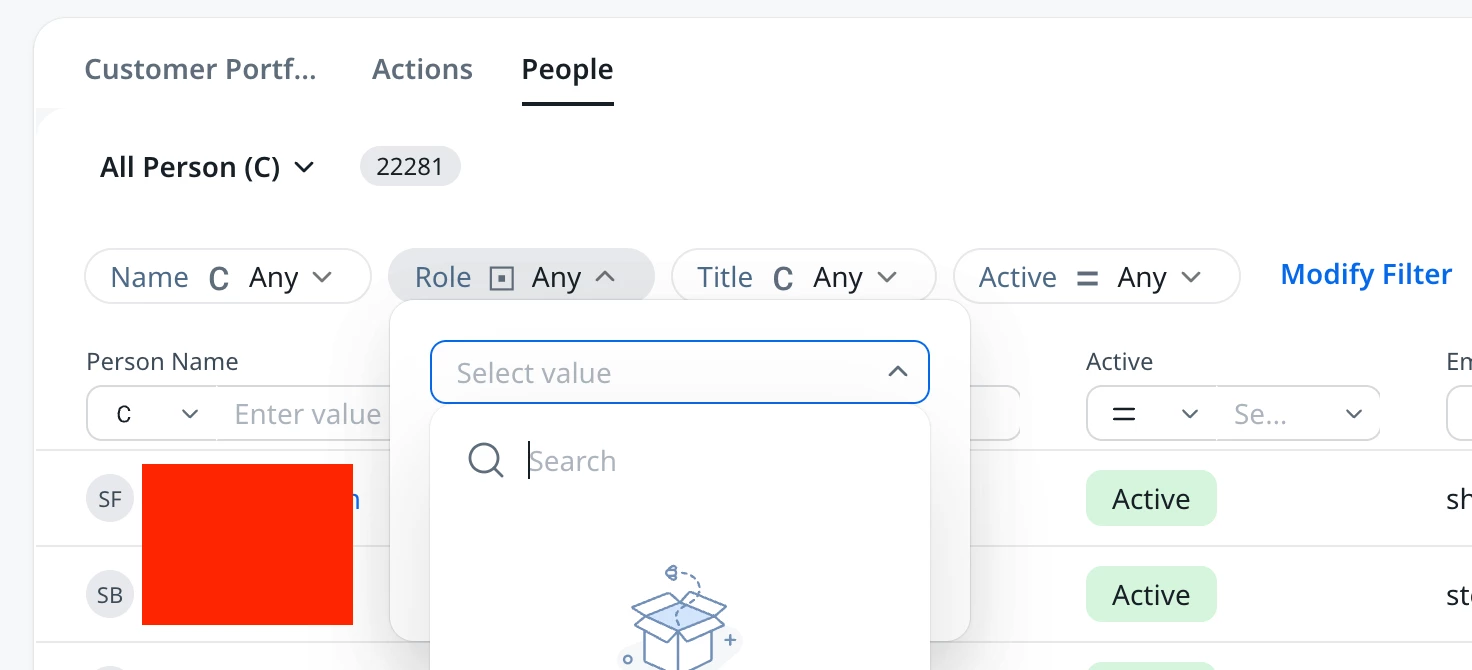
Right off the bat, when testing with Group Send, I notice that in the layout config, admins do not have control over the default filter values.   When looking at the People section from user’s Home, it defaults to “Name”, “Role”, “Title”, and “Active.”
 

We do not currently use “Role” as a field option, so this will confuse end users (especially when it’s blank).  Admins must have the ability to curate the default filters to our standard fields and requirements.

Also, “Name” should be adjusted to “Company Name” to clarify that it’s not a search for the individual user names, but for the Company.  


19 replies

heather_hansen
VIP ⭐️⭐️⭐️⭐️⭐️
August 7, 2025

Adding my example here.  We don’t use the Role field OOTB in Gainsight because we define roles in SFDC in a multi-select picklist, so we don’t populate anything in the single select OOTB Role field.  We are piloting Group Send with a few CSMs, and they immediately became confused when trying to filter by Role and discovering none of their contacts showed up despite being assigned the role in SFDC.  So, essentially if I want to have them be able to use Group Send and filter to specific roles, I now have to configure a process to continually update the single select Role field before rolling out large scale so as not to confuse people.  It also makes it extrememly confusing for someone who doesn’t know Gainsight data to know which field to select when filtering.

Carol_Keyes
Helper ⭐️
August 8, 2025

We fully agree with this idea. Giving admins control over the default filters for Group Send is essential for creating a simple, curated, and efficient user experience. Admins know their company's data and how their teams work best. The current default filters can be confusing for end users, leading to incorrect filtering and wasted time. Allowing for this customization would ensure that CSMs can use the tool seamlessly and confidently without needing to manually adjust filters every time. This would greatly improve team efficiency and prevent potential errors when communicating with customers.

Carol Keyes
dayn.johnson
VIP ⭐️⭐️⭐️⭐️⭐️
August 8, 2025

… We don’t use the Role field OOTB in Gainsight because we define roles in SFDC in a multi-select picklist, so we don’t populate anything in the single select OOTB Role field… it also makes it extremely confusing for someone who doesn’t know Gainsight data to know which field to select when filtering.

This. We aren’t alone in using non-standard fields (we don’t use the OOTB CSM field), so anything that relies on a Gainsight standard field to work will be broken out of the gate.

That, and end users shouldn’t be expected to filter. Nor do they expect to.

End users need it ready to go.

Staff CS Content & Comms Manager, 2x Gainsight CS Ops Product Council Member
bradley
Expert ⭐️
August 12, 2025

@dayn.johnson 
Q1→ Currently only users (CSMs) can add/delete sticky filters as per the need

Q2→ Still exploring. Any feedback/suggestion is welcome cc ​@pgeorge 

@ssamarth for Q2 - Please see this thread :)

victoria_peeker_barry
Contributor ⭐️⭐️⭐️⭐️⭐️
August 28, 2025

100% agree that admins should have control as they know the data...I feel all new functionality should keep in mind Admin control...

Victoria
pgeorge
Gainsight Employee ⭐️
May 4, 2026
New IdeaOpen
pgeorge
Gainsight Employee ⭐️
May 4, 2026

Thanks for submitting this idea, ​@darkknight . 
We’ve reviewed it and appreciate you sharing the use case. We’ll keep this idea open while we continue to assess interest and impact. Community feedback and voting will help guide next steps.

darkknight
Expert ⭐️
May 4, 2026

@pgeorge I don’t really understand why you need more votes/interest here.  The impact should be clear. 

For some reason, Gainsight assumes every customer functions the same way and that all our use cases match, but that couldnt’ be farther from the truth. Every customer is different, and admins should have the ability to customize layouts/views anywhere in the system to ensure we have the ability to curate against our own use cases and reduce the potential for confusion and frustration with end users.  Honestly, this should have been a part of the GA release. 

Jeff Kirkpatrick
dayn.johnson
VIP ⭐️⭐️⭐️⭐️⭐️
May 4, 2026

We fully agree with this idea. Giving admins control over the default filters for Group Send is essential for creating a simple, curated, and efficient user experience. Admins know their company's data and how their teams work best. The current default filters can be confusing for end users, leading to incorrect filtering and wasted time. Allowing for this customization would ensure that CSMs can use the tool seamlessly and confidently without needing to manually adjust filters every time. This would greatly improve team efficiency and prevent potential errors when communicating with customers.

@Carol_Keyes spelled this out cleanly 8 months ago. Group Send would be a fantastic tool to give our CSMs, but not if it’s just going to make things more confusing. We’re trying to enable our CSMs by showing them how communicating with their customers from Gainsight makes it easier. This isn’t easier.

Configuring Gainsight Home, reports, dashboards, and other areas via Sharing Groups and custom fields (rules engine populating a single-select picklist based on manager name) are some of the workarounds we have to go through in the name of making things “easy” -- please help us make it easy to give our CSMs what they need so we can give them more of a reason to actually work from Gainsight.

Staff CS Content & Comms Manager, 2x Gainsight CS Ops Product Council Member