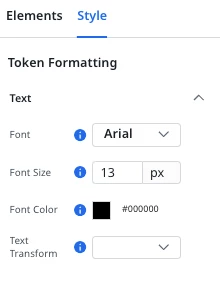

This may have been asked previously (over a year ago, probably for the old editor -- and not acknowledged), but is there a reason that tokens in the new Horizon email templates are not affected by the text formatting options in the main editor toolbar, and instead have their own formatting options? (screenshot below)
In particular, the “Font Weight” formatting option seems like a glaring omission. If we want to make a token bold after the email has already been created and we’ve begun testing it (mapped) in the program, we have delete the text, re-tokenize it, and re-map it. For token heavy emails where we may want to emphasize a string of text that contains multiple tokens, this becomes tedious very quickly. (ex: “… {{company}} has {{# of credits}} credits that will expire on {{Month DD, YYYY}}...”)
If we want to make that entire line bold, we have to delete all three tokens, add them back again, make the sentence bold in the email formatting editor, re-tokenize those tokens, update the type (number, date format), and then re-map them in the program.
TL/DR: Whichever option is easier (either allowing tokens to be affected by the general formatting toolbar or adding a “font weight” option to the “token formatting” style menu), could we please get this added in a future release? 🙏