

Stuart
Helper ⭐️⭐️
April 24, 2024
New Idea

Horizon Rules UI - Fix the need for a scrollbar upon adding filter criteria

Related products:CS Rules Engine
  • April 24, 2024
  • 14 replies
  • 132 views

Hi Folks,


I couldn’t find an idea/enhancement request listed already for this - apologies in advance if there is one and I’ve missed it!


Across features in Gainsight where horizon queries can be built (Rules/DD/New JO Queries), depending on the criteria selected (name of the field, field datatype, and operator) this can cause a horizontal scrollbar to appear in the filter modal.
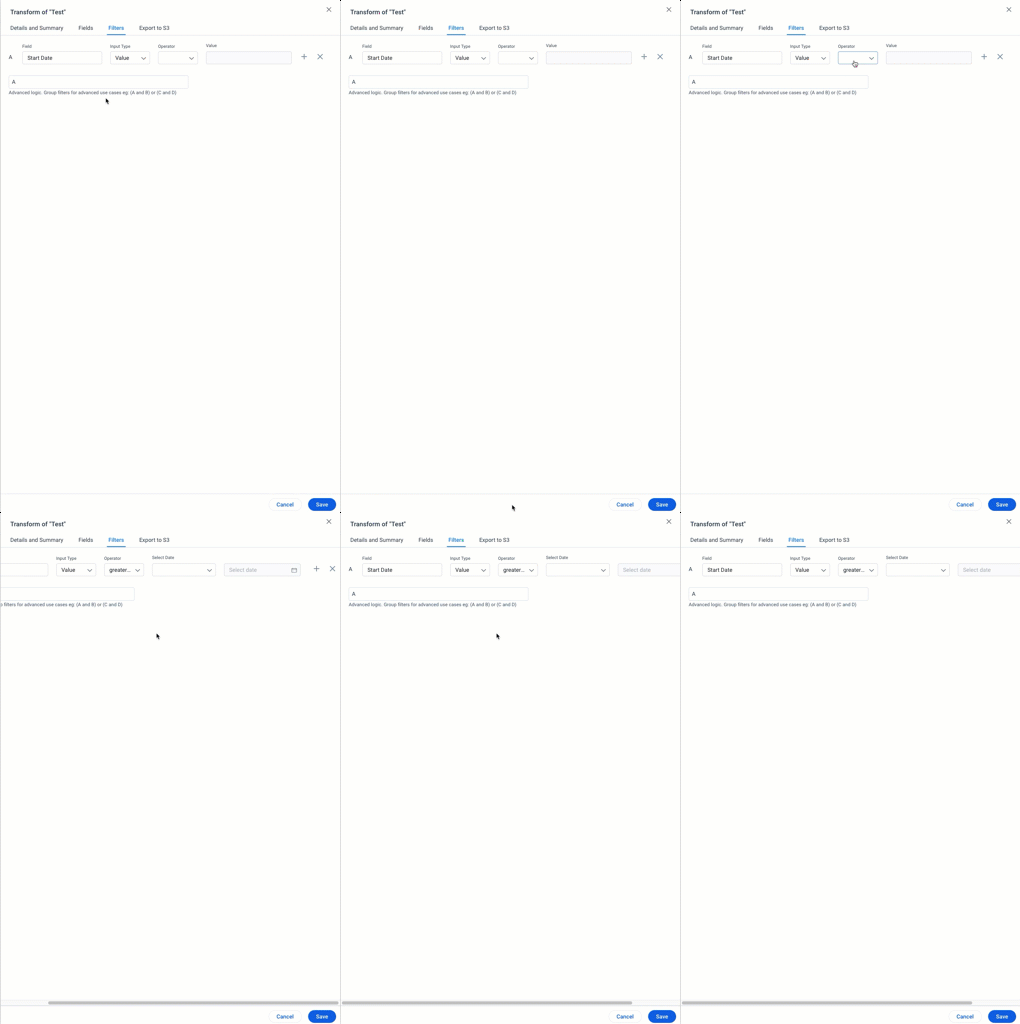
 

Admins have likened this to the line return on a typewriter..


Once the operator is selected, the end user has to scroll to the right of the modal to be able to add a new filter field, or delete a particular filter.

This may seem trivial, but when you have mulitple filters per dataset/node and you’re working within HRE pretty much every day, it becomes extremely tiresome - especially since there is so much whitespace on the page when the filter modal is open.

The ask would be for the stakeholders responsible for Horizon UI to review this specific area of the UI for improvement; can the modal be made bigger, are there changes in responsiveness that would remove the need for a scrollbar, or should buttons in the UI be rearranged so they’re not at the end of the page?

This is a small change, but would be a huge quality of life improvement for admins using the Horizon engine on a daily basis.


Other admins, what have I missed?


Thanks,


Stuart

14 replies

dayn.johnson
VIP ⭐️⭐️⭐️⭐️⭐️
April 24, 2024

Slightly different issue but same type of problem a year ago as well: 


And the “private beta group posts are invisible to everyone (Gainsters included) not in the group ” issue strikes again!

ugh. I really don’t get why Gainsters wouldn’t be able to see it either. Here’s a jpeg if you wanna read it: 


Thanks for sharing that, @bradley! 

Absolutely agree. I feel like there are some holdouts here that only use their laptop. *gasp*

But… I’ve gotta assume that the vast majority of us use at least ONE larger monitor (mine’s a 27” set at 1920 x 1080) to edit EVERYTHING in Gainsight (and use a smaller screen for referencing our sources, other data, example logic...).

Anyone who wants to join the conversation about private forum posts, that parked idea is here. 😀

Staff CS Content & Comms Manager, 2x Gainsight CS Ops Product Council Member
bradley
Expert ⭐️
April 24, 2024

@dayn.johnson I can’t even use Gainsight without an external monitor. Some of the screens become completely unusable. I have a massive ultrawide monitor and still end up typewritering though

dayn.johnson
VIP ⭐️⭐️⭐️⭐️⭐️
April 24, 2024

@dayn.johnson I can’t even use Gainsight without an external monitor. Some of the screens become completely unusable. I have a massive ultrawide monitor and still end up typewritering though

This! 👆

I legit go into “catch up on professional development/emails/documentation/planning/copywriting” mode if I’m down to just my laptop. And make quick updates to JOs.

Staff CS Content & Comms Manager, 2x Gainsight CS Ops Product Council Member
alizee
VIP ⭐️⭐️⭐️⭐️⭐️
April 24, 2024

@dayn.johnson I can’t even use Gainsight without an external monitor. Some of the screens become completely unusable. I have a massive ultrawide monitor and still end up typewritering though

Oh yes. Configuring dropdowns on a 14´´ laptop. One of the many ideas of Hell I have. But a very vivid one. 

The most expensive part of building is the mistakes. That's true in construction. Not so much in CSOps. So ask questions, make mistakes and learn. All views expressed here are my own.