

spencer_engel
Expert ⭐️
September 21, 2017
Released

Make Gantt Chart created and end dates more flexible

Related products:CS C360 & R360 & P360
  • September 21, 2017
  • 40 replies
  • 452 views
First off, I love the Gantt Chart feature and think it will be immensely helpful. I also know that feature is in Beta right now, so if my request is already on the roadmap, that's fine. 

However, I noticed the following issue when trying to load a success template. What I want to do is be able to load a 4-week success plan template that contains one objective CTA per week. Each objective CTA would then have a playbook attached so that the template would essentially be a project plan with four objectives and about 20 total tasks. 

The issue is that when I apply that template, it automatically makes my start date in the Gantt Chart equal to the created date of the CTA. I can't edit that created date in the CTA or in the Gantt Chart, so I'm stuck with a project plan this.
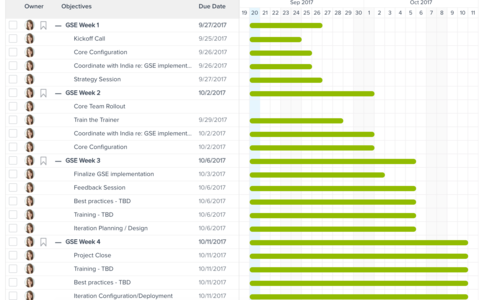


What I want to be able to do is stagger the start dates for Weeks 2-4 so that the bar is only a few days long rather than all of them starting on the day I create the CTA. 

Are there any plans on the roadmap to make this editable, or better yet, is there a good alternative solution to accomplish what I'm looking for?

    40 replies

    nitisha_rathi
    Expert ⭐️⭐️
    September 22, 2017
    Hi Spencer,

    As you must be aware, currently we use CTA/ task created date as the bar start date. Is there any other CTA attribute based on which we should decide the start date or do you want it to be manually customizable?

    Thanks,
    Nitisha
    spencer_engel
    Expert ⭐️
    September 22, 2017
    Good question, Nitisha. The issue is that the Created Date field on the CTA is not editable and since the Gantt Chart is read-only, that means I'm stuck with the start dates.

    So to answer your question, I'd just prefer to have the tasks be manually customizable.
    samantha_braastad
    Contributor ⭐️⭐️⭐️⭐️⭐️
    September 27, 2017
    This is an ask of our team as well. We would like two options for setting the created date: 
    1. Manually set by the CSM
    2. Set based on a previous task due date or close date
    #2 would be very helpful to allow proceeding Objectives to move out if the start of one objective is dependant on the completion of another. Similar to how CTA's and original due dates are tracked, it would be helpful to have an original start date tracked and the gantt chart line a different color if the start date is earlier or is pushed out to have a visual representation of the change.
    ian_turner_997cbf
    Contributor ⭐️
    December 19, 2017
    Agreed! I have a Success Plan with an Objective, and all of my tasks to achieve that Objective all start on the day I created the Objective. I want to have dependent tasks (based on a prior task being finished).
    jeffrey_coleman
    Helper ⭐️
    December 21, 2017
    Absolutely! This isn't a Gantt chart right now, it's a bar chart!
    elaine_cleary
    Helper ⭐️⭐️
    December 21, 2017
    I was just speaking with another Gainsight customer today who shares the same views expressed here.  They really need to be able to adjust or set the objective CTA "start date" to something besides the 'created date' (which provides no value).  @nitisha Is this on the Gainsight roadmap?  Thank you!
    nitisha_rathi
    Expert ⭐️⭐️
    December 28, 2017
    Hi Elaine,

    Yes, this is on the roadmap and we will try to implement it soon. I will post updates here once I have more clarity on ETA.

    Thanks,
    Nitisha
    adam_szakacs
    Contributor ⭐️
    January 23, 2018
    Hi Nitisha,

    We're running into a similar issue at our company - we're built an objective for each meeting (Q1 Business Review, Q2 Business Review, etc.) and we're hoping to share the Gantt chart with our customers. The start date for each of these should of course be different, and not the date the plan was created.

    Do you have any update around timing for this? It's pressing on our side for annual planning with customers.

    Thank you.

    Adam
    elaine_cleary
    Helper ⭐️⭐️
    January 31, 2018
    Thanks for resurfacing, Adam.  I'm working with another Gainsight customer that really needs the objective start dates to be actual start dates and not the date the plan was created.  @Nitisha -- any new information?  Thank you!
    joyce_wren
    Contributor ⭐️⭐️
    February 2, 2018
    Our company has the same issue, the gnatts chart is just a bar chart of tasks to be completed and not useful. Could it be as simple as allow the start date to be edited or the ability to change the color of the bar when it changes to "in progress"