

spencer_engel
Expert ⭐️
September 21, 2017
Released

Make Gantt Chart created and end dates more flexible

Related products:CS C360 & R360 & P360
  • September 21, 2017
  • 40 replies
  • 452 views
First off, I love the Gantt Chart feature and think it will be immensely helpful. I also know that feature is in Beta right now, so if my request is already on the roadmap, that's fine. 

However, I noticed the following issue when trying to load a success template. What I want to do is be able to load a 4-week success plan template that contains one objective CTA per week. Each objective CTA would then have a playbook attached so that the template would essentially be a project plan with four objectives and about 20 total tasks. 

The issue is that when I apply that template, it automatically makes my start date in the Gantt Chart equal to the created date of the CTA. I can't edit that created date in the CTA or in the Gantt Chart, so I'm stuck with a project plan this.
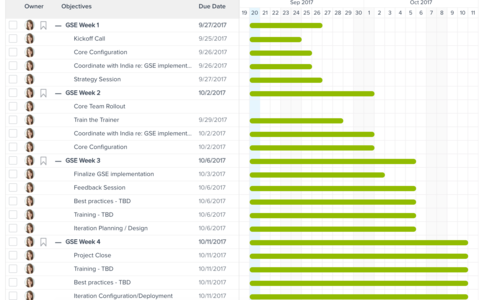


What I want to be able to do is stagger the start dates for Weeks 2-4 so that the bar is only a few days long rather than all of them starting on the day I create the CTA. 

Are there any plans on the roadmap to make this editable, or better yet, is there a good alternative solution to accomplish what I'm looking for?

    40 replies

    jahnavi
    Contributor ⭐️⭐️⭐️⭐️⭐️
    February 13, 2018
    Hello Team,

    Any updates on the ETA for making the start date flexible? This would be very helpful as the customers would like to see a plan of next 12 months 18 months etc. 

    Regards,
    Jahnavi
    aditya_marla
    Helper ⭐️⭐️⭐️
    February 15, 2018
    Hi All,

    Thanks for sharing this. We are planning to introduce the concept of "Start Date" in objectives (Currently, we use the Created Date & it would not be correct to make it editable).This is there on our roadmap but there is no ETA as of today. Will keep you updated on any progress.

    A couple of question I had regarding the same:

    - Do you want the CSM’s to manually the start dates manually or does the Admin want to define them at the template level? (Would just having the CSM edit the start date of objectives be useful - since it might increase the overhead if there are too many Objectives/Tasks? ) 
    - Do you need the same ability for tasks as well? (Changing start date of tasks etc.)
    - If they can be defined at a template level, how might you would they want to determine the start dates? (Some of them might be: Based on due date of another objective, Based on closed date of an objective. Based on success plan dates (date SP became active?))
    - From a UI perspective, do you want the objectives/tasks that have not started to be hidden/ distinguished in some form?

    Regards
    adam_szakacs
    Contributor ⭐️
    February 15, 2018
    Hi Aditya,

    - I think ability to manually set start dates, as well as dependent on completion of a prior objective/task (eg. "Finish date of QBR + 3 days")
    --- Any measure of days should be business days
    - CSM would be able to manually set these dates, but ability to include dependencies like the above so tasks automatically waterfall would be extremely helpful. 
    - Yes tasks should be set independently of objectives
    - I think all objectives/tasks should be visible

    My 2 cents to make this a very simplified Gantt charting tool (some of the key functionality of Microsoft Project and others).

    Thanks.

    Adam
    ana_rita_santos
    Contributor ⭐️⭐️
    February 16, 2018
    Hi Aditya,

    These are great news! Only the "no ETA" is concerning me for now. We are really missing this feature.
    We are starting with Gainsight at my company and this was a big no no for us. It is really important for our CSMs to be able to have a visual representation of the success plan. We could achieve this with the Gantt chart, if there was a start date editable in the CTA.
    Some thoughts on your questions:
    • Agree that the created date should not be editable, a separate field will be more appropriate;
    • The CSMs should be able to adjust the start dates. They can come pre-filled from the template, based on the start date of the success plan (not the created date). This way, we would reduce the overhead of manually setting all the dates.
    • Tasks could inherit the start dates from the Objectives (or not). But yes, the start date should be editable for tasks also.
    • It would be great if we could have that kind of intelligence available, for setting the start dates based on a set of conditions. All the ones you refer are very useful.
    • For us it would be really important to have the tasks that didn’t start yet distinguished from the ones that are ongoing and the ones that are completed. 
    We are really missing some visuals on the representation and current status of the Success Plans. It is much easier to communicate with customer when you have a visual representation of the current status of the Success Plan.

    Thanks!
    ian_turner_997cbf
    Contributor ⭐️
    February 16, 2018
    Yes I think there is a strong need for task management and visualisation for CSMs and internal/external stakeholders. There should not be a need to drop in to MS Project or other SaaS tools to do lightweight task management (CTAs etc.).   I know this could be a big step up in terms of functionality for Gainsight and "customer success", but there are strong competitors (Wrike etc.) that have very compelling solutions in this area.... and they support templated activities that can be instantiated etc. 😞
    faust_belarmino
    Helper ⭐️⭐️
    March 15, 2018
    Our team was just talking about this! It would be great to edit some of those start dates according to needs. 🙂
    jennifer_kirkland
    Contributor ⭐️⭐️⭐️
    March 15, 2018
    I wish I could double vote and follow!

    We need task and CTA start dates to be based on the due date/completion date (once completed) of another task/CTA and we need the ability for CSMs to edit start dates as well. 
    andrew_mcallister
    Contributor ⭐️
    March 16, 2018
    Couldn't agree more.....in fact: the Gantt chart feature is useless without it, and I won't be telling my team to pay it much attention until this gets rectified.
    brittany
    Contributor ⭐️⭐️⭐️⭐️⭐️
    March 21, 2018
    The objectives/tasks not yet started should still be visible, but differentiated based on color of the bar in the gantt. There should be different colors for the different statuses (in progress, completed, upcoming)

    The Start Date should be a different field from Created Date. 

    The Task Start Date should be different from the Objective Start Date

    The Start Date should be manually editable by the CSM as well as able to be set during Template configuration.

    To start, these should be options to set the date:
    *Custom (Calendar drop down)
    *Previous task closed date
    *Previous objective closed date

    Ideally, there would eventually be the above with the below add ons
    *Previous task closed date + __ days
    *Previous objective closed date  + __ days
    *(Drop down to choose a specific task) closed date + __ days
    *(Drop down to choose a specific objective) closed date + __ days
    brittany
    Contributor ⭐️⭐️⭐️⭐️⭐️
    March 21, 2018
    The objectives/tasks not yet started should still be visible, but differentiated based on color of the bar in the gantt. There should be different colors for the different statuses (in progress, completed, upcoming)

    The Start Date should be a different field from Created Date. 

    The Task Start Date should be different from the Objective Start Date

    The Start Date should be manually editable by the CSM as well as able to be set during Template configuration.

    To start, these should be options to set the date:
    *Custom (Calendar drop down)
    *Previous task closed date
    *Previous objective closed date

    Ideally, there would eventually be the above with the below add ons
    *Previous task closed date + __ days
    *Previous objective closed date  + __ days
    *(Drop down to choose a specific task) closed date + __ days
    *(Drop down to choose a specific objective) closed date + __ days