

Released
Make Gantt Chart created and end dates more flexible
First off, I love the Gantt Chart feature and think it will be immensely helpful. I also know that feature is in Beta right now, so if my request is already on the roadmap, that's fine.
However, I noticed the following issue when trying to load a success template. What I want to do is be able to load a 4-week success plan template that contains one objective CTA per week. Each objective CTA would then have a playbook attached so that the template would essentially be a project plan with four objectives and about 20 total tasks.
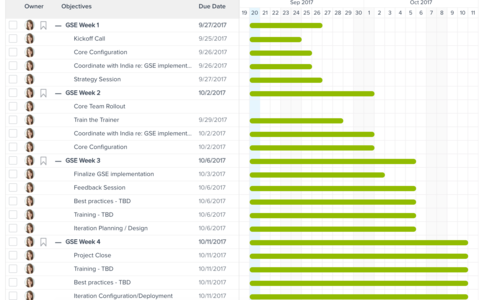
The issue is that when I apply that template, it automatically makes my start date in the Gantt Chart equal to the created date of the CTA. I can't edit that created date in the CTA or in the Gantt Chart, so I'm stuck with a project plan this.
What I want to be able to do is stagger the start dates for Weeks 2-4 so that the bar is only a few days long rather than all of them starting on the day I create the CTA.
Are there any plans on the roadmap to make this editable, or better yet, is there a good alternative solution to accomplish what I'm looking for?
However, I noticed the following issue when trying to load a success template. What I want to do is be able to load a 4-week success plan template that contains one objective CTA per week. Each objective CTA would then have a playbook attached so that the template would essentially be a project plan with four objectives and about 20 total tasks.
The issue is that when I apply that template, it automatically makes my start date in the Gantt Chart equal to the created date of the CTA. I can't edit that created date in the CTA or in the Gantt Chart, so I'm stuck with a project plan this.
What I want to be able to do is stagger the start dates for Weeks 2-4 so that the bar is only a few days long rather than all of them starting on the day I create the CTA.
Are there any plans on the roadmap to make this editable, or better yet, is there a good alternative solution to accomplish what I'm looking for?