

spencer_engel
Expert ⭐️
September 21, 2017
Released

Make Gantt Chart created and end dates more flexible

Related products:CS C360 & R360 & P360
  • September 21, 2017
  • 40 replies
  • 452 views
First off, I love the Gantt Chart feature and think it will be immensely helpful. I also know that feature is in Beta right now, so if my request is already on the roadmap, that's fine. 

However, I noticed the following issue when trying to load a success template. What I want to do is be able to load a 4-week success plan template that contains one objective CTA per week. Each objective CTA would then have a playbook attached so that the template would essentially be a project plan with four objectives and about 20 total tasks. 

The issue is that when I apply that template, it automatically makes my start date in the Gantt Chart equal to the created date of the CTA. I can't edit that created date in the CTA or in the Gantt Chart, so I'm stuck with a project plan this.
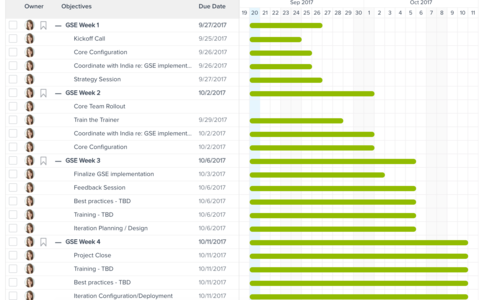


What I want to be able to do is stagger the start dates for Weeks 2-4 so that the bar is only a few days long rather than all of them starting on the day I create the CTA. 

Are there any plans on the roadmap to make this editable, or better yet, is there a good alternative solution to accomplish what I'm looking for?

    40 replies

    elaine_cleary
    Helper ⭐️⭐️
    March 27, 2018
    Like Jennifer, I wish I would double vote!  I continue to hear the similar feedback as noted in this Community post - the Gantt chart is not valuable since it's just a bar chart and making the start dates manually editable would be a good starting point.  Is there any update from Gainsight product on prioritization?  Thank you!
    graham_harman
    Contributor ⭐️
    March 27, 2018
    Can not agree more with this thread, the bar chart is not presentable to a client in it's current form. Exec's & PM's would just not accept this as a working document.
    Making the start dates manually editable is the minimum needed before a CSM could consider sharing this with their client.

    Would a Gainsight CSM use the current version to manage their clients success plans, I very much doubt it
    jen_pakravan
    Contributor ⭐️⭐️⭐️⭐️⭐️
    May 10, 2018
    is there an update on this?
    ray_roohparvar_faea94
    Contributor ⭐️⭐️
    May 10, 2018
    I'm not one to pull punches with my feedback, but without the ability to edit a start date this feature is a major fail. Completely useless. I'm embarassed to go back to my team and tell them there's no way to change it after almost everyone of them asked me how to change the start date. As a suggestion, maybe Gainsight shouldn't roll out half baked ideas...
    aditya_marla
    Helper ⭐️⭐️⭐️
    May 11, 2018
    Hi Ray,

    Thanks for sharing your thoughts and feedback on this. Completely agree that we need to introduce the concept of "Start Date" in (today its based on  Created Date) and make the GanttChart work on this. This is definitely high on our to-do list but unfortunately, I do not have an ETA for this. Will keep you updated as and when this gets picked up
    Also, would you be open for a quick call - I would like to understand how you are using success plans & maybe walk you through what we plan to do

    Regards
    heather_landgraf
    Contributor ⭐️⭐️⭐️⭐️⭐️
    May 17, 2018
    We need this too!
    eva_lau
    Contributor ⭐️⭐️
    May 22, 2018
    Can't agree more. We are currently using the success plan to track "use cases" progress using each objective. However, not able to edit start & end date or make the gantt chart to reflect a custom start & end date has made it less usable. Afterall, Gantt chart is a good feature to show customers progress.
    amanda_neil
    Contributor ⭐️⭐️⭐️⭐️⭐️
    June 15, 2018
    Would love to see this in the next release
    erik_chase
    Contributor ⭐️⭐️
    July 23, 2018
    I really want to see this in place quite soon, as well.  Currently, I have a 12 week long Success Plan Template who's last tasks take about a day or two to complete, but the since they are created on the same day as the initial tasks in the plan, it gives the appearance that the task will take 12 weeks of work.  Doesn't look really good to our customers, either, when we send them a powerpoint with that Gantt chart either...
    mike_sasaki
    Contributor ⭐️⭐️
    July 28, 2018
    Thank you for bringing this up.  I'm surprised this isn't being prioritized.  Anyone that has ever used a GANTT chart knows how important it is to have the flexibility to stagger start dates.