
spencer_engel
Expert ⭐️
Nov 1, 2021 1:52 PM UTC
New Idea

Make Rule Chain Administration More Friendly

Related products:CS Rules Engine

I appreciate the new UI in the Rules Engine, but it feels like we’ve taken a step backward in some ways. 


Two examples, specifically regarding Rule Chains: 

  • I used to rely quite a bit on being able to preview rules from the Rule Chain view. I can no longer do that with this new UI, which means I have to go back to my Rules list and search around for the rule(s) in question that I simply want to either preview or edit straight from the Rules Chain page. This results in extra clicks and tabs. 
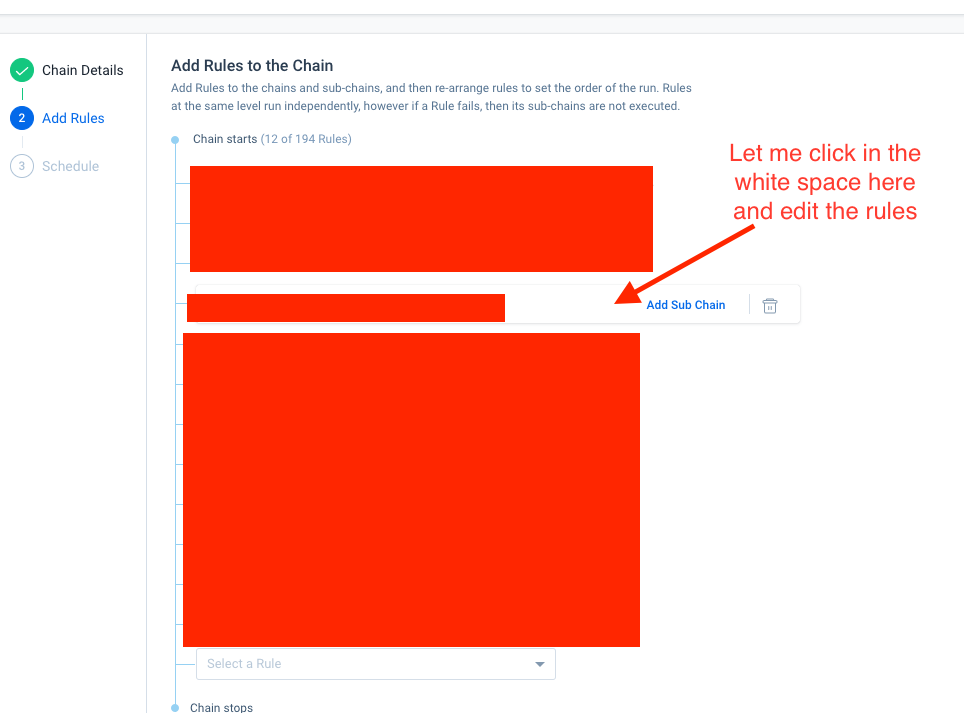
  • I recently had to go in and remove a few outdated rules from a Rule Chain. I wanted to deactivate the rules as well, but I can’t do that from the Rule Chain menu. I also can’t deactivate a rule from the Rules List without removing it from the Rule Chain first. So either way, I’m having to click on both tabs, find the rule in question in both places, and do the necessary task. Why not just let me take care of both things (removing the rule from the rule chain and deactivating it) in one place?

21 replies

darkknight
Expert ⭐️
Nov 1, 2021 2:16 PM UTC

The new UI is such a pain

Translate
Jeff Kirkpatrick
gunjanm
Expert ⭐️
Nov 1, 2021 2:38 PM UTC

The new UI is such a pain

Quoting just to emphasize.

Translate
Gunjan
heather_hansen
VIP ⭐️⭐️⭐️⭐️⭐️
Nov 1, 2021 2:40 PM UTC

+1 - I’ll add to this with my use case for the edit functionality - I have rules in a rule chain that I want to trigger with the receipt of an S3 file.  I had built the rules to use the date pattern initially, and when I went to add them to the chain with the S3 trigger, I get the message that I can’t use the date pattern, so I have to go back to the Rules list to edit all the rules, and then, come back to the Rules Chain to make the adjustments.

Translate
saltamash
Helper ⭐️⭐️
Nov 1, 2021 3:30 PM UTC

Definitely can related to to #1 raised by Spencer. It is frustrating when you were able to do something and due to an upgrade/update you can know longer do it. 

Translate
bradley
Expert ⭐️
Nov 1, 2021 3:32 PM UTC

The new UI is such a pain

Quoting just to emphasize.


emphasis intensifies

Translate
Expert ⭐️
Nov 1, 2021 3:50 PM UTC

In addition to this why did we put all the icons into a click through menu? I spend most days in rules and it has doubled the amount of click I have to do on that page.


Addition two, the Summary Ribbon is nice. But, if I turn it off it should remember I have it turned off. It resets every time I go to the page and then I turn it off every time.

Translate
matthew_lind
VIP ⭐️⭐️⭐️⭐️⭐️
Nov 1, 2021 8:10 PM UTC

I’ve observed that each recent adjustment to the Rules Engine UI adds to my efforts as an admin. It just keeps getting harder, little by little, to efficiently administer the Rules Engine. Recent examples:

  • Summary “Analytics” Ribbon cannot be permanently dismissed
  • Inability to de-activate from places where that functionality used to exist
  • More clicks than previous UI for same efforts
  • Rule Name usually truncated, and column width cannot be permanently widened

I know plenty of folks on this thread, and elsewhere, would come to the table for feedback and positive changes within Rules Engine. I do hope Gainsight is able to take this feedback and/or set some Advisory Committee time to collect input.

Translate
Making people their best....currently disguised as a CS Ops Architect. How can I contribute to your success?
darkknight
Expert ⭐️
Nov 1, 2021 8:58 PM UTC

I’ve observed that each recent adjustment to the Rules Engine UI adds to my efforts as an admin. It just keeps getting harder, little by little, to efficiently administer the Rules Engine. Recent examples:

  • Summary “Analytics” Ribbon cannot be permanently dismissed
  • Inability to de-activate from places where that functionality used to exist
  • More clicks than previous UI for same efforts
  • Rule Name usually truncated, and column width cannot be permanently widened

I know plenty of folks on this thread, and elsewhere, would come to the table for feedback and positive changes within Rules Engine. I do hope Gainsight is able to take this feedback and/or set some Advisory Committee time to collect input.

:100:  Also, filters are more robust but take more effort to manage. Why do I have to open the filters up in order to clear them?

Translate
Jeff Kirkpatrick
Expert ⭐️
Nov 3, 2021 6:52 PM UTC

Another thing, on the Rule overview screen didn’t we use to have a run button there? If we didn’t can we get one? I normally have two tabs open the execution logs and the actual rule opened up so I can do some adjustments and then run. But now I have to click out of the overview, click the three dots, click run, then click back into overview.

Translate
darkknight
Expert ⭐️
Dec 16, 2021 12:47 PM UTC

@rakesh 

Translate
Jeff Kirkpatrick