

spencer_engel
Expert ⭐️
November 1, 2021
New Idea

Make Rule Chain Administration More Friendly

Related products:CS Rules Engine
  • November 1, 2021
  • 21 replies
  • 272 views

I appreciate the new UI in the Rules Engine, but it feels like we’ve taken a step backward in some ways. 


Two examples, specifically regarding Rule Chains: 

  • I used to rely quite a bit on being able to preview rules from the Rule Chain view. I can no longer do that with this new UI, which means I have to go back to my Rules list and search around for the rule(s) in question that I simply want to either preview or edit straight from the Rules Chain page. This results in extra clicks and tabs. 
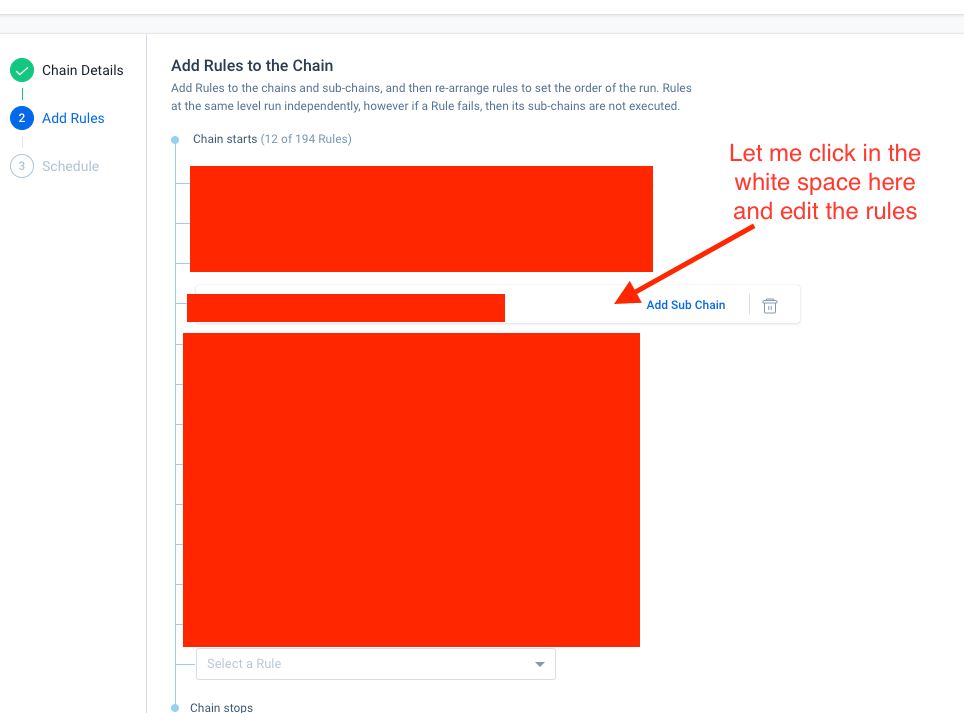
  • I recently had to go in and remove a few outdated rules from a Rule Chain. I wanted to deactivate the rules as well, but I can’t do that from the Rule Chain menu. I also can’t deactivate a rule from the Rules List without removing it from the Rule Chain first. So either way, I’m having to click on both tabs, find the rule in question in both places, and do the necessary task. Why not just let me take care of both things (removing the rule from the rule chain and deactivating it) in one place?

21 replies

anirbandutta
Expert ⭐️
December 20, 2021

Hey @spencer_engel , I had a connect with PMs on this request. Definitely under consideration but we need more time to share any updates in this direction.

It's an opportunity for engagement
anirbandutta
Expert ⭐️
December 20, 2021

I’ve observed that each recent adjustment to the Rules Engine UI adds to my efforts as an admin. It just keeps getting harder, little by little, to efficiently administer the Rules Engine. Recent examples:

  • Summary “Analytics” Ribbon cannot be permanently dismissed
  • Inability to de-activate from places where that functionality used to exist
  • More clicks than previous UI for same efforts
  • Rule Name usually truncated, and column width cannot be permanently widened

I know plenty of folks on this thread, and elsewhere, would come to the table for feedback and positive changes within Rules Engine. I do hope Gainsight is able to take this feedback and/or set some Advisory Committee time to collect input.


@matthew_lind I believe these enhancements have already been shipped.

It's an opportunity for engagement
darkknight
Expert ⭐️
December 20, 2021

@andutta the rule name does default to widened now -  but if you adjust the size of the browser at all it reverts back to the narrow view. 


Jeff Kirkpatrick
anirbandutta
Expert ⭐️
December 21, 2021

Thanks @darkknight , I will have this feedback routed to the team. cc @rakesh 

It's an opportunity for engagement
Contributor ⭐️⭐️⭐️⭐️
January 11, 2022

Whoever thought this rule chain redesign would make admins life easier was sooooooo wrong! 

I’ve spent hours trying to figure how to add a rule as a subchain without having to rearrange or re-add the rest of the rules and still not able to do it. I have 11 rules in the chain and feel dizzy trying to follow the blue lines down to figure where to add a subchain. It feel like walking on eggshells trying not to delete something by accident. Please bring the old design back. Ditto to all other issues uncovered here.


spencer_engel
Expert ⭐️
February 24, 2022

Another thing that has been a thorn in my side recently: There is no easy way to see whether a rule is actively running. There is a “Next Scheduled Run” column available, but it shows as “Not Scheduled” for rules that are part of an active rule chain. This means it’s next to impossible to easily figure out which rules are part of an active rule chain vs. which rules are just old and should be deactivated. 


I feel like this needs to fixed, or at the very least give us a “Last Run Date” column. 

bradley
Expert ⭐️
March 3, 2022

Another thing that has been a thorn in my side recently: There is no easy way to see whether a rule is actively running. There is a “Next Scheduled Run” column available, but it shows as “Not Scheduled” for rules that are part of an active rule chain. This means it’s next to impossible to easily figure out which rules are part of an active rule chain vs. which rules are just old and should be deactivated. 


I feel like this needs to fixed, or at the very least give us a “Last Run Date” column. 

Yes, this is super obnoxious and unintuitive.

anthonysabato
Helper ⭐️
March 28, 2022

@spencer_engel  I have the same issue and concern that this is misleading if there is a next run even if part of a Rule Chain. It should indicate it is Scheduled. I did notice the next scheduled run does appear in the Rule Analyzer. Without the Next Run info, it can be difficult to troubleshoot complicated issues. Definitely a product miss here.

sarahmiracle
VIP ⭐️⭐️⭐️⭐️⭐️
October 24, 2022

I feel like this needs to fixed, or at the very least give us a “Last Run Date” column. 

Quoting for emphasis and linking back to a related request:


Customer Success Systems Admin @ Amplitude, 3x Gainsight CS Ops Product Council Member
anirbandutta
Expert ⭐️
October 26, 2022

+@rakesh 

It's an opportunity for engagement