

Milestones: Add a toggle to disable manual creation of specific types by End-Users and Improve UI
As Gainsight usage matures across enterprise teams, Gainsight Admins face recurring friction around Timeline hygiene, governance, and UI consistency. Specifically:
-
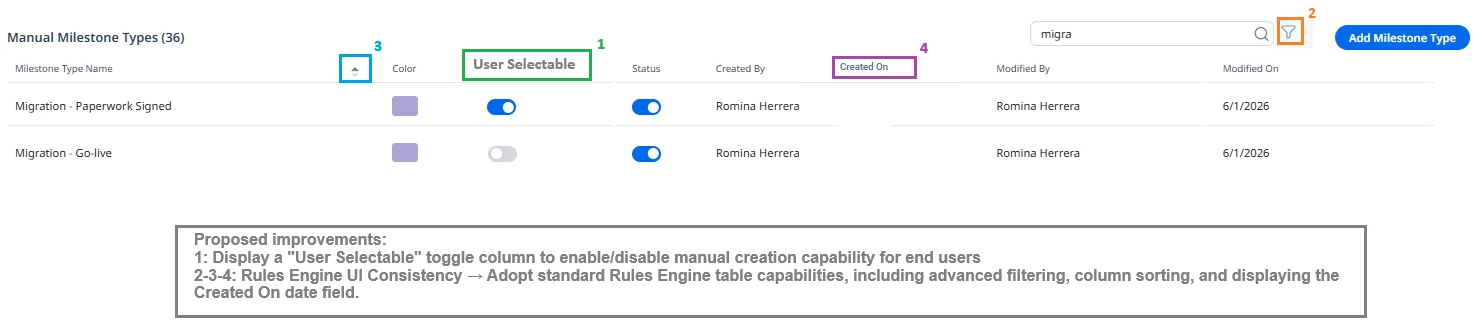
System vs. Manual Milestone Governance: Currently, for a Milestone Type to be populated via Rules Engine, it must be marked as Active. However, this automatically exposes it to be used by end users. This leads to data inaccuracy (end-users manually logging what should be system-only milestones like automated health triggers or stage changes) and dropdown clutter (compounded by the inability to reorder or filter milestone types).
-
Disconnected Milestones & Notes: Milestones mark key moments in a customer's journey, but there is no native way to explicitly tie a Note Template directly to a specific Milestone to provide context.
-
UI & Metadata Inconsistencies: Key metadata fields like
Created By,Created On,Modified By, andModified Onand functionality like sort by, rearrange fields and advanced filtering are displayed inconsistently across Administration UIs and standard object views, causing friction for Admins auditing configuration. (See this idea [turning 10 years old next month by the way], and this idea)
Proposed Solutions
1. Granular Control for Milestone Manual Creation
Introduce an additional toggle in the Milestone Configuration settings:
-
User selectable:
[ On / Off ]
How it works: Marking a Milestone Type as Off hides it from the C360/R360 Timeline dropdown menu while keeping it fully operational for backend automation.
2. Enable Timeline notes Association with specific Milestones
Allow admins to assign/associate Timeline Notes to specific Milestones.
-
When creating or editing a Timeline entry, display only notes relevant to that specific milestone type to the end user.
-
Ideally, allow us to force a specific template to a specific milestone (toggle to mark it “default”
-
This brings rich context to high-value milestones (e.g., attaching the Executive Briefing notes directly to the "Executive Briefing Completed" Milestone).
(Referencing Community Idea: Assign Timeline Notes to Specific Milestones, plus two linked in that same idea for context)
3. Standardization of Admin UI & System Fields (Created By / Modified By)
Standardize system metadata fields (Created By, Created On, Modified By, Modified On) across the Milestone Administration UI and related settings tables to align with standard Gainsight UI design patterns.
(Referencing Community Idea: Consistency in the UI: Created By/On & Modified By/On)
Business Impact & Value
-
Eliminates Human Error: Prevents CSMs from manually selecting automated, backend-only milestone types meant exclusively for system triggers.
-
Cleaner UX & Faster Execution: Reduces C360 Timeline dropdown bloating so CSMs see only the actionable, manual milestone types they actually need.
-
Richer Context & Storytelling: Tying Timeline notes to specific Milestones gives leadership and cross-functional teams immediate context behind key account achievements.
-
Better Governance & Administrative Efficiency: Gives Admins precise control over automated vs. manual milestone logging without clunky workarounds, while maintaining UI metadata standards across the platform.
-
Complements Long-Standing Community Requests: Addresses core Timeline hygiene challenges alongside long-requested features like milestone reordering and admin UI readability.
P.S. This request initially started as a solve for the first issue (System vs. Manual Milestone Governance). However, given the compounding challenges around Milestone Administration, I decided to expand and consolidate these closely related ideas into a single request for easier review and context.