

sami.burk
Contributor ⭐️⭐️⭐️⭐️
November 2, 2021
New Idea

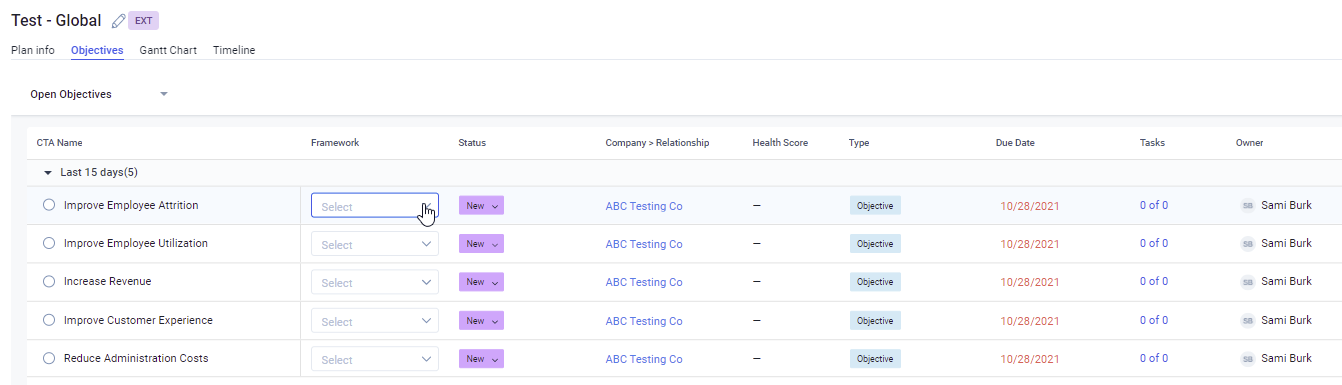
Objective CTA View in Success Plan: Admin Functionality to Set Default Columns

Related products:CS Success Plans & Customer Goals
  • November 2, 2021
  • 13 replies
  • 200 views

It would be beneficial if Admins had the ability to set the default column set up / view for specific Success Plan types. 
 

Use Case:
We offer a specific Success Plan type for our CSMs. In this SP,  there is a certain field on the CTA Objectives that helps determine how to approach the CTA and how it appears in the Snapshot. While we can train the CSMs to add a column for this field to the Objective CTA tab, the ideal functionality would be that an Admin could set it so the default view for this Success Plan type always includes that field as a column. 


13 replies

mpatra
Helper ⭐️
November 7, 2023
No Status→Acknowledged
Monica Patra | Senior Product Manager| Gainsight
spencer_engel
Expert ⭐️
December 11, 2024

Just came across this today. Why is there not parity with Cockpit views where you can add whatever fields you want from both the CTA object and the Company object? To only be limited to a dozen or so fields is crazy. We’re having to build a dashboard with a list of success plans because of this inexplicable limitation (e.g. can’t even show ARR in the Success Plan list view).

Gainsight Employee ⭐️
February 21, 2025

We have an use-case to create a Admin Views in the Success Plan. We expect the advanced filter configuration in the Custom Views (like we have in the cockpit). Since the existing views can’t support any other fields from the company object. It would be helpful, if we can prioritize this request, Since the Success Plan Admin is getting re-designed.

Surendra Sairam K