

spencer_engel
Expert ⭐️
June 25, 2024
Development

Option to remove "non-editable" error message on C360 Widgets

Related products:CS C360 & R360 & P360
  • June 25, 2024
  • 24 replies
  • 347 views

Something that’s been driving me crazy is this error message that pops up when hovering over a C/R360 widget that you don’t have access to edit: “You do not have the required permission to edit the widget data. Please connect to your GS Admin.”
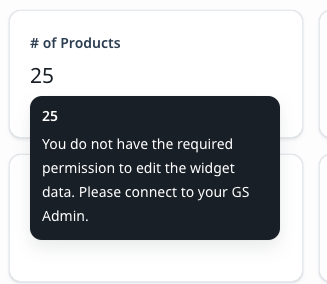
 

Why is this (grammatically dubious) message even needed? Also, it’s distracting because in this particular case, I have the widget linked to a related list report, so the end users need to click on the widget in order to quickly traverse to the related report. This is very slick and useful functionality but is partially ruined by the above message popping up every time. Please consider fixing this or at least giving admins the option to turn it off.

24 replies

gunjanm
Expert ⭐️
July 18, 2024

Agreed, this is kinda crazy. @rahul_prayakarao if you look at our instance, you will also see we have an HTML C360 Summary widget that shows essentially product icons. This shows the html upon hover, whereas we have actually designed it to show a sort of help text. This hasn’t worked since that recent release, and shows the whole long html instead. It’s nuts.

Gunjan
bradley
Expert ⭐️
August 14, 2024

I’m even getting this when I hover over the standard Company>Name field. How did this get released @rahul_prayakarao ?


darkknight
Expert ⭐️
August 23, 2024

Every. Non-Editable. Field. On. The. C360. Summary.
 

Jeff Kirkpatrick
rahul_prayakarao
Helper ⭐️⭐️
August 26, 2024

Hello everyone. Apologies once again for the inconvenience caused to the CSMs. We’ve decided to remove the tool tip in 360 and revert to the previous experience.

Just to clarify, this change was part of a broader initiative (Field Level Permissions). We’re now separating the 360 Admin control from this, and the team will address it shortly (if everything goes as planned - in the next couple of weeks)

I’ll keep you updated in this thread as the changes are implemented. 

bradley
Expert ⭐️
August 26, 2024

Hello everyone. Apologies once again for the inconvenience caused to the CSMs. We’ve decided to remove the tool tip in 360 and revert to the previous experience.

Just to clarify, this change was part of a broader initiative (Field Level Permissions). We’re now separating the 360 Admin control from this, and the team will address it shortly (if everything goes as planned - in the next couple of weeks)

I’ll keep you updated in this thread as the changes are implemented. 

Glad to hear it will be reverted. I would encourage the team to test these out with actual users before releasing them to see if they make sense in real world scenarios.

darkknight
Expert ⭐️
August 26, 2024

Glad to hear it will be reverted. I would encourage the team to test these out with actual users before releasing them to see if they make sense in real world scenarios.


I cannot 👍🏼 this enough!

Jeff Kirkpatrick
bradley
Expert ⭐️
October 14, 2024

@rahul_prayakarao is there any ETA on when an improvement will be released?

bradley
Expert ⭐️
October 30, 2024

@revathimenon @rahul_prayakarao Do we have any ETA on when this change will be made?

rahul_prayakarao
Helper ⭐️⭐️
November 18, 2024

This will be fixed by end of this week ​@bradley 

cc ​@revathimenon 

bradley
Expert ⭐️
November 18, 2024

This will be fixed by end of this week ​@bradley 

cc ​@revathimenon 

Big if true!