

spencer_engel
Expert ⭐️
June 25, 2024
Development

Option to remove "non-editable" error message on C360 Widgets

Related products:CS C360 & R360 & P360
  • June 25, 2024
  • 24 replies
  • 347 views

Something that’s been driving me crazy is this error message that pops up when hovering over a C/R360 widget that you don’t have access to edit: “You do not have the required permission to edit the widget data. Please connect to your GS Admin.”
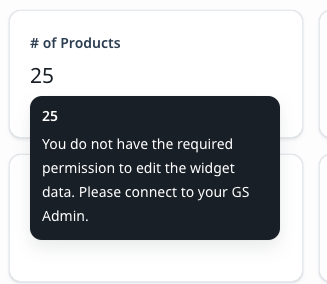
 

Why is this (grammatically dubious) message even needed? Also, it’s distracting because in this particular case, I have the widget linked to a related list report, so the end users need to click on the widget in order to quickly traverse to the related report. This is very slick and useful functionality but is partially ruined by the above message popping up every time. Please consider fixing this or at least giving admins the option to turn it off.

24 replies

bradley
Expert ⭐️
November 26, 2024

This will be fixed by end of this week ​@bradley 

cc ​@revathimenon 

Narrator: It was not, in fact, fixed at the end of that week.


​@rahul_prayakarao any updated ETA on this or is there some voodoo I have to do to get the update?

rahul_prayakarao
Helper ⭐️⭐️
December 5, 2024

Apologies for the delay ​@bradley. Our team encountered some unforeseen issues while fixing this issue. 

The team has now fixed it for all modules except the Home module. The fix for Home module will be made in the subsequent releases. 

pgeorge
Gainsight Employee ⭐️
December 19, 2024

The fix has been deployed. You will not see the hover message in the Company Profile page

We will also be fixing the same in the Person profile page shortly

pgeorge
Gainsight Employee ⭐️
December 19, 2024
New Idea→Development