cameron_wright
Gainsight Employee ⭐️⭐️
January 7, 2019
New Idea

rule results different from preview data

  • January 7, 2019
  • 35 replies
  • 587 views
After talking with a customer via a support case we discovered that when you preview the results of a rule they will not show the same as the results show.

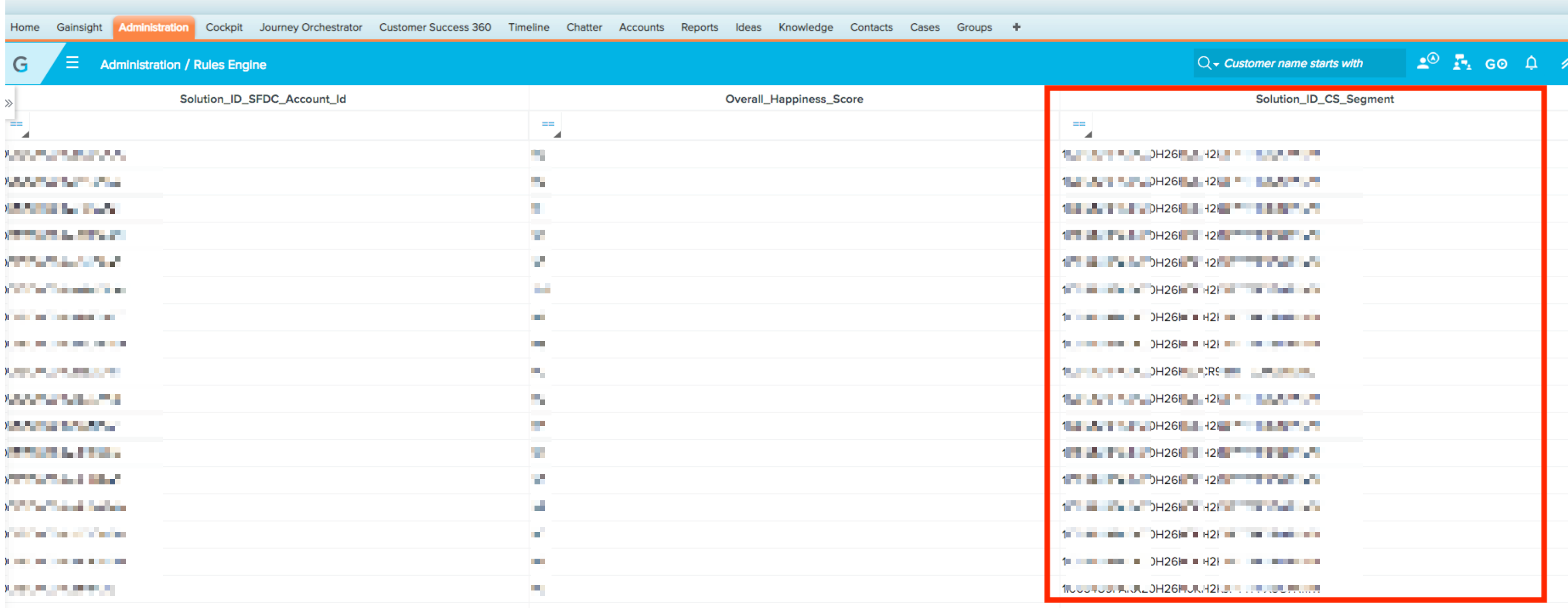
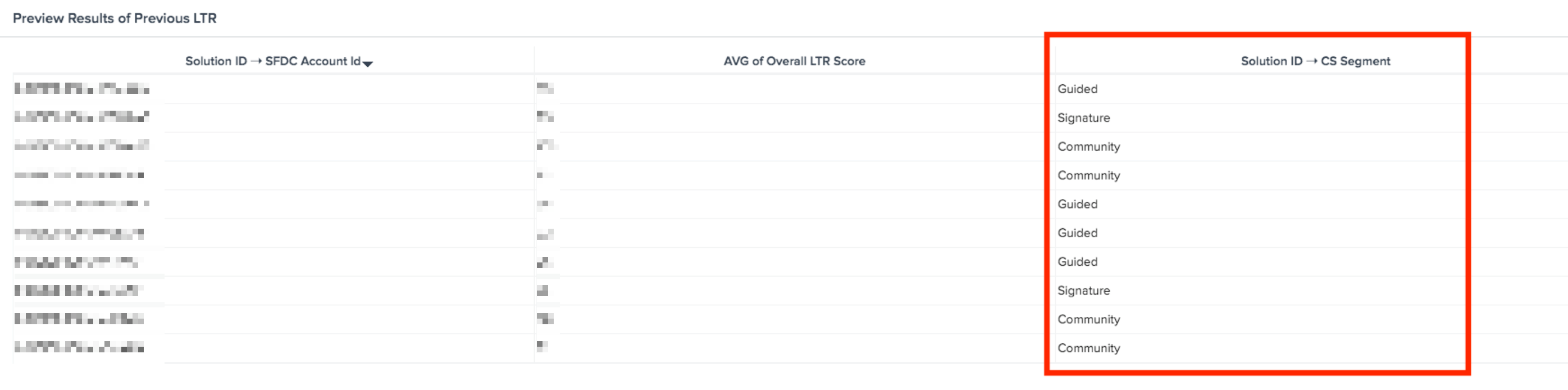
For instance, in the first image below you see a preview data set to a rule, this shows the name of the data in the field. "Guided" is an example.

But in the second image this is a rule run result and it shows an ID (blanked out for privacy purposes).

This is as design but in the future myself and others would find it useful for these to be matching. Troubleshooting a rule or data validation is very hard when these do not match up.

The reason it is like:

The execution itself uses the actual data so we have GSID's for Picklist values in the logs.

But in rule setup preview we are converting these GSID's to Picklist names to avoid confusion while setting up the rule.

The way we would like it to work:

Show the datasets as the same so that we can validate and confirm data easily.


    35 replies

    gunjanm
    Expert ⭐️
    January 27, 2021

    I would also add that it is impossible to Preview based on a particular Rule Run Date without adding or changing an existing filter. This is a little frustrating when I do want to run something historically and have to just assume I got everything right for that. 

    I am happy to provide more detail, just not sure if this should be on the same Idea? 

      
    End Proctoring-
     
    Gunjan
    heather_hansen
    VIP ⭐️⭐️⭐️⭐️⭐️
    January 27, 2021

    Just ran into this again today where I had a status I was trying to pull into a custom object from a Timeline field, and it was virtually impossible to troubleshoot because it was the GSID for the Status picklist value instead of the actual value.

    darkknight
    Expert ⭐️
    January 27, 2021

    :point_up_tone1:

    Jeff Kirkpatrick
    mindym
    Contributor ⭐️⭐️⭐️⭐️
    January 28, 2021

    I just ran into this issue in a bionic rule. I set it up to merge on a picklist field, not realizing this would be an issue (since after all, when I preview the dataset it shows the values just fine!). Because the merge is one of many steps in the rule it took me awhile to even pinpoint what was happening. This is an incredibly frustrating experience. I understand that I can create a case expression, but that requires a) another transformation task that should be unnecessary and b) re-writing every subsequent merge and transformation task to add in the new task required to build the case expression.

    It is a frustrating experience enough to have to create a case expression. It is even more frustrating to have no idea based on the preview that there would even be a problem. Then you have to find it, be shocked and enraged, and then redo a bunch of work.

    bradley
    Expert ⭐️
    January 28, 2021

    @mindym  Consistency across the board is an underpinning ask for like 90% of the requests I see :/

    rakesh
    Gainsight Employee ⭐️
    Lets put your data to work!
    January 29, 2021

    Hi all,


    We are working on improving the picklist handling in our data processing layer (Rule Run, Data Designer Run, JO Run, etc.). This should avoid the above-mentioned workarounds with respect to the picklist. However, there are quite a few considerations before we can deliver this - the primary concern is involving the performance (Label instead of id means an additional join internally). We will first prototype and check performance impact with production data and if the results are good, would then pick it up. 


    Let me know if there are any additional thoughts on this one!

    darkknight
    Expert ⭐️
    January 29, 2021

    @rakesh I would trade a bit of a performance hit for the savings I would get in troubleshooting/testing time.

    Jeff Kirkpatrick
    bradley
    Expert ⭐️
    January 29, 2021

    @rakesh I would trade a bit of a performance hit for the savings I would get in troubleshooting/testing time.

    100% with this. Unless there is some massive performance hit where it’s barely useable I’d rather have better functionality that requires more development time every time.

    darkknight
    Expert ⭐️
    March 19, 2021

    This is getting more and more frustrating now that I am on NXT.

    Exactly how am I supposed to interpret Rule Execution logs like this - and with TWELVE Actions - in order to validate that the rule is doing what I want it to do.  It’s SO time-consuming.


    Action 12 field mapping
    Action 12 tab


    Jeff Kirkpatrick
    HollySimmons
    Helper ⭐️
    January 27, 2022

    I’m trying to be a conscious data steward and only update SFDC records when the value held in GS differs from what’s currently in SFDC, but with picklists it’s not possible with doing case expressions and I have too many that they don’t fit on one task (plus it’s just annoying and not future proof, ugh). 

    You (GS) KNOW the value of the picklist in GS, you KNOW the value of the picklist in SF, it should be possible to use a filter of GS /= SF without having to do the above. 

    I can’t think of any possible example where I would want to compare (or match like those commenting above) a GS Picklist ID to something. It’s always going to be the value. 

    Please fix this….