Yoeri
Gainsight Employee ⭐️⭐️⭐️
Aug 21, 2020 12:53 PM UTC
How to

How To Configure The Visibility of Ideas

  • Mar 14, 2024 2:55 PM UTC
  • 22 replies
  • 668 views
  • Translate All

Not everyone wants to make their ideation section publicly available to the entire world. Sometimes you want to give only certain users access to ideas or want to gate ideas behind a login wall. In this article you will learn how to to configure the visibility of ideas with permissions.

Note: This article is only relevant for customers who have access to the newest ideation module. If you do not have access to the ideation module this article does not apply to you. Interested in the new ideation module. Learn more here

Permissions

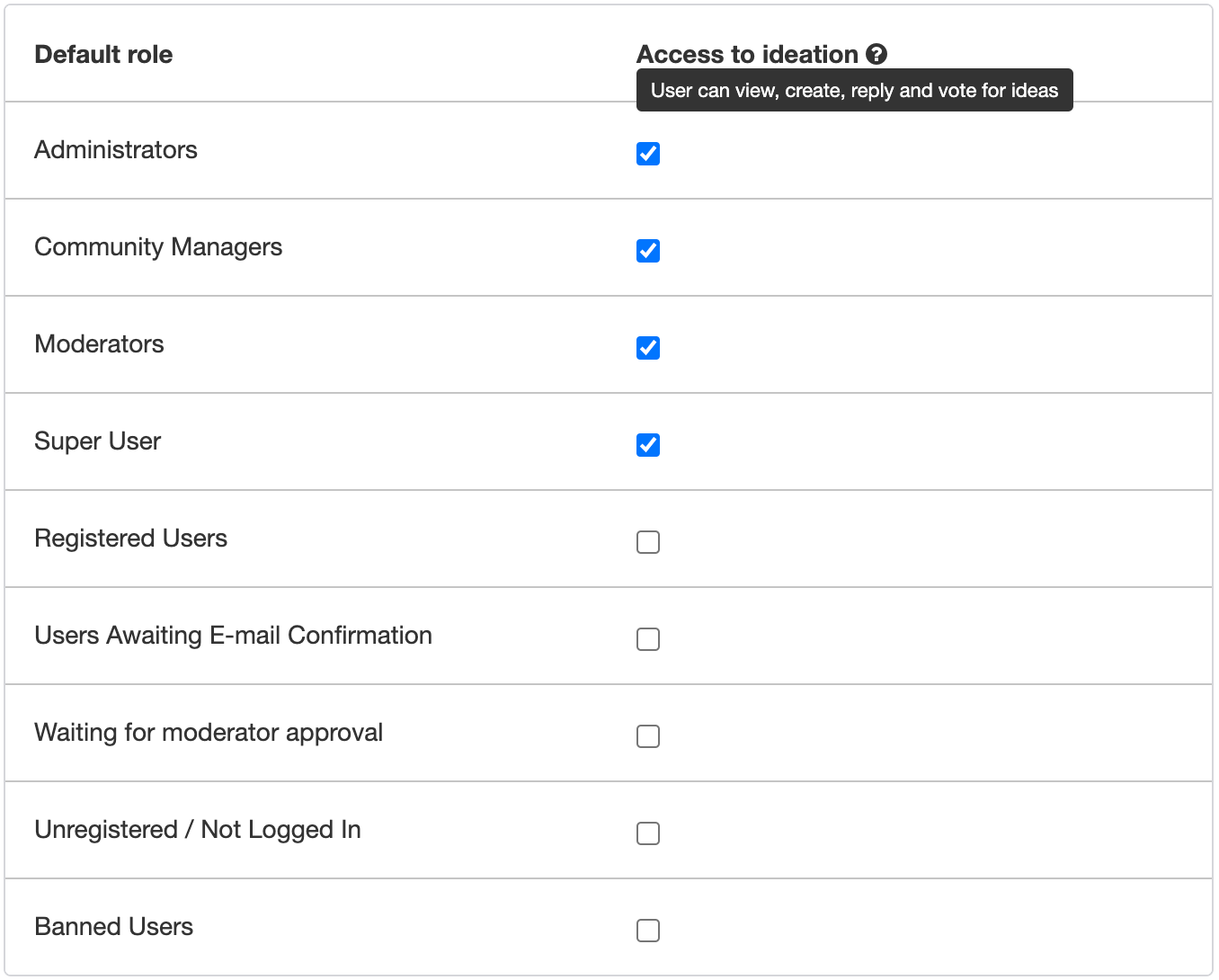
Permissions allow you to configure which user roles have access to ideation. When you grant a user role access to ideation the users within this role can view, create, reply and vote for ideas. Use permissions to only grant some user segments access (e.g. beta testers, premium customers, colleagues)


How to configure permissions

  1. Go to Control → Platform → Ideation
  2. Click Permissions
  3. Grant or Revoke default and custom roles access to ideation
  4. Click Save changes
Ideation permissions

Tip: To make ideas only available for registered users (behind a login wall) uncheck the following default roles:

  • Users Awaiting E-mail Confirmation
  • Waiting for moderator approval
  • Unregistered / Not Logged In

22 replies

Contributor ⭐️⭐️⭐️
Jan 31, 2022 11:02 PM UTC

Hey @Yoeri  - 
I’d like to make the Ideas section visible to everyone (open to unregistered users) But to ‘create’ or ‘vote’ I want them to be logged in. 
Is this possible? 

Translate
Yoeri
YoeriAuthor
Gainsight Employee ⭐️⭐️⭐️
Feb 1, 2022 5:27 PM UTC

Hi Dorothy, 

This is not possible unfortunately. The ‘Access to ideation’ checks regulate both visibility and voting permissions.

Translate
Group Product Manager, Customer Communities
Kalli.Solby
Contributor ⭐️
Apr 19, 2022 11:30 PM UTC

Hi @Yoeri !

I’m wondering if anyone knows why the viewed number shows on some posts and not others? For example, on this post, at the top, you can see “120 views”, but other posts you cannot see views…

Thanks for any help!
KS

Translate
Yoeri
YoeriAuthor
Gainsight Employee ⭐️⭐️⭐️
Apr 20, 2022 11:05 AM UTC

Hi Kalli,

This is specifically the case for ideas. Ideas were developed as a separate content type so we could add unique characteristics (status, product area) and build dedicated reporting for it. Views for ideas have not been added to the idea, but as an admin you can view the numbers of views for ideas in the admin backend (Control).

Translate
Group Product Manager, Customer Communities
Maayan K
Contributor ⭐️⭐️⭐️⭐️
Jun 27, 2022 7:08 PM UTC

Hi Kalli,

This is specifically the case for ideas. Ideas were developed as a separate content type so we could add unique characteristics (status, product area) and build dedicated reporting for it. Views for ideas have not been added to the idea, but as an admin you can view the numbers of views for ideas in the admin backend (Control).

Hi Yoeri!

Hope you are good :) Are there plans to facilitate this?

Actually would like even less than Kali, just to show the section exist but for non logged in users they will get error “no permission” similar to the behavior we see in grups module type “Private Group” 

Thanks!


Translate
In the sweet spot between Tech & Biz I ride
Yoeri
YoeriAuthor
Gainsight Employee ⭐️⭐️⭐️
Jun 28, 2022 7:14 AM UTC

Hi Maayan, 

We will hide the ‘ideas’ section from the main navigation by default if a user doesn’t have access to it. If you would add a call-to-action / link to ideation on the homepage (e.g. in the form a quick-link) and the user clicks it he would be taken to ideation. If a user doesn't have access we’ll show a ‘access denied’ message by default (which you can customise). I like the Sprout Social community where they show a clear ‘You need to be logged in to view this content’ message with a clear call to action to sign in:


Translate
Group Product Manager, Customer Communities
Maayan K
Contributor ⭐️⭐️⭐️⭐️
Jun 29, 2022 6:56 AM UTC

thanks that's perfect!

this is our error message :)


Translate
In the sweet spot between Tech & Biz I ride
ryanne.perry
Helper ⭐️
Jul 5, 2023 6:54 PM UTC

Hi @Yoeri I wanted to follow up on this as I see it’s been a year since last discussed. Is there a way to remove the ‘Idea’ as a content type in the new topic form but still keep “ideation’ permissions on?

We currently used the ‘Ideation’ section to showcase our Roadmap and keep that behind a login so only customers and partners can view. They have the ability to comment on Roadmap items through the Productboard integration but we are not quite yet ready for customers to submit ideas. Some customers use the ‘Idea’ content for questions that aren’t really ideas also.

Hoping to hear if anyone has any other thoughts as well?

Translate
🌻 Ryanne
Yoeri
YoeriAuthor
Gainsight Employee ⭐️⭐️⭐️
Jul 5, 2023 9:23 PM UTC

Hey Ryanne,

You have two options:

  1. Hide the ‘idea’ topic type button in the create topic page using custom CSS. This way users can never select ‘idea’ when they go to the create topic page. Your roadmap integration with Productboard will remain intact on the page that you currently have it.
  2. Add a custom page (e.g. ‘roadmap’) using our newest custom pages functionality. Embed the productboard roadmap there and configure the page visibility for this page so that only customers and partners can view it. You can then revoke the ideation permissions from all users in the community, this way users are never able to submit an idea again.

My recommendation would be to go for the second approach as you do not want to make use of the build in ideation module at this time. It’s better to disable this module until you may want to use it. 🙂

Translate
Group Product Manager, Customer Communities
ryanne.perry
Helper ⭐️
Jul 5, 2023 9:28 PM UTC

Thank you, @Yoeri!

  1. Do you have code available to share to accomplish this?
  2. Is there a way to re-direct the url? While I understand this is easier, we now have many customers who have the current url saved and we are trying to avoid a delayed/negative customer experience here.
Translate
🌻 Ryanne