Yoeri
Gainsight Employee ⭐️⭐️⭐️
August 21, 2020
How to

How To Configure The Visibility of Ideas

  • March 14, 2024 at 2:55 PM
  • 22 replies
  • 664 views
  • Translate All

Not everyone wants to make their ideation section publicly available to the entire world. Sometimes you want to give only certain users access to ideas or want to gate ideas behind a login wall. In this article you will learn how to to configure the visibility of ideas with permissions.

Note: This article is only relevant for customers who have access to the newest ideation module. If you do not have access to the ideation module this article does not apply to you. Interested in the new ideation module. Learn more here

Permissions

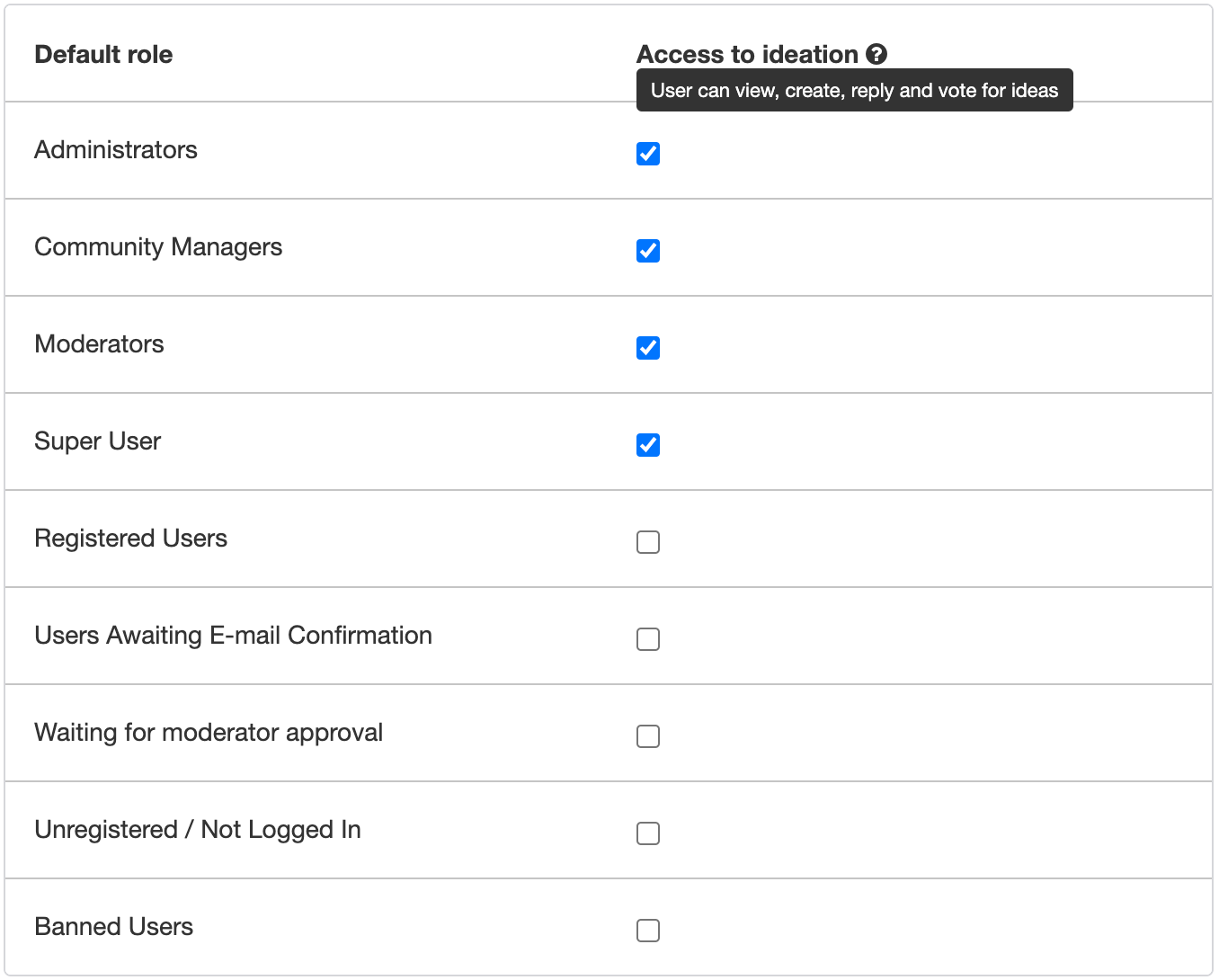
Permissions allow you to configure which user roles have access to ideation. When you grant a user role access to ideation the users within this role can view, create, reply and vote for ideas. Use permissions to only grant some user segments access (e.g. beta testers, premium customers, colleagues)


How to configure permissions

  1. Go to Control → Platform → Ideation
  2. Click Permissions
  3. Grant or Revoke default and custom roles access to ideation
  4. Click Save changes
Ideation permissions

Tip: To make ideas only available for registered users (behind a login wall) uncheck the following default roles:

  • Users Awaiting E-mail Confirmation
  • Waiting for moderator approval
  • Unregistered / Not Logged In

22 replies

Yoeri
YoeriAuthor
Gainsight Employee ⭐️⭐️⭐️
July 5, 2023

You’re welcome! 

  1. Unfortunately I’m not a coder myself, so I won’t be able to provide you the right code. 😕 I recommend you to reach out to someone who has the right coding experience (either within your team or from technical support). 
  2. it’s not possible to set a redirect URL for the /ideas landing page if you deactivate the ideas module
Translate
Group Product Manager, Customer Communities
lauro.lana
Helper ⭐️⭐️⭐️
July 6, 2023

Hey @ryanne.perry, I’m not a coder as well but maybe I can help you with this one. Are you looking to hide the idea option when creating a topic? Something like this?


Translate
ryanne.perry
Helper ⭐️
July 6, 2023

Thanks much @leo-inspired! That does look like the right path.

Translate
🌻 Ryanne
elyhienrich
Contributor ⭐️⭐️
June 4, 2024

Hi @Yoeri 

is it possible to set it so a certain custom role can see the ideas page but not be able to submit an idea?
We have this ability on other category pages but I can only see “access to ideation” which blocks the entire ideation page from them.

Translate
Yoeri
YoeriAuthor
Gainsight Employee ⭐️⭐️⭐️
June 5, 2024

Hey @elyhienrich 

is it possible to set it so a certain custom role can see the ideas page but not be able to submit an idea?

Unfortunately this is not possible, for ideation you control the visibility, ability to submit and reply all in a single permission switch. What is your usecase for allowing users to see ideas but not allowing them to submit them, I assume that users who can see ideas can also vote for them. 

Translate
Group Product Manager, Customer Communities
elyhienrich
Contributor ⭐️⭐️
June 5, 2024

Hi @Yoeri 

Our use case is that we don’t want employees posting ideas, however we do want employees to be aware of ideas that are coming in especially if they are a CSM and have a customer that they have encouraged to post & of course our product team. So we need the functionality to turn off the allowance of a certain custom role from being able to post in this space.

Another option could be the ability for community moderators to audit ideas before they are posted(?) 


Thanks! 

Translate
Kenneth R
Expert ⭐️⭐️
June 6, 2024

@elyhienrich My two cents here is that I’d probably go for a non-technical solution in the scenario you describe.  I’d simply make it a policy / guideline for employees to not post ideas.  If that occasionally were to go wrong, a very quick and painless moderation action, followed by a polite note to the employee that apparently missed the memo, would fix it.  Do you think that could work in your situation?  I’m guessing that this would likely be a very rare occurrence.

Translate
Yoeri
YoeriAuthor
Gainsight Employee ⭐️⭐️⭐️
June 7, 2024

Thanks Kenneth, this is what I would have recommended as well :)

Translate
Group Product Manager, Customer Communities
erin.brisson
Contributor ⭐️⭐️⭐️⭐️⭐️
September 23, 2024

Safe to assume from this that there’s no current way to allow users to vote for an idea but to hide the vote count, correct?

Translate
Erin
Kenneth R
Expert ⭐️⭐️
September 24, 2024

Hi @erin.brisson - yes that’s right, there’s no out-of-the-box way to hide the vote count.  I am curious - why would you not want your members to see the vote count?  

Translate