
Frank
Product Guru
February 23, 2018

How To Ban A User

  • February 23, 2018
  • 24 replies
  • 975 views

Some users can cause seriously bad vibes on your community. Maybe they’ve broken your community guidelines, or they’re being really offensive. You can choose to ban these users. If a user is banned, they’ll no longer be able to sign in to the community (and therefore won’t be able to post anything, or interact with other users). When a banned user tries to login, they see a message indicating that they’re no longer able to access the community (see below for a screenshot).
 

How To Ban A User

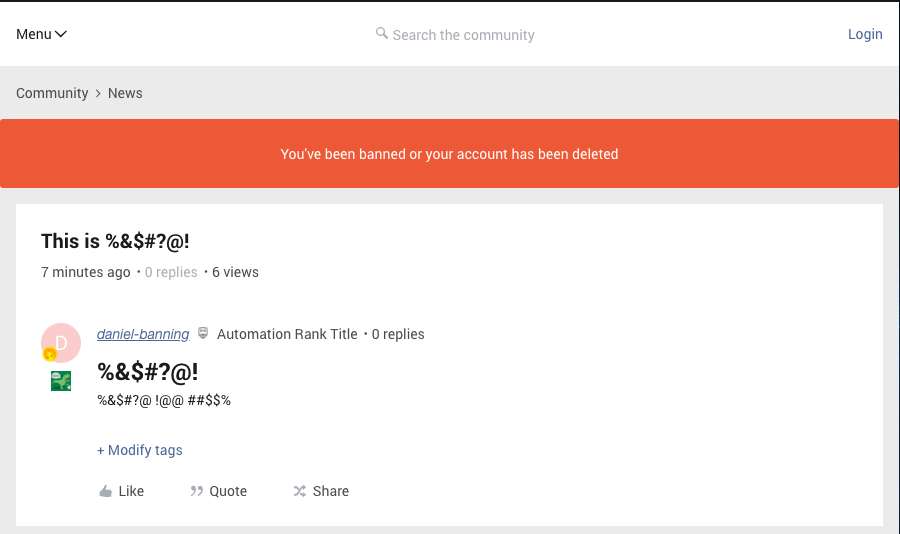
  1. Go to Control > User Overview > Choose a user’s profile.
  2. Press the bright red ‘Ban user’ button (this immediately applies a ban).
  3. The user is now banned and can no longer sign in to the community.
  4. Accidentally banned a user? No problem. Just press the ‘Unban user’ button!
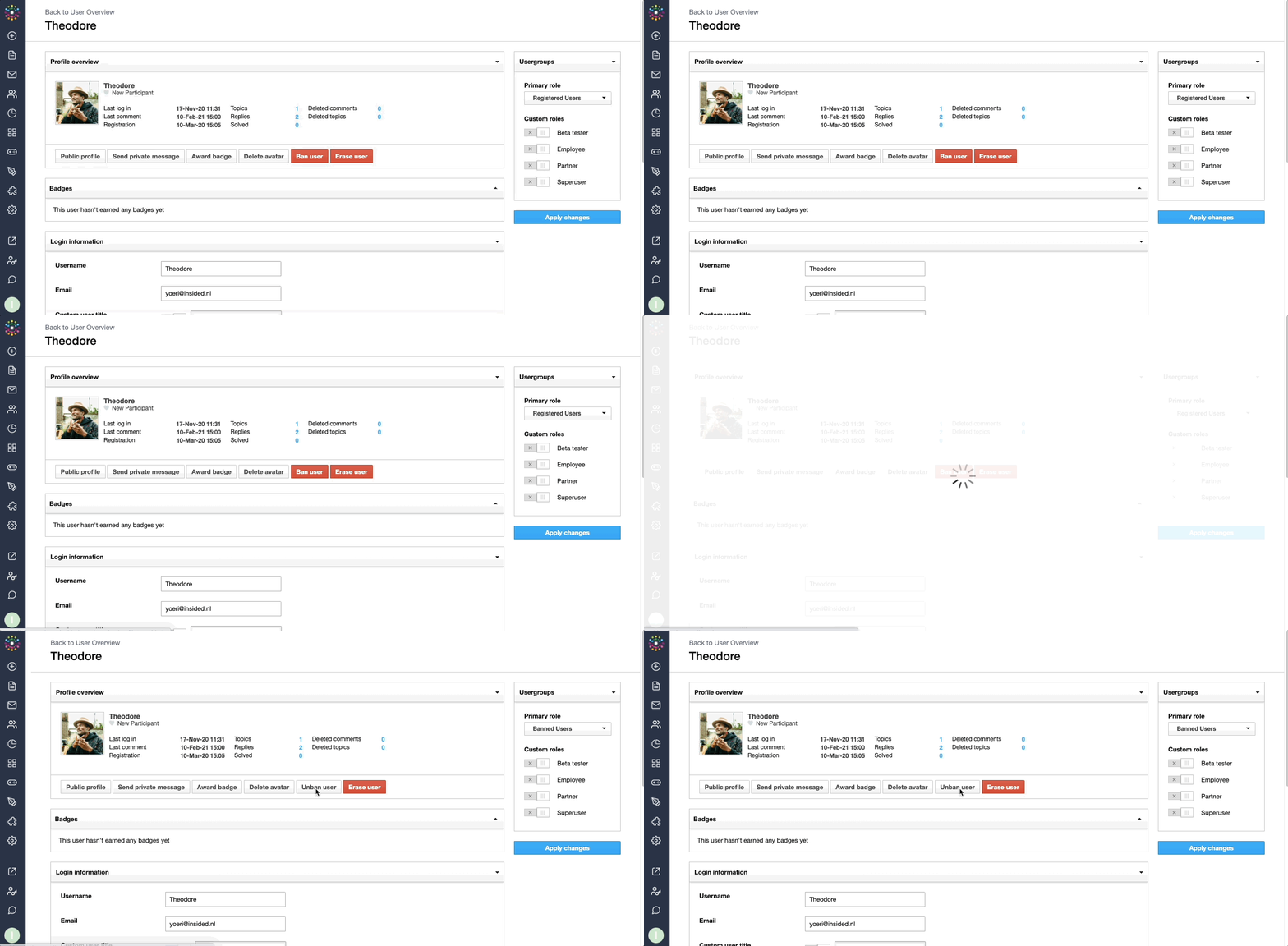
 

Message displayed to a banned member when they try to sign in:
cf97d5c3-522a-40ef-abf0-6e45c08aa08b.png


:gear:  Tips, Tricks, and Technical Bits​​​​

🎯 Need to find details of all banned users on your community? Use the primary role ‘Banned users’ as a filter on the user overview. As a side note: changing someone’s primary role to ‘Banned users’ has the same effect as pressing the ‘Ban user’ button.

:warning: Banned users are still able to browse the community, as lurkers. In order to prevent a particularly abusive user from accessing the community, inSided can manually set up an IP block. Just send an email to ccsupport@gainsight.com, including the user's details (username or email address) and IP address (see below).

💎 You can also ban a user from the topic overview. Just click the profile element next to a user, and press the ‘Ban user’ button.

:exclamation: When you mark one of your user’s posts as spam, you can choose to have them banned automatically or not.


How to obtain a users IP Address

In order for us to IP ban the user we will need to get the IP address from the person who’s been posting abusive content.

You can easily get this before banning the user by accessing the post/reply from Control.

Simply open the thread in Control and click the IP button. Then copy the IP address (which may be an IPv4 or IPv6) and share it with support explaining the situation.
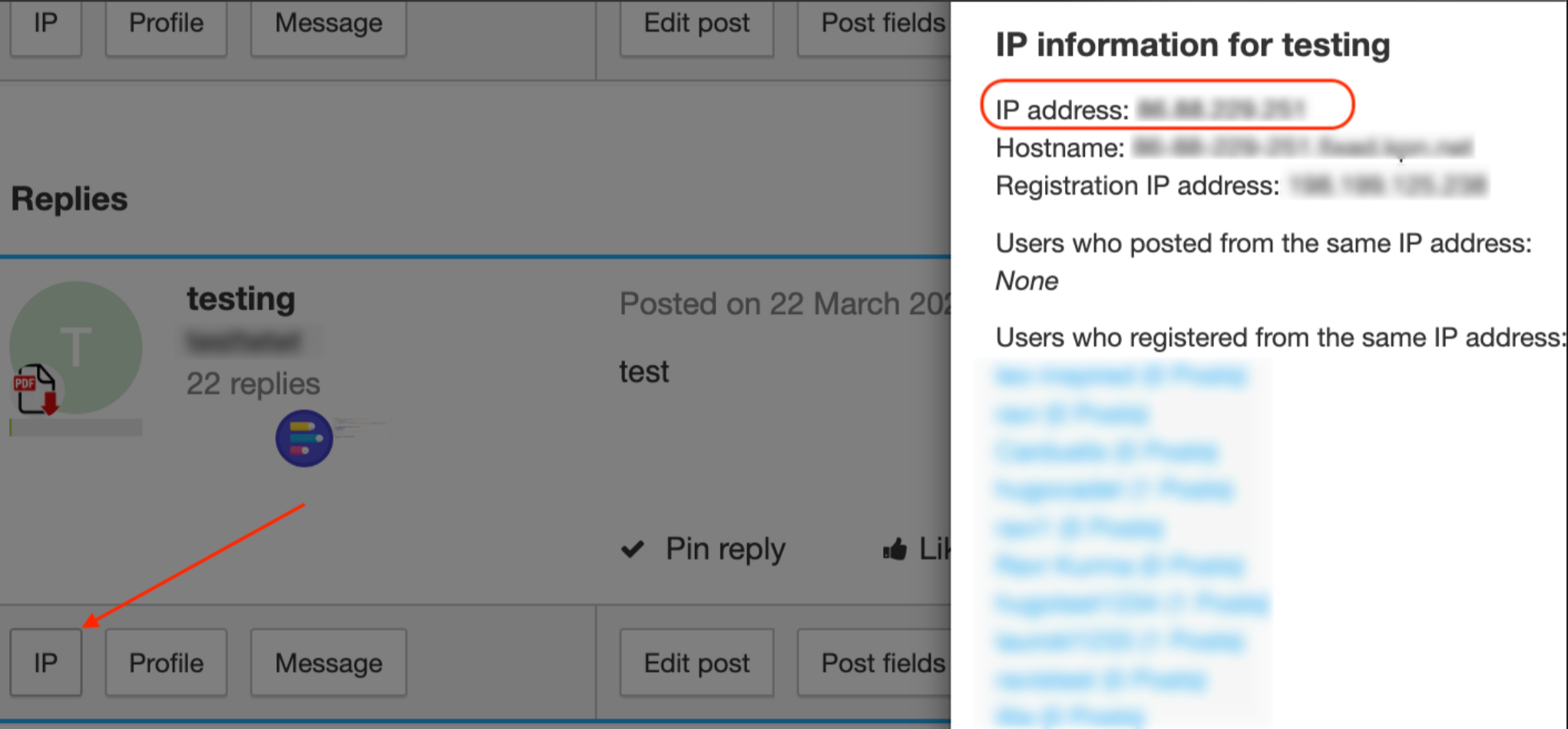
You may get a list of user who are posting/registered from the same IP address. This normally happens on company level when different users are using the same network (VPN, for example).

    24 replies

    timcavey
    Helper ⭐️⭐️
    March 8, 2022

    Yep makes sense, thanks both!


    I think the term BAN has a sense of permanence. If someone will never ever be unbanned, there’s no advantage in leaving their user profile to be viewed and interacted with. 


    You mention un-banning someone. Well that’s more of a suspension. I can easily see why a suspension would include not removing their profile. Maybe this could be a separate function:


    • Ban: anonymize profile, prevent logging in
    • Suspend: prevent logging in 
    learning, sharing and repeat
    wtempleton
    Contributor ⭐️⭐️⭐️
    March 17, 2022

    Is there a way to customise the ban message that users see after a ban is applied? I’d like to offer a link to our disputes policy in the text, for example.

    Community Manager, Console Connect | he/him
    Julian
    Gainsight Employee ⭐️⭐️⭐️
    April 12, 2022

    Sorry, just spotted your question, here the info you are looking for:

    Module: Forum

    Key: You've been banned or your account is deleted

    Let me know if you need more help with this!


    I follow my nose, it always knows
    security_lion
    Helper ⭐️⭐️
    January 24, 2023

    Why do banned users still receive email notifications for groups or forums they are a part of?

    revote
    VIP ⭐️⭐️⭐️⭐️⭐️
    January 24, 2023

    :gear:  Tips, Tricks, and Technical Bits​​​​

    💎 You can also ban a user from the topic overview. Just click the profile element next to a user, and press the ‘Ban user’ button.
    ​​​

    What does this actually mean? 

    TomW
    Helper ⭐️⭐️
    January 25, 2023

    :gear:  Tips, Tricks, and Technical Bits​​​​

    💎 You can also ban a user from the topic overview. Just click the profile element next to a user, and press the ‘Ban user’ button.
    ​​​

    What does this actually mean? 

    Hi revote! In a topic overview where you see all posts in a topic there is a ‘profile’ button (next to IP and message). If you click that button you'll also have the option to ban the user.

    Click ‘Profile’
    Together with other information about the user, you'll see these options.


    revote
    VIP ⭐️⭐️⭐️⭐️⭐️
    January 25, 2023

    Thanks @TomW, for some reason I was confused 😃

    wtempleton
    Contributor ⭐️⭐️⭐️
    January 26, 2023

    Question and perhaps feedback here, @Julian:


    Why doesn’t the posts of a banned user become anonymized similar to when a profile is deleted? 


    Someone might try to tag them, send them a private message etc

    Got notified to a new reply here, and came across this and wanted to give my two cents - there are many cases where you would want a ban status to be invisible to other users, particularly in the case of someone trying to send a banned user tags or private messages. In a past job, we had necessity to use suspensions as a tool to try and change someone’s behaviour - our goal was always to keep them on the community if we could, but if they were acting out and wouldn’t change what they were doing through discussions, having that discussion without them having the ability to use the community in the meantime was helpful. A change in their behaviour was most successful when they could save face within the community amongst other members because people did not know that they had had some action taken against them. Any indicator that someone was temporarily suspended would work against that.

    We also had rare cases of long-standing member bans being reviewed and bringing someone back to the community after several years, and in those cases it was helpful for that member to have access to their account in full.

    Community Manager, Console Connect | he/him
    Sam77
    Contributor ⭐️⭐️⭐️
    January 13, 2025

    @Julian - the below is a new module and key that need to be added correct? I want to update that message to let folks know that we don’t approve accounts created generic email addresses. Edit to add: How can I quickly confirm the message on the end-user side?


    Sorry, just spotted your question, here the info you are looking for:

    Module: Forum

    Key: You've been banned or your account is deleted

    Let me know if you need more help with this!


    Kenneth R
    Expert ⭐️⭐️
    January 14, 2025

    Hi ​@Sam77 - yes, this phrase would need to be added in the Phrases section in Control.  The easiest way to test this is to create a test account and then ban it from Control, so you can see the end-user experience for yourself.  I have a private Gmail account that I always use for this kind of testing.