Contributor ⭐️⭐️⭐️⭐️
March 16, 2020
Solved

Tracking loggins

  • March 16, 2020
  • 3 replies
  • 234 views

I’m trying to track how who logged in to our mobile app, how many times and when. I’ve created this filter in Audience Explorer:
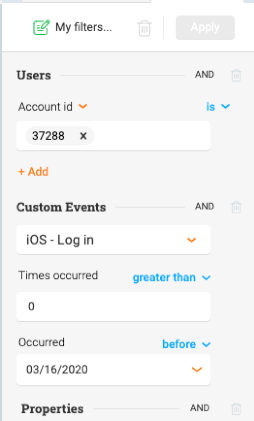
 

But it just gives me a list of user with no details about when they logged in, etc. I know I can view each individual user’s profile to view their activity, but I just want to create a single view/report that I can export. When I export a CSV from these filters it gives no details about loggins. 


PX newbie here so I really appreciate any help!


Thanks!

 

    Best answer by dileepnalla

    Hi @jriva ,


    Refer to the below video (runtime: 2 mins) that can help you:


    To the question : 

    I’m trying to determine which users have logged in, when and how often - at an account level

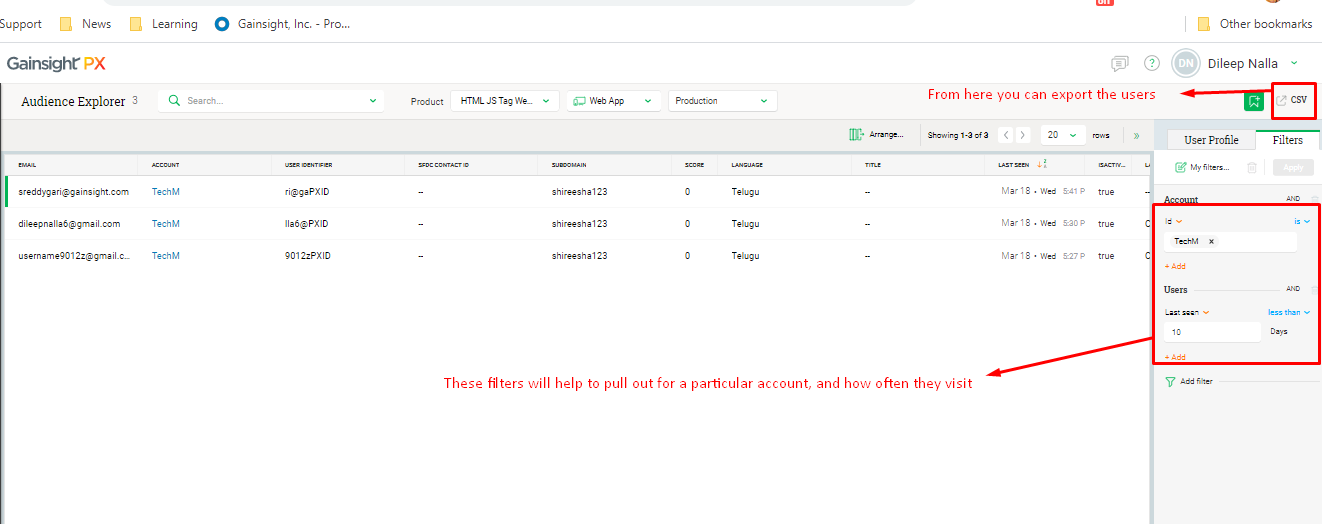
    You can determine which users have logged and how often they have logged in by using the simple filter of Account and User last seen from UI

    But to know when all they have logged in (time and date ), you can use API that I have shared above


    Is there at least a way to export which users of a particular account have logged in via the UI? 

    Yes, you can use the last seen option in the filter and export the filtered users in CSV


    Thanks

    Dileep Nalla


    3 replies

    dileepnalla
    Gainsight Employee ⭐️⭐️
    March 16, 2020

    Hi @jriva,


    Thanks for posting your question on the Gainsight Community.


    Coming to the question, I understood that you are looking to build a report on individual user login history.

    Example: If User U1 logs in, you want to track the time or instance of every login.

    This is possible to know via user profile which you are already aware of, however if you are looking to export that data, it is not really possible from UI with the existing product design.

    Good news is that you have a provision to get that data exported using our API

    For Session Events: https://gainsightpx.docs.apiary.io/#reference/sessionevent

    For Identify Events: https://gainsightpx.docs.apiary.io/#reference/identifyevent/v1eventsidentify/get-identify-events


    Using the above API’s you can export/ extract the data.


    let me know if you need any further assistance, In case if you have questions related to PX, feel free to reach us on pxsupport@gainsight.com too!


    Thanks

    Dileep Nalla


    Thanks, Dileep Nalla
    jrivaAuthor
    Contributor ⭐️⭐️⭐️⭐️
    March 16, 2020

    Thanks for the response @dileepnalla 

    I’m trying to determine which users have logged in, when and how often - at an account level

    Example: Account ABC had 10 users log in last month. U1 logged in 3 times (with dates), U2 logged in 10 times, U3 logged in 7 times, etc.

    If the individual log in history can only be exported via API, is there at least a way to export which users of a particular account have logged in via the UI? 


    dileepnalla
    Gainsight Employee ⭐️⭐️
    March 18, 2020

    Hi @jriva ,


    Refer to the below video (runtime: 2 mins) that can help you:


    To the question : 

    I’m trying to determine which users have logged in, when and how often - at an account level

    You can determine which users have logged and how often they have logged in by using the simple filter of Account and User last seen from UI

    But to know when all they have logged in (time and date ), you can use API that I have shared above


    Is there at least a way to export which users of a particular account have logged in via the UI? 

    Yes, you can use the last seen option in the filter and export the filtered users in CSV


    Thanks

    Dileep Nalla


    Thanks, Dileep Nalla