

Yoeri
Gainsight Employee ⭐️⭐️⭐️
January 22, 2020
announcement

Coming soon: Instant search and search filters

  • January 22, 2020
  • 22 replies
  • 549 views

We’re pleased to share that we are currently working on improving the user- interface and experience of search.

Jump to the instructions to preview the advanced search on your community
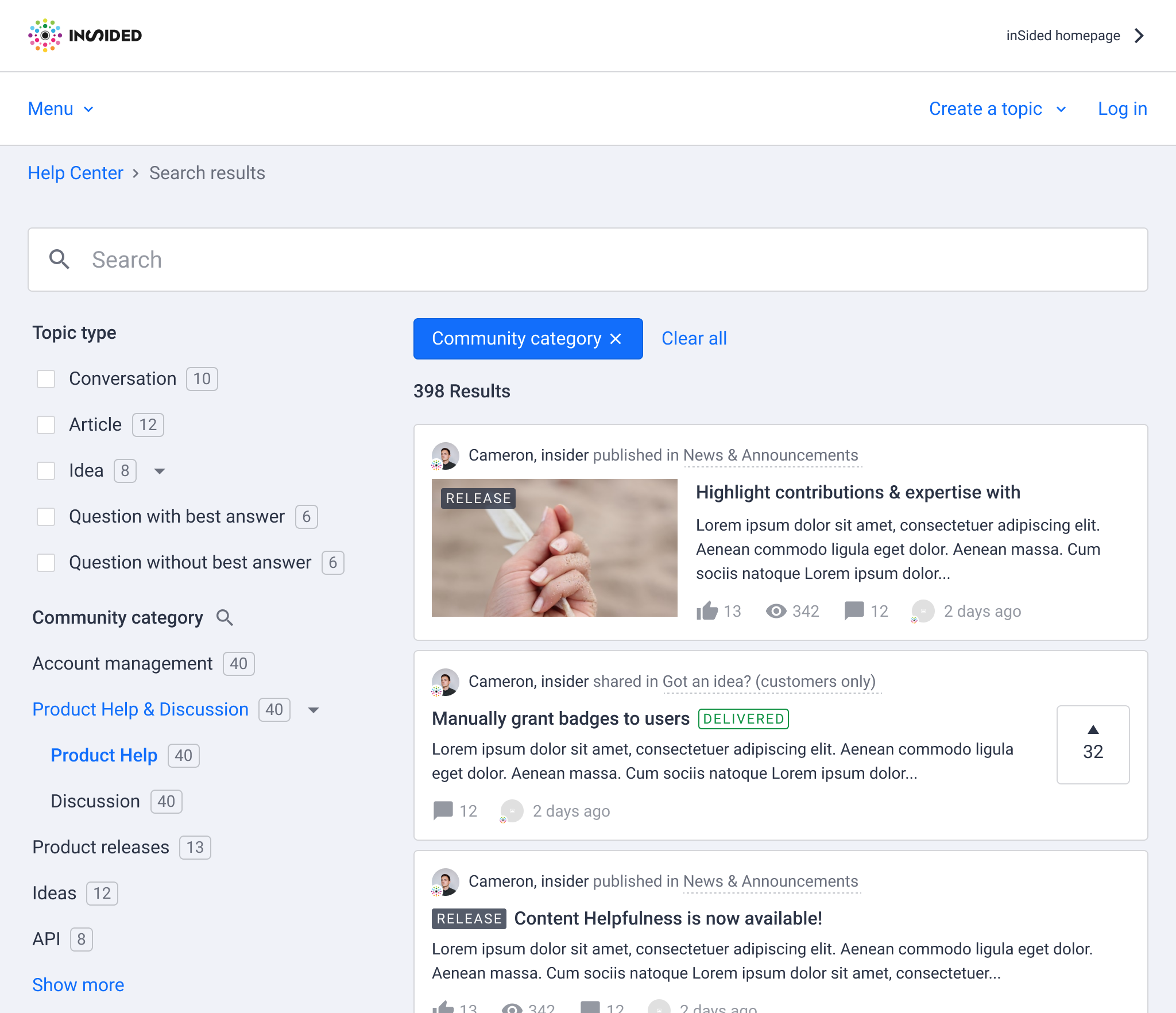
Example of new search result page

What to expect

  • Searching in a category page will only show results from that specific category*

  • Instant search - the list of search result will automatically refresh as you type in a search result page

  • Endless scroll - when you reach the bottom of the list of result we’ll automatically load a new set of results

  • UI changes - the list of search results will be changed to improve read- and scanabilty

  • Search filters - you will be able to filter search result pages on:

    • Community (parent) categories

    • Knowledge base (parent) categories

    • Topic type

    • Public tag

    • Source (e.g. community, knowledge base)

*category specific search results are already available in the live-search dropdown

We have more ideas for search filters but would like to hear your input on this as well: Let us know what you think of this update, share your most desired filter and stay tuned for more!

22 replies

Contributor ⭐️⭐️⭐️
January 29, 2020

I would like a filter of the number of replies in a topic, this way we could create a quick link to the topics without replies, making it easier for members to help. 

Yoeri
YoeriAuthor
Gainsight Employee ⭐️⭐️⭐️
January 29, 2020

We have some exciting news; instant search and filters is now available for you to see and test. This feature is still in progress, so if you encounter any issues or strange things please let us know.

Here is what you need to know:

You can see and test search on your production and staging community on a hidden URL. This URL is public, so anyone with the URL can access it. Your community users will not see the new search page until we will publicly release it. This new search page lives next to the existing search page.

We deliberately choose to give you access to this new search page on production so you can test with real data.

How to test

Add /search/instant behind your community URL to see the new search experience, e.g:

https://community.insided.com/search/instant

What can you do

  • See and test the new experience
  • Change the sidebar filter labels with the phrases tool
  • Prepare an update for your end-users

When will this be available for my end-users (aka when are you releasing this)

February 5 (Wednesday) around 12:00

The new search page is now available, learn more here: https://community.insided.com/news-platform-updates-16/now-available-instant-search-and-search-filters-1977

What is next

Plans and ideas we want to add over time:

  • More filters (based on your feedback)
  • Redirect Recently active, Unanswered questions, Active since last visit pages to this new search experience

How do we measure success

We will track if the new search experience is successful by looking for the following trends: No Results Rate (percentages of searches that retrieved zero results) decreases, Clickthrough Rate (percentage of searches where at least 1 result was clicked by the user) increases, Click position (Average position of the clicks performed on the search results) decreases.

Feedback, questions?

We’re happy to hear your thoughts and feedback on this feature. 

Group Product Manager, Customer Communities
Suvi Lehtovaara
Helper ⭐️⭐️
January 30, 2020

@Yoeri Thanks for this! I’m already testing! :heart_eyes:

I’m trying to edit Phrases, but I was not able to edit all of them. Some yes, but now the tool is not working anymore. I press edit in this view, but nothing happens.

What should I do? I’m trying to edit “Aiheen tyyppi” :nerd:


https://yhteiso.elisa.fi/
Yoeri
YoeriAuthor
Gainsight Employee ⭐️⭐️⭐️
January 30, 2020

Suvi, I’ll send you a private message with more details - we suspect some external header scripts clash with our translation tool.

Group Product Manager, Customer Communities
LPortalupi
Helper ⭐️
February 1, 2020

Hi @Yoeri. Thanks for giving us a way to test this (and edit the Phrases) in advance! I really like it.

If I click on a “Community category” (as written in your screenshot), it expands and shows the sub-categories. This wasn’t clear to me the way it’s currently designed. I would love to have a standard block arrow that indicates to the user that there’s a sub-menu available!

Like this:


Yoeri
YoeriAuthor
Gainsight Employee ⭐️⭐️⭐️
February 2, 2020

Good feedback and nice mockup! I’ll pass it on to the team :)

Group Product Manager, Customer Communities
Suvi Lehtovaara
Helper ⭐️⭐️
February 3, 2020

Time-based filters are on the top of our wish-list as well :relaxed:

We have a mature community and at the moment the search returns topics that are several years old - it would be nice to be able to filter only topics that are for example less than 3 months old.

https://yhteiso.elisa.fi/
Hiewwaiy
Contributor ⭐️⭐️⭐️⭐️
February 3, 2020

Hi @Yoeri 

Looks great so far! 
 

We have noticed one thing: 
There are two parent categories (see below) that do not expand, which means that the subforums do not appear. Is this a bug? 


Gr Hiewwaiy
Yoeri
YoeriAuthor
Gainsight Employee ⭐️⭐️⭐️
February 3, 2020

We pushed an UI update that shows a small dropdown arrow to the parent categories based on @LPortalupi her feedback.

We also figured out that parent categories with an empty space behind the title did not expand (thanks to feedback of @Hiewwaiy) this should now be resolved

Group Product Manager, Customer Communities
Contributor ⭐️⭐️⭐️
February 3, 2020

When will this be available for my end-users (aka when are you releasing this)

February 3 (Wednesday) around 12:00

@Yoeri Just checking: Did you mean this week’s Wednesday? 5th of February?


Elisa OmaYhteisö https://yhteiso.elisa.fi