


Gainsight CC: Accelerate Engagement with AI Answers (Open Beta)
Related products:CC Analytics & ReportingCC Others
  • January 13, 2026
  • 7 replies
  • 132 views

Supercharge your community experience with the power of generative AI.
 

AI Answers is now available in open beta, bringing conversational search to your Customer Communities. With this feature, your users can instantly find answers and uncover insights, all powered by AI.


Find Answers Instantly with AI-Powered Search (AI Answers)

Transform your community search into a dynamic, conversational experience.

  • AI-Driven Understanding: Interprets natural language to deliver relevant, human-like responses.
  • Cited Results: Includes source links for full transparency and context.
  • Streaming Responses: Watch answers appear in real time for an engaging, interactive feel.
  • Expandable Insights: Click to reveal additional context and related sources.
  • Continuous Learning: Improves accuracy based on user feedback and interactions.
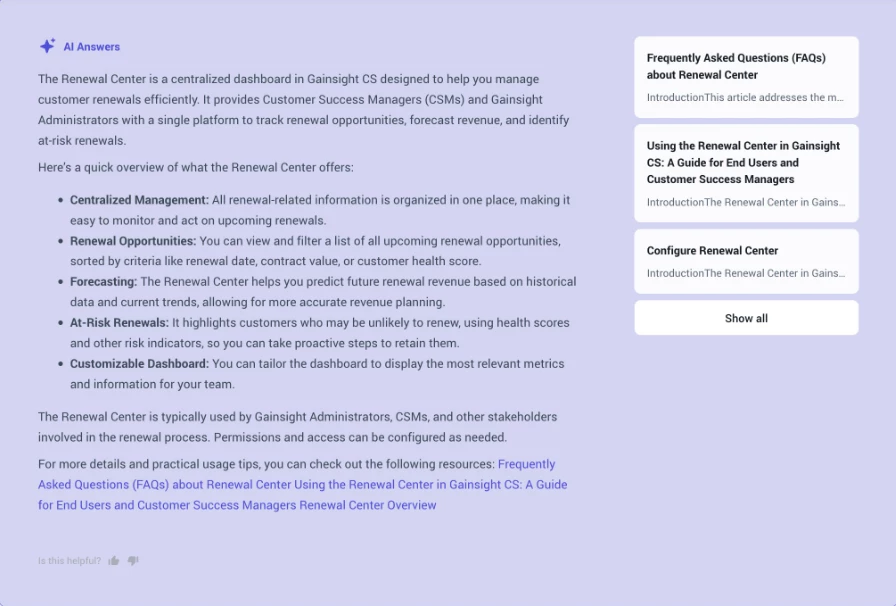
AI Answers helps members find information faster and with more confidence — making every search feel like a conversation with an expert.

How to Get Started

AI Answers is available in Customer Communities Control > AI & Automation.

  • If you already use Smart Assistant or Moderation AI, you’ll see the new AI Answers option automatically — no additional enablement required.
  • If you’d like to add this feature, you can activate it directly within the AI & Automation settings page.

Set Up in Minutes

Enable AI Answers

  1. Go to Customer Communities Control > AI & Automation > AI Answers
  2. Toggle Enable AI Answers (Beta)
  3. Configure your data sources for AI search
  4. Customize response settings and source citations

Also included in this open beta, Search Analytics Dashboard is a new dashboard that allows admins and community managers to review how users interact with search. Key metrics include total number of users, total searches, the no results rate and more!
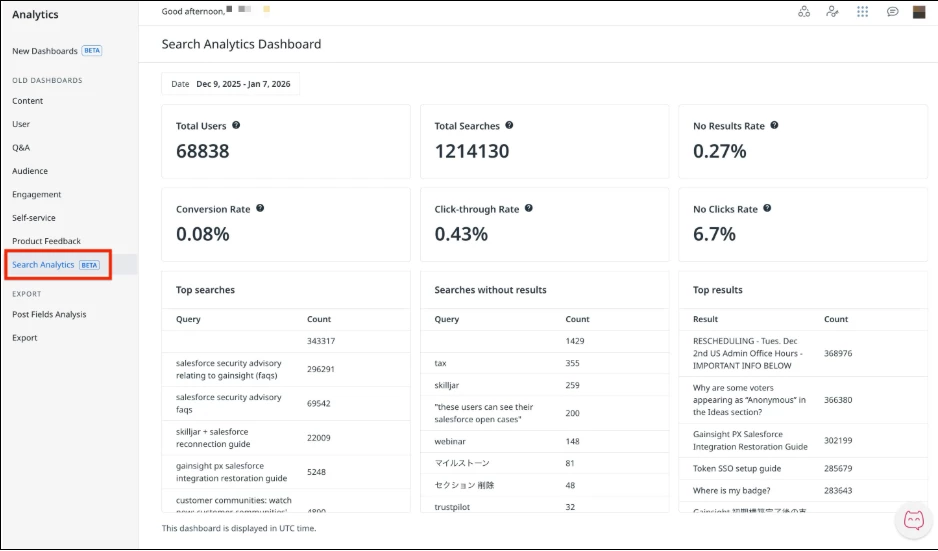
With Search Analytics, teams can now better understand how search is being used, identify gaps in the search experience, and make informed improvements.

👉 Check out the Release Notes for more details.

💬 Have questions or feedback? Drop a comment below — or better yet, ask our new AI!


7 replies

DannyPancratz
Forum|alt.badge.img+9
  • VIP ⭐️⭐️⭐️⭐️⭐️
  • January 13, 2026

Could you please share what the tooltip definition of Conversation Rate is in the Search Analytics Dashboard? 


DannyPancratz
Forum|alt.badge.img+9
  • VIP ⭐️⭐️⭐️⭐️⭐️
  • January 13, 2026

Could you please share what the tooltip definition of Conversation Rate is in the Search Analytics Dashboard? 

screenshot of the tooltip definition


ryanne.perry
  • Helper ⭐️
  • January 13, 2026

Are the AI search results only from data posted in the Community? Or would it also include our knowledge base as we have it set up for federated search via app integration?


atwhite
Forum|alt.badge.img+1
  • Helper ⭐️⭐️
  • January 13, 2026

Thank you! We’re excited for this feature! Some initial questions that came up:

How are Search Queries Without Results determined? Some terms in our list are accurate, while others (at least in our testing) do produce results. Are terms (and whether they produce results) role-dependent? 

Also: this seems to be the case from our testing, but I want to confirm that if we still have Search Summaries for All Users toggled off, the new AI Answers will not appear for them yet and only display for admins?


Jef Vanlaer
Forum|alt.badge.img+3
  • Helper ⭐️⭐️
  • January 14, 2026


  • If you already use Smart Assistant or Moderation AI, you’ll see the new AI Answers option automatically — no additional enablement required.
  • If you’d like to add this feature, you can activate it directly within the AI & Automation settings page.


Is there an option to enable AI Answers if we don’t use Smart Assistant or Moderation AI yet? I only have an AI (not AI & Automation) settings page in Control and don’t see the new feature listed.


JeppePeppe
  • Helper ⭐️⭐️
  • January 14, 2026


  • If you already use Smart Assistant or Moderation AI, you’ll see the new AI Answers option automatically — no additional enablement required.
  • If you’d like to add this feature, you can activate it directly within the AI & Automation settings page.


Is there an option to enable AI Answers if we don’t use Smart Assistant or Moderation AI yet? I only have an AI (not AI & Automation) settings page in Control and don’t see the new feature listed.


We’re missing that option in Control as well, although we use Moderation AI. We don’t have the option AI & Automation.


alan.edwards
Forum|alt.badge.img+1
  • Contributor ⭐️⭐️⭐️
  • January 14, 2026


  • If you already use Smart Assistant or Moderation AI, you’ll see the new AI Answers option automatically — no additional enablement required.
  • If you’d like to add this feature, you can activate it directly within the AI & Automation settings page.


Is there an option to enable AI Answers if we don’t use Smart Assistant or Moderation AI yet? I only have an AI (not AI & Automation) settings page in Control and don’t see the new feature listed.


We’re missing that option in Control as well, although we use Moderation AI. We don’t have the option AI & Automation.

We also do not have the AI & Automation option.