
New Idea

Filtering in drill down reports.

Related products:None
  • October 21, 2020
  • 2 replies
  • 75 views

andrew_biehle
Forum|alt.badge.img+3

Posting on behalf of customer. Currently on reports that contain a drill down, if you want to apply filters to the drill down section of a report you need to apply them globally on the report itself. This potentially filters out data at the global level which you want to see.

The use case here is that you’d like to see a holistic view at the global report level and then when you drill down you’d like to see specific data filtered down per dataset. 

2 replies

darkknight
Forum|alt.badge.img+5
  • Expert ⭐️
  • October 21, 2020

Example use case:

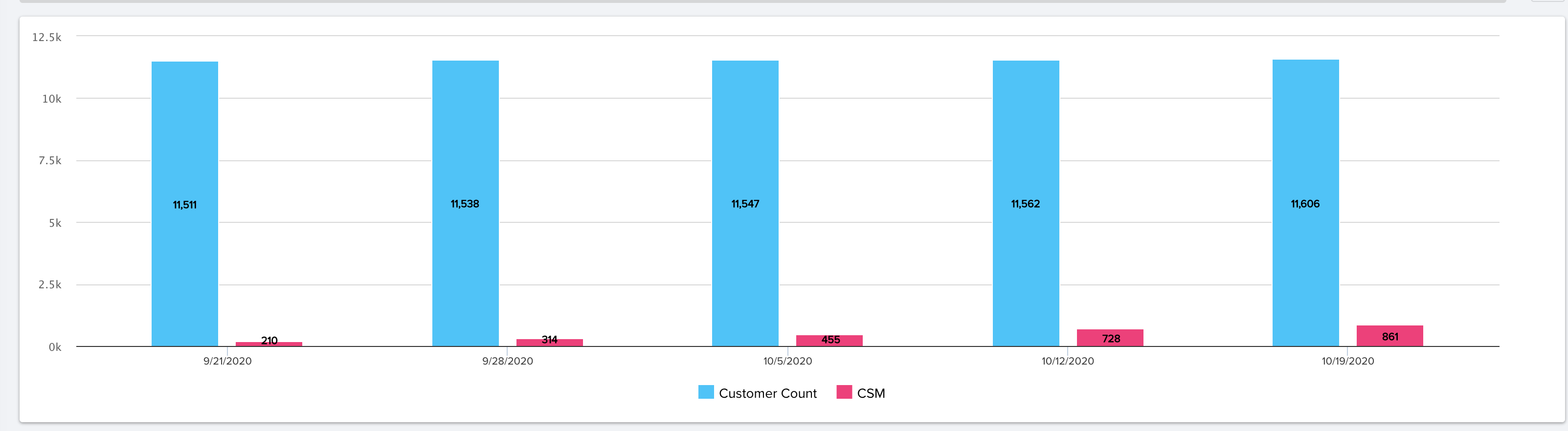
Report to see the total Company Count beside the total CSM count (companies where a CSM is assigned over time. (We are snapshotting Company records weekly)


Show me:  Count of Company GSID,  Count of CSM

By: Snapshot Date


So when “Company Count” Column says 11,606 and “CSM” Column  says 861, I would expect that when I click “Company Count” the drill down would contain 11,606 lines and when I click “CSM” the drill down would contain 861 lines.

The numbers in the column view are correct… but the drill downs that match to the number in the column. If I click on a column that says it has 861 records, I would expect the drill down to display 861 records. It’s misleading otherwise.


kelly
Forum|alt.badge.img+3
  • Helper ⭐️⭐️⭐️
  • May 7, 2025

Would love to see some more traction on this one. I have an NPS Response by Role report, you’d think drilling down into any of the roles/their respective response rate would display the responders (those that contributed to the response rate). But no, it’s a list of all survey participants and not inherently obvious that a bunch of the rows are not responders.