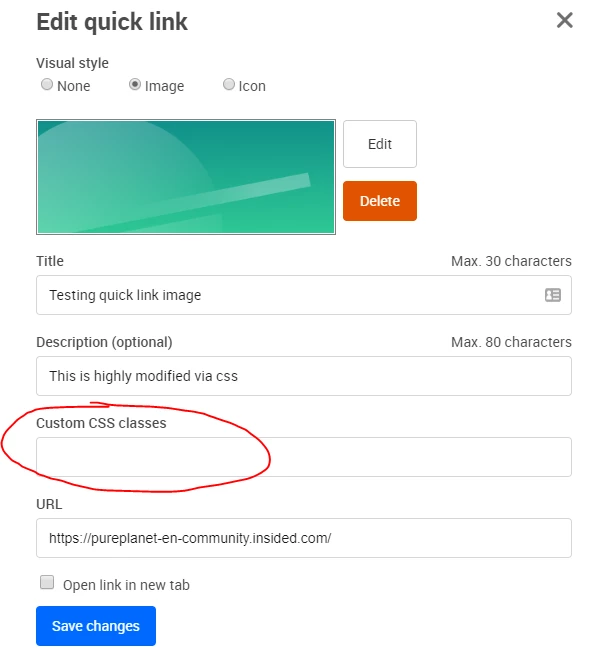
I’m currently styling the Insided platform and noticed that in the raw html there are very few css classes which could be used to hook custom styles into. Therefore my suggestion is kind of two-fold;
- As a default, output more class names for all the elements on the page
- Allow for custom css class names to be set against items in control, and against custom page elements
In more detail;
1.
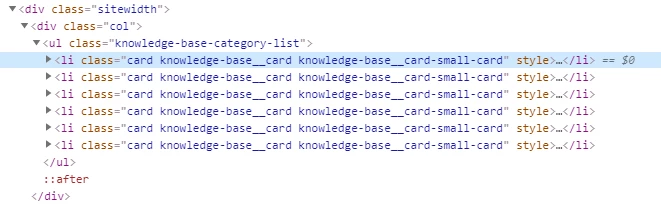
If we look at the following source code for the knowledge base category output on the homepage, there is nothing differentiating the different categories in the <li> elements. Even if it included an FAQ section id or something, we could style each in a different way - perhaps a different background or title colour etc. It’s a similar situation for other items that are outputted - adding in a topic id, section id etc would be extremely useful to style those differently if necessary.
At the top level of the html, user information as class names would be useful in the <body> element so that anything on the page could be modified id the user was e.g. logged in/out or if they belonged to a certain user group.
2.
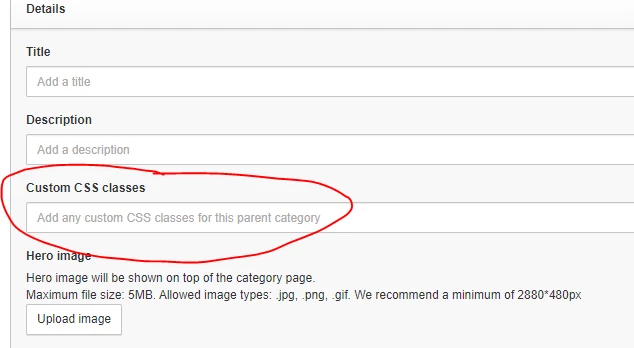
As an extension to 1 above, being able to apply custom css classes on things in Control would allow for ultimate flexibility with regard to styling on the frontend. For example, if there was a custom CSS class field when adding an FAQ parent category, then this would be outputted to the html wherever that parent category was shown. We could perhaps have a ‘green-background’ css class, or a ‘prominent’ class, or a ‘hide-on-mobile’ class etc (the styling rules would of course be defined in the existing Custom CSS editor)
For custom page elements, e.g. quicklinks, we could also add a custom css class to instantly style or theme each link panel with different colour text, background or really anything.