
Released
Expand or Format fields on Success Plan Info
We are in the process of rolling out Success Plans internally, and there is a LOT of information that up to now CSMs have been storing externally on a powerpoint document or in Evernote that we are trying to give them space for within their success plans.
I've successfully added the fields they've asked for and made them long text fields, but there does not appear to be a way today to specify the formatting or the way these display. When more than one line worth of text is entered, it doesn't currently wrap smartly and all additional whitespace appears to be ignored, making these context fields much less usable than they could be.
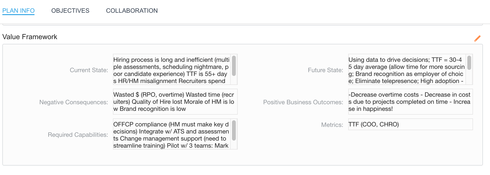
Even if I make these rich text field types in Salesforce, the result on the 360 is the same. They don't even give the standard bottom-right-corner expand that Chrome adds to all text area boxes in standard forms. I don't mind the scrolling, but the wrapping makes it difficult to read.
My folks are asking for it to be readable, which I don't think is unreasonable. Do I have any options today to make this happen? If not, please strongly consider preserving input formatting.
Thanks!

I've successfully added the fields they've asked for and made them long text fields, but there does not appear to be a way today to specify the formatting or the way these display. When more than one line worth of text is entered, it doesn't currently wrap smartly and all additional whitespace appears to be ignored, making these context fields much less usable than they could be.
Even if I make these rich text field types in Salesforce, the result on the 360 is the same. They don't even give the standard bottom-right-corner expand that Chrome adds to all text area boxes in standard forms. I don't mind the scrolling, but the wrapping makes it difficult to read.
My folks are asking for it to be readable, which I don't think is unreasonable. Do I have any options today to make this happen? If not, please strongly consider preserving input formatting.
Thanks!

Sign up
If you ever had a profile with us, there's no need to create another one.
Don't worry if your email address has since changed, or you can't remember your login, just let us know at community@gainsight.com and we'll help you get started from where you left.
Else, please continue with the registration below.
Welcome to the Gainsight Community
Enter your E-mail address. We'll send you an e-mail with instructions to reset your password.