

In order to prevent the duplication of contacts within our Salesforce instance, our IT team recently rolled out the concept of "Related Contacts." In a nutshell, a single Contact record exists by email address and is considered a "Direct" contact on the account where it was originally created. There is an additional Salesforce object (Account Contact Relationship) which associates that same Contact record with additional accounts in an indirect fashion, if that contact is to be associated with more than one Account.
I tried to diagram what this looks like:
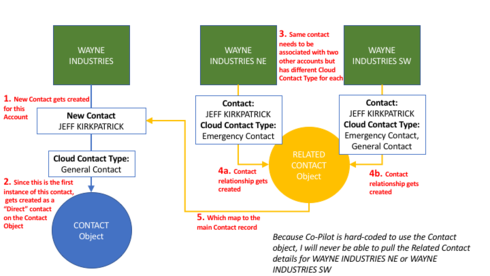
Because Co-Pilot is hard-coded to pull from the Contact object, in my example my PowerList would only get the Contact details associated with the original "Wayne Industries" account. I have no way of pulling in "Jeff Kirkpatrick" as related to "Wayne Industries NE" or "Wayne Industries SW"
I believe allowing a Data Space to be used here would address our use case (at least I hope it would).
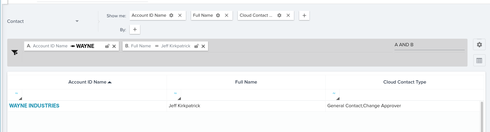
Using the example above (with Account names redacted), if I run a report on the Contact object I only get one record:
Where if I run a report off of a Data Space I created that incorporates the Account Contact Relationship object with the Contact object, I can see the Contact record associated with multiple Accounts, including it's account-specific "Related Cloud Contact Type" values
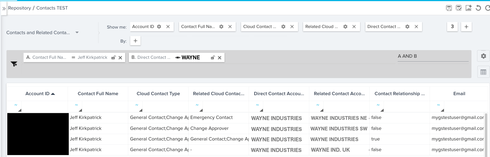
In the above, the 7th column where the values are true/false is the "Direct" flag.
This is a really big item for us - pretty much a make or break for our ability to use CoPilot.