New Idea

Linking URL's in reports

Related products:None
  • April 16, 2019
  • 11 replies
  • 1213 views

ky_powell
Forum|alt.badge.img
  • Contributor ⭐️⭐️⭐️⭐️⭐️
When running an opportunity report, it would be beneficial to be able to link to the opportunity just like all Account Names are linkable/clickable off account reporting. In SFDC, the one upside to having our reporting there is the ability to have clickable links to the various opportunities, products, etc so that a CSM can take more actions straight from a report.

I thought I saw something about Gainsight working on allowing URLs in reports for certain objects, is this still the case?

11 replies

keith_mattes
Forum|alt.badge.img+3
  • Helper ⭐️⭐️
  • April 16, 2019
I'd like to vote this up as well. We've had lots of user stories for linkable items to SFDC objects, especially opportunities.


lila_meyer
Forum|alt.badge.img+5
  • Gainsight Employee ⭐️⭐️⭐️
  • April 25, 2019
Hi Ky,

URL data type support is currently only available for MDA objects in reports. I think if you wanted SFDC records to be clickable hyperlinks in reports, you'd need to load the records to a custom field (w/ URL Data type) in an MDA object.


pele
Forum|alt.badge.img+4
  • Helper ⭐️⭐️⭐️
  • April 26, 2019
One thing you could do is add a HYPERLINK formula field to an sfdc object and add it to GS reports you're creating.

For a give object, the formula would look something like this:

HYPERLINK("https://your_domain_here.my.salesforce.com/" & Id , "clever_field_name_here" )

The hyperlinked field will display in GS reports as a link and take you to the linked sfdc page.

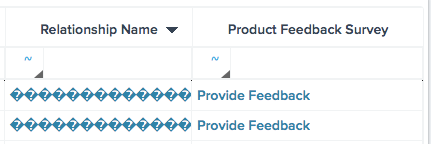
Different use case, but here's an example of a HYPERLINK formula field in a GS report:

**this particular field pictured just links to a quick survey for our CSMs to give product feedback on behalf of their customers at any time.


Hello:


I ran into this similar issue last week - confirming I was able to build a hyperlink formula directly from the object and it works great. However, because it’s a URL field type, I am unable to group the new custom field.


Are there any updates on being able to group reports by URL field type? I believe this request is on a few other community threads, but figured I’d start here to see if there was any updates.


Thank you!


Best,
Joseph


sai_ram
Forum|alt.badge.img+1
  • Expert ⭐️⭐️
  • July 7, 2021

@josephcrawford sorry for the inconvenience, I will work on it and get back to you. Thank you.


rakesh
Forum|alt.badge.img+2
  • Lets put your data to work!
  • July 9, 2021

Hi All,

I’ve converted this to an idea. Do upvote it if you want this feature. 


I understand that this would be helpful. However, my understanding is that this hyperlinks only works for SFDC classic edition, not lightning.


bradley
Forum|alt.badge.img+8
  • Expert ⭐️
  • July 12, 2021

Hi All,

I’ve converted this to an idea. Do upvote it if you want this feature. 


I understand that this would be helpful. However, my understanding is that this hyperlinks only works for SFDC classic edition, not lightning.

@rakesh Not sure if this is applicable here, but you can get lightening URLs to work. You just need to make sure the URL is set up properly. I used Concat() to make one for a JO program. Namely you need to use the lightening pathway as well as force it to open in a new window with target=”_blank”. If you don’t force the link to open in a new page/window with lightening it won’t work.


Concat(<a href=,
https://yoursfdcdomain.lightening.force.com/lightening/r/object_name,
Object_ID_Field,
/view,
” target=”_blank”>,
Display Text,
</a>)


  • Contributor ⭐️⭐️⭐️
  • July 5, 2022

HI

I am  using below URL to open new window in report or C360 layout but it does not work.

Can you plz advise?

Concat(<a href=",https://lightning.force.com/,Record ID, target="_blank", ”>,Link,<,/a>)


bradley
Forum|alt.badge.img+8
  • Expert ⭐️
  • July 11, 2022

@Syed added my reply to you here: 


Stuart
Forum|alt.badge.img+3
  • Helper ⭐️⭐️
  • December 8, 2022

+1 to the request, it would be good to have automatic recognition of a url, or the ability to convert a string to a url field with the use of a formula field.


That being said, @bradley’s explanation of converting the opportunity ID to a URL and wrapping in an ahref is working as of Dec ‘22.


In DD I took the following steps:
Grab your data including the 18 character Opportunity ID and the Opportunity Name

Add a transformation:
Use case fields for the following:

Helper field one: string with:

<a href="https://yoursfdcdomaininsertedhere/lightning/r/Opportunity/

Helper field two: convert your Opportunity ID from an ID field to a string

Helper field three: 

/view" target="_blank">

Helper field four: 

</a>

Save, and create another transformation from the above transform

Add formula field > string > concat


HelperField1, HelperField2, HelperField3, Opportunity Name, HelperField4.


Note, this will show as a string when viewed in the DD explorer, however when the dataset is made universally, when the field is viewed in Report Builder it will show as a hyperlink with the Opportunity Name.


Forum|alt.badge.img
  • Contributor ⭐️⭐️
  • March 3, 2023

In reporting, its not possible to concat more than 2 fields using formula field to convert string to hyperlink.

Any workarounds?

Thanks a lot in advance.