New Idea

Success Plan auto-save

Related products:None
  • March 12, 2018
  • 17 replies
  • 196 views

heather_hall
It would be great if the note fields in a Success Plan could auto-save. I accidentally erase my work when activating plans without having taken the step to save first and it hurts so much every time! 

17 replies

sai_ram
Forum|alt.badge.img+1
  • Expert ⭐️⭐️
  • March 21, 2018
@Heather, Thanks for sharing this!

we will definitely consider your request based on More number of Me too's from other customers.

scotty
Forum|alt.badge.img
  • Contributor ⭐️⭐️⭐️⭐️⭐️
  • March 21, 2018
I'm a part of the same customer, but my team complains about this constantly.

brandy_guillory
  • Contributor ⭐️⭐️⭐️
  • May 31, 2018
I recently created a success plan and forgot to click "save" it refreshed the page somehow and i lost all what I entered, so i definitely would like an autosave.

aditya_marla
  • Helper ⭐️⭐️⭐️
  • June 1, 2018
Hi,

Thanks for sharing this...it makes complete sense & can understand the frustration it causes to lose the data you just entered. Will think about either implementing auto-save or providing a warning when trying to navigate to a different place and there is some unsaved data

liam_nicholls
I've added my vote to this.  Today a colleague and I were just commenting on how we had had trouble with accidentally losing data when navigating away from the success plan page.

We may not have not have noticed that this was an issue, but we have created so many in the last week or two and made a numerous mistakes. I'm glad to see this is already being discussed.

christian_auner
Forum|alt.badge.img
  • Contributor ⭐️⭐️⭐️
  • September 23, 2019
Hi,

the auto-save function is also highly requested from our csm's. A success plan is normally not done in a few minutes and our csm's having often calls or critical tasks in between and sometimes the session to Salesforce is lost or they can not save the Success plan due to other issues.

Is there an update on this?


anthonysabato
Forum|alt.badge.img+2
  • Helper ⭐️
  • January 13, 2020

I’ve had a number of users complain about the same issue with  loses of data in Success Plans after say updating the due date. Not good functionality. Is there an update on this item?


jnunes
Forum|alt.badge.img+1
  • Gainsight Employee ⭐️
  • March 26, 2020

Hi @aditya_marla is there an update on this? I have other customers asking about this. Thank you!


aditya_marla
  • Helper ⭐️⭐️⭐️
  • October 1, 2020

Hi @jnunes 

We are working on redesigning success plans. This would be addressed along with it...in the new design all fields (apart from RTE) would autosave 

Regards


Anil Raj Pujari
Forum|alt.badge.img

in Success Plan Horizon experience all fields (except RTE) would autosave. RTE fields auto save is not yet support due to technical challenges


seth_schroeder
Forum|alt.badge.img+1
  • Gainsight Employee ⭐️⭐️
  • July 28, 2021

Hello Everyone,

Happy to announce that your request has been considered and implemented in the Success Plan Horizon Analytics available in Gainsight NXT. Success Plan Horizon Analytics has new capabilities such as expandable fields and an auto-save feature for contentwhen creating new Success Plans.

Thanks for posting!


mindy
Forum|alt.badge.img+1
  • Helper ⭐️
  • June 9, 2022

How exactly is this implemented with an auto-save feature in success plans? I just had someone complaining to me about this in my internal office hours. If they spend significant time typing up something in the success plan page (outline goals, risks, etc) then navigate away for whatever reason, none of that info is saved. They were expecting it to work more like timeline where a draft is auto-saved or some other mechanism so the content is not all lost.


Forum|alt.badge.img+2
  • Contributor ⭐️⭐️⭐️⭐️⭐️
  • July 7, 2022

I’m still seeing this as an issue too.


Forum|alt.badge.img
  • Contributor ⭐️⭐️⭐️⭐️
  • July 12, 2022

@seth_schroeder yes please on the above “how” it’s implemented. One of my people just had the erasure happen yesterday when she didn’t save her success plan so is there a setting that we need to turn on?


Forum|alt.badge.img+4
  • Contributor ⭐️⭐️
  • July 31, 2023

Hi @Anil Raj Pujari

My team is still experiencing issues with losing data in the plan info section because it doesn’t auto save, and will only save one section at a time. Is there a workaround for this? I see that the status is partially fixed, but it is not clear to me what updates were made. 

Thanks!


mpatra
Forum|alt.badge.img
  • Gainsight Employee ⭐️
  • August 8, 2023

Hi,

Auto save functionality is supported by all fields except the Rich Text Fields which we don’t support due to technical challenges. 

Did you face this issue with any other fields other than the Rich Text Fields?

Having said that, we will evaluate supporting auto-save in the Rich Text Fields again. Please allow me some time to have a conversation with the team. I will update this group on the status of the project.


Thanks,

Monica


Forum|alt.badge.img+4
  • Contributor ⭐️⭐️
  • August 8, 2023

Hi Monica, 

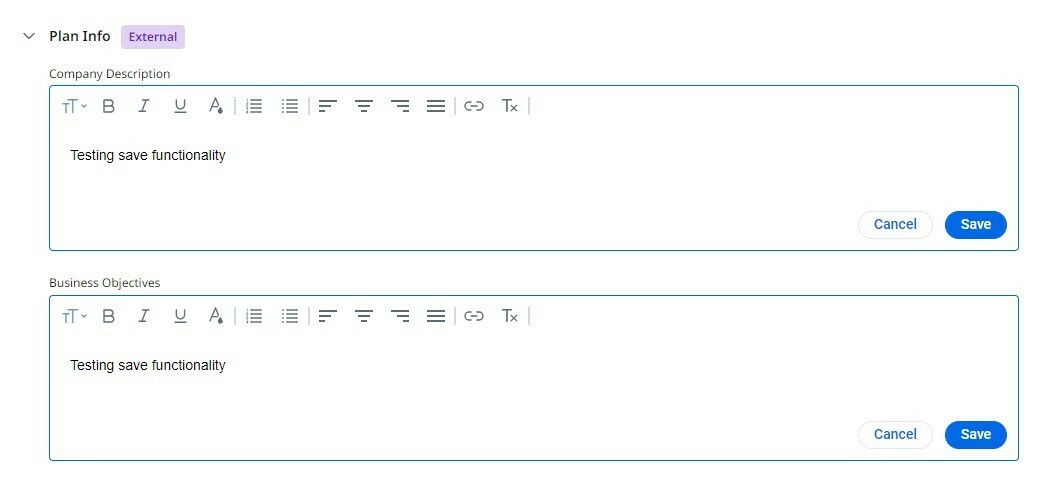
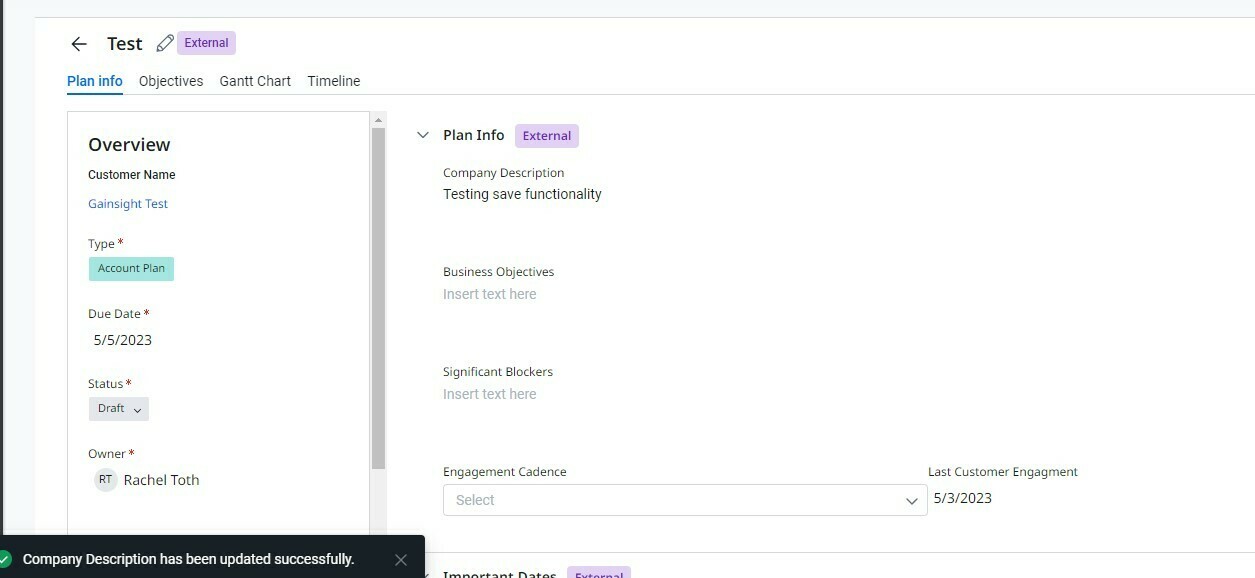
The only fields we are experiencing this issue on are the rich text fields. The main pain point my team has brought to my attention is that they are able to open/edit the rich text fields such as description and business objectives at the same time, but when they click save on one, the other one is deleted. 


Both fields open to edit
Result when top field is saved


If the auto save functionality is not possible, I think this could be solved with a ‘save all’ option or by limiting the ability to open/edit multiple rich text fields at one time since it is not possible to save them together. 


Thanks!