Contributor ⭐️⭐️
November 18, 2020

enlarge the window

  • November 18, 2020
  • 8 replies
  • 115 views

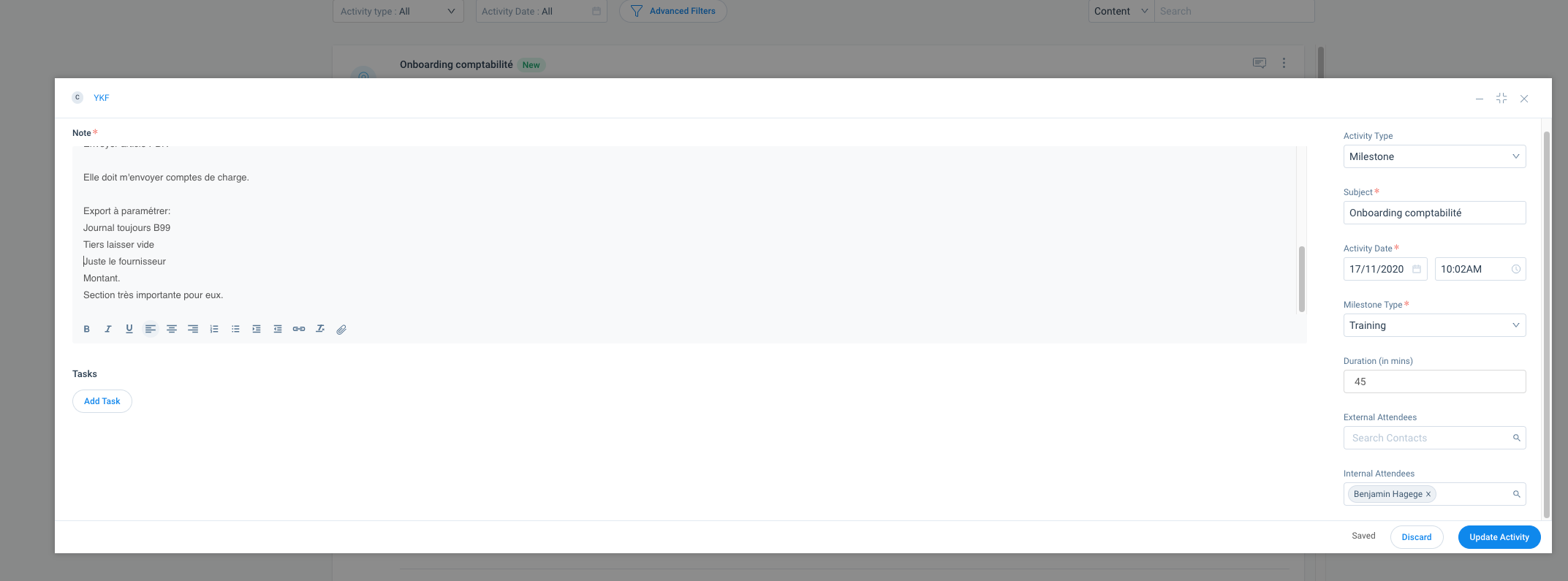
Would be great to be able to expand the window size when we log a call. 


8 replies

john_apple
Expert ⭐️
November 18, 2020

In the upper right of the Timeline draft, next to the X is a square looking icon to enlarge the entry window. Were you specifically asking about the notes field?

benji89Author
Contributor ⭐️⭐️
November 18, 2020

Hi John, 

Yes this is what I click on to enlarge the window, as you can see in my screen capture. Still the window to type notes is too small… :(

dan_ahrens
Expert ⭐️⭐️⭐️
November 19, 2020

This is good feedback. Do we have any plans to use the screen real estate more completely @nitisha_rathi ?

VP of Customer Success at Forcepoint
benji89Author
Contributor ⭐️⭐️
December 2, 2020

Hi @nitisha_rathi any update please? It is really annoying that even when enlarged the windows remain small ? Thanks

sai_ram
Expert ⭐️⭐️
December 11, 2020

@benji89 we have gathering all the feedback on new Timeline and actively working on them. Thanks!!

benji89Author
Contributor ⭐️⭐️
December 11, 2020

@sai_ram OK thanks, looking forward for some improvements there. 

sai_ram
Expert ⭐️⭐️
February 22, 2021

@benji89 this is fixed and available now. Thanks!!

benji89Author
Contributor ⭐️⭐️
February 22, 2021

Hi @sai_ram, thanks, this is much appreciated!