

lila_meyer
Gainsight Employee ⭐️⭐️⭐️
June 25, 2019

PX: Add Location or Page to Engagements List View

  • June 25, 2019
  • 5 replies
  • 134 views
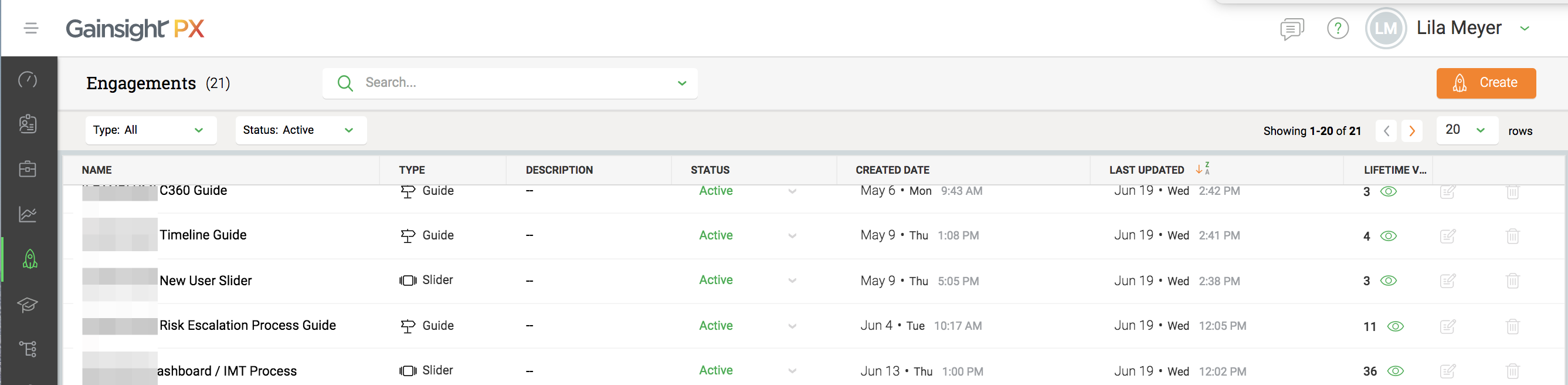
To provide better visibility into potential engagement conflicts, it'd be helpful if the Engagements List View included the engagement's location and/or page that it's targeted to. Right now, I have to click into the individual engagements to see the location in the app that the engagement will appear.


5 replies

harshibanka
Gainsight Employee ⭐️⭐️
June 26, 2019
Harshi (pronounced like the Hershey's chocolate); PLG and Digital CS Evangelist
dileepnalla
Gainsight Employee ⭐️⭐️
June 30, 2019
Hi @lila_meyer / @mickey / @ciarapeter

How about adding the product name to identify the engagement that belong to?

Here i have multiple enagement that are built for various products, tough for me to identify


@harshibanka your thoughts please

Thanks

Dileep Nalla

Thanks, Dileep Nalla
lila_meyer
Gainsight Employee ⭐️⭐️⭐️
July 1, 2019
Yes, that's a good point. We need to start the engagement name with CS, PX, etc. to help distinguish them.

Lila Krutel, Dir. Global Education Services
prashant_mathapathi
Helper ⭐️⭐️⭐️
July 8, 2019
Hi Lila,

To know the targeted launch page of an engagement easily , we can use the following work around:

We can include a phrase about the targeted page in the engagement Desription, so that it is easily visible on the engagement list view.


Regards

Prashant

lila_meyer
Gainsight Employee ⭐️⭐️⭐️
June 19, 2020

I think this is still needed because users aren’t regularly using the description area to identify the engagement location.

Lila Krutel, Dir. Global Education Services