

Question

"Include Null" Option and other feedback

  • December 5, 2025
  • 1 reply
  • 17 views

emiller

@Aleksandra I wanted to provide some more feedback on the “include null” option.  I am finding that it actually makes using the filters quite confusing, as it seems that you need to check it in order for the filter to work, and other times it needs to be unchecked.  For example, if I use the “in” option with the custom roles filter, it seems that it must be “unchecked” to get the correct results.  Whereas the “not in” filter seems to require it to be checked in order for it to work properly.  It’s a bit non-intuitive and not really obvious how to use it. Maybe a tool tip would help?

Other feedback:

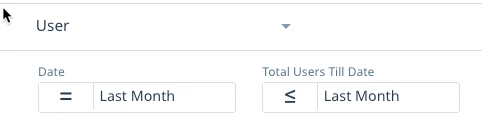
Double date selection required - When trying to get the total number of members in the community as of the end of the previous month, on the new DB I had to fill in two date filters, vs only one in the old dashboards.  This seems redundant to me, I don’t understand why the additional date filter is needed.
Download data option - I tried the download data option on the new registrations component, expecting to get an export with a list of newly registered users.  Instead, it downloaded a spreadsheet with just the total number, which I can’t imagine being useful to anyone.  Are there plans to make this option more useful?



1 reply

Aleksandra
  • Gainsight Product Manager
  • December 8, 2025

Hi ​@emiller 

Thank you for taking the time to provide additional feedback on the "include null" option. We will revisit how we can provide more tooltips to make it easier to use.

Regarding the global date filters in the User Dashboard, I understand the confusion about needing two date filters in the new dashboard, as this differs from the previous version. The reason for this is that the filters in the New Dashboards can apply to a subset of widgets on the dashboard, and this is precisely the case. This approach provides more flexibility in interacting with data within the same dashboard.
As mentioned in the article, when you hover over any global filters, you’ll see a blue border highlight on the reports and KPI widgets affected by that filter. This feature makes it easier to identify which filters impact specific parts of the dashboard.
I hope this clarifies the necessity of using two separate date filters