

Kenneth R
Expert ⭐️⭐️
December 14, 2017

How to add a poll (survey) to your topic

  • February 19, 2025 at 1:54 PM
  • 26 replies
  • 1791 views
  • Translate All

Curious to know whether your members like your new community design?  Polls let you offer a vote to your community members so they can make their voices heard.

This option isn’t limited to Moderators - any registered user can add a poll to a topic. But users can only vote in a poll once, so make sure you choose wisely!

How to create a topic with a poll

  1. When creating a new topic (in Community or Control) click the three dots ‘...’ → Poll. A Poll form field will be added below your topic description
  2. Add your question
  3. Add options (at least 2)
  4. Type up your topic and hit ‘Publish’ when you’re done.

How to View Poll Results

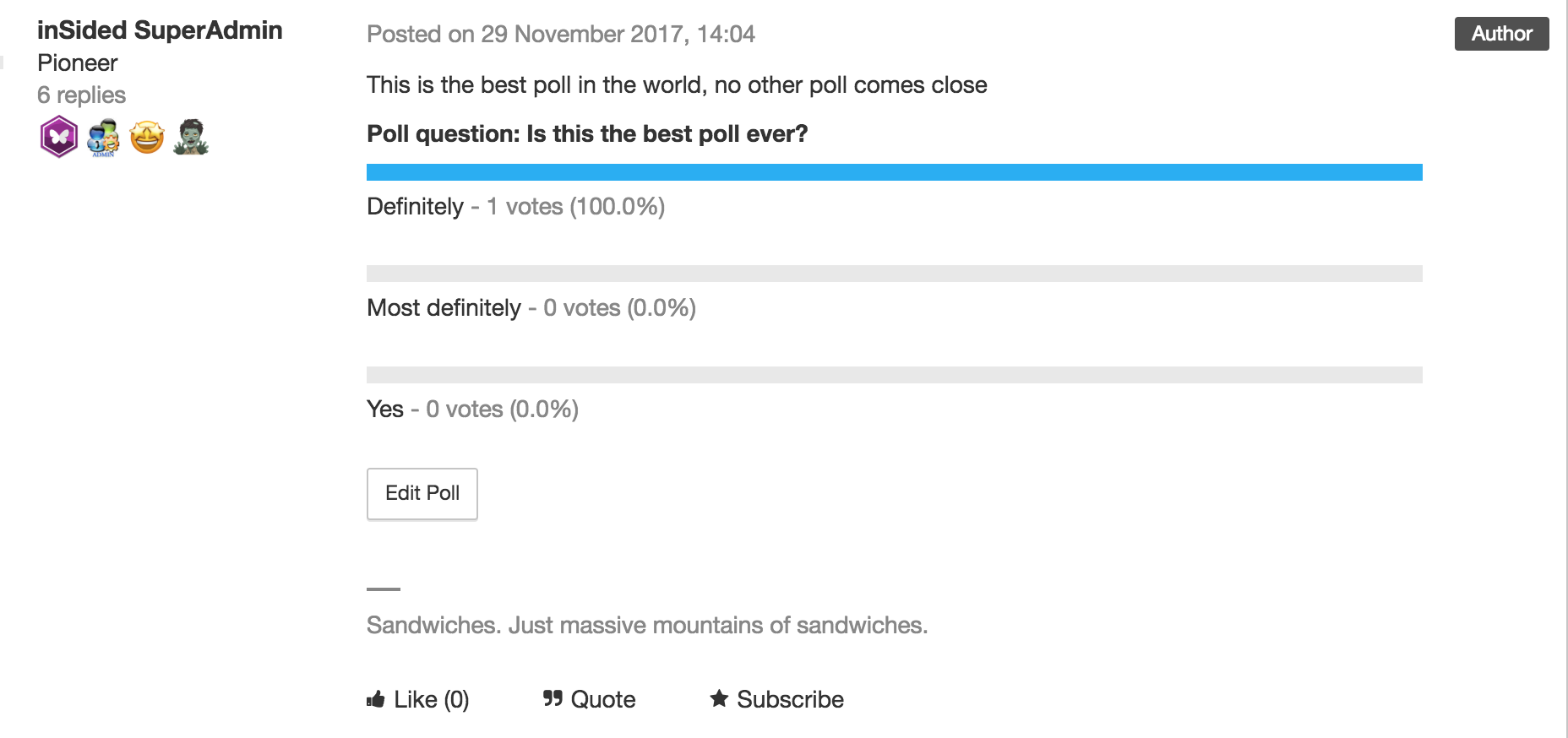
  1. Click on the topic in Control → the Poll results will show in the topic itself. 
 

:gear:  Tips, Tricks, & Technical Bits:

  • Polls can’t be added to existing topics.
  • Once you've created a poll, it's not possible to add new options to it.
  • If you close a topic containing a poll, members will still able to vote on it - the only way to disable voting is by trashing the topic.
  • To delete a poll from a topic, view the topic in Control, click 'Edit Poll', then (make sure you're certain, since this next step will immediately delete the poll) click 'Delete poll'.
  • Typo in your poll? No sweat! View the topic in Control, click 'Edit Poll', correct the poll option, then hit 'Save changes'. You can also remove poll options (as long as no votes have been cast for that poll).


26 replies

m4rc
Helper ⭐️
July 21, 2020

Does anyone know if a user doesn’t accept level 3 cookies whether they can still create a poll?

We’ve got a regular (who alas is anti cookies) struggling to post polls. Seems that the text editor is only seeing one poll option when in fact she’s created five. 

I’m wondering if it’s cookies related as it’s site functionality :thinking:

Translate
Julian
Gainsight Employee ⭐️⭐️⭐️
July 28, 2020

I am still checking with our developers, but I had some challenges reproducing it. I now registered on inSpired, using a incognito browser where I only accepted the minimum cookie level. I was still able to create a poll.

It could be that you have a different cookie mapping, but I would not think that there is a restriction based on cookie level for creating polls. This feature is not using any third-party tools or anything that could cause this.

It might be much easier: It could be that the user is trying to add a poll in a reply - this is not possible. Polls can only be created in the opening post of a new thread. Can you verify that the user is aware of this?

Translate
I follow my nose, it always knows
m4rc
Helper ⭐️
September 3, 2020

It might be much easier: It could be that the user is trying to add a poll in a reply - this is not possible. Polls can only be created in the opening post of a new thread. Can you verify that the user is aware of this?

Thanks @Julian 

The user was trying to create polls in the opening post. Not replies.

It’s a mystery! 

Translate
m4rc
Helper ⭐️
September 15, 2020

Hey @Julian 

The same community member is still having poll issues. She’s accepted cookies, but when she adds an option to her poll and hits ‘return’ it deletes the option. She’s using an iPad. I’m going to raise a servicedesk ticket :thumbsup:

Translate
Julian
Gainsight Employee ⭐️⭐️⭐️
September 15, 2020

Hi Marc,

thanks for letting us know, that sounds like a bug within the editor. Hopefully my colleagues will be able to sort it out quickly!

Translate
I follow my nose, it always knows
Casstastr0phee
Contributor ⭐️⭐️⭐️⭐️⭐️
January 4, 2021

Is there a new ideas/feature request already open to make editing polls an option after someone has voted? A Community mod accidentally published their poll post (mostly because he couldn’t see the poll in draft mode and wondered what would happen if it posted), but then a user participated in the poll. Now we can’t edit the questions anymore, which just seems a little silly. I guess I can understand to some extent why that might be hazardous, as you can maybe be malicious and edit the poll title and options and make it look like people voted for something else….but I mean...if thats the case, can you at least make it so that you can see what a poll looks like in draft mode? I’m sure there are bigger fish to fry in terms of feature requests...but I still think this would be a helpful little thing :) 

Translate
I follow Julian's nose, it always knows
jessicadaniels
Contributor ⭐️⭐️⭐️
December 12, 2022

Is it still correct that users (not admins, community managers, or moderators) have to vote to see the answers? And, does this include the user who posts the poll who must vote to see the answer?


Thanks! 

Translate
Jessica Daniels, Grove Community Manager
JessicaMendez
Contributor ⭐️⭐️⭐️⭐️
November 28, 2023

Hello!

I’d like to share the preview of an article with someone who is not an admin. When I share the preview, they cannot see the poll in the post. The post only shows the copy, not the poll.


Is this an error or are polls not visible in preview format? Thanks!

Translate
jevaaler
Contributor ⭐️⭐️
November 1, 2024

Is it still correct that users (not admins, community managers, or moderators) have to vote to see the answers? And, does this include the user who posts the poll who must vote to see the answer?


Thanks! 

Came here looking for an answer to this question and it looks like this is still the case. Would be amazing if we could get an update from Gainsight about this.

Translate
Kenneth R
Kenneth RAuthor
Expert ⭐️⭐️
November 7, 2024

Hey @jevaaler - this is still the case.  If you want to have more features and flexibility around polling, it’s possible to do it in other ways.  Typeform surveys, for example, can be easily embedded into a community topic and will allow you to create much more elaborate types of polls.

Translate