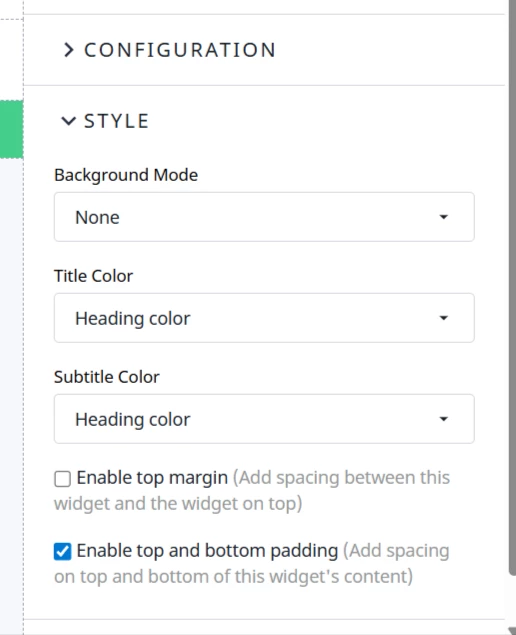
When you build a new widget, you can add configuration options, where you can add (among many other things) color picker options to define things like the background color of the widget etc…
But Background color, title color, top/bottom padding settings already exist in the Style section. At the moment these don't have an impact on the styling of a custom widget, but is it possible to use these setting in the widget?
If yes, how could we reference these settings?
Best answer by marekkoszlak
Thanks for bringing this up! The Styles section here is meant for native widgets. It controls container-level styles like the standard title and widget wrapper. For custom widgets, the recommended way to manage their styling is to use the configuration properties you mentioned.
One more thing worth mentioning is that we're currently working on improvements to our design tokens system. Soon you'll be able to style the widgets you create so they inherit the styling configured in your community. It will all be covered in the Developer Portal, so AI agents working with the extensions repository will also have all the information they need to handle this for you!
Thanks for bringing this up! The Styles section here is meant for native widgets. It controls container-level styles like the standard title and widget wrapper. For custom widgets, the recommended way to manage their styling is to use the configuration properties you mentioned.
One more thing worth mentioning is that we're currently working on improvements to our design tokens system. Soon you'll be able to style the widgets you create so they inherit the styling configured in your community. It will all be covered in the Developer Portal, so AI agents working with the extensions repository will also have all the information they need to handle this for you!
Hey Julien, let me look into this with the team and get back to you. What is it that you are missing in the existing color picker? Is it the lack of Hex value input possibility, or something beyond that?
If you ever had a profile with us, there's no need to create another one. Don't worry if your email address has since changed, or you can't remember your login, just let us know at community@gainsight.com and we'll help you get started from where you left.
Else, please continue with the registration below.