Matt Breneman
Contributor ⭐️⭐️⭐️
September 22, 2026
Solved

Exposing Likes, Views, and Reply count on topics

  • September 22, 2026
  • 3 replies
  • 18 views

Hi all, 

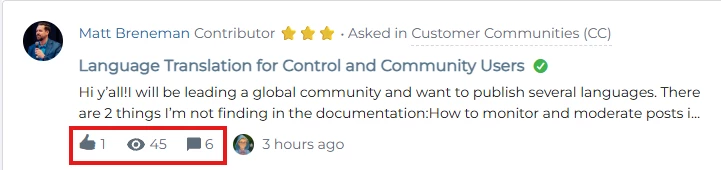
I have been searching documentation and talking to the AI agent to figure out how to expose the like, view, and reply count on the community posts. Example:
 

My Community right now only shows views:
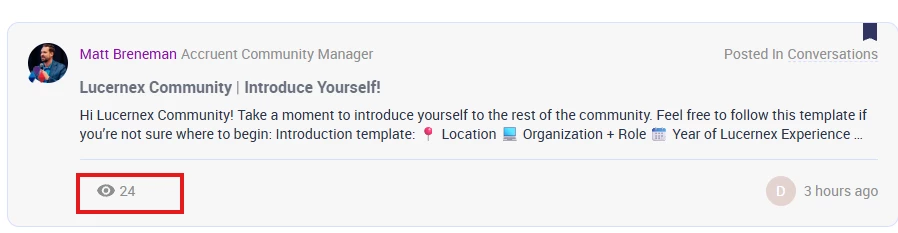
 

How do I enable the likes, views, and replies? Thank you!

    Best answer by mitchell.gordon

    Hello Matt! It looks like you might have some custom CSS hiding these.


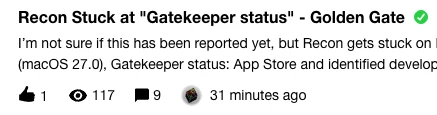
    Here are some screenshots from my community of what out of the box looks like. 


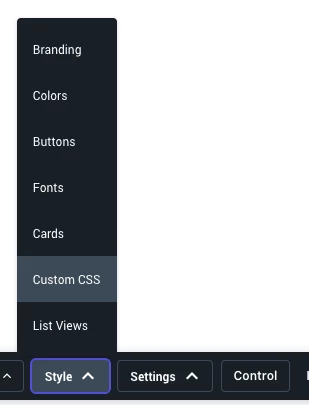
    If you to log in as an admin, go to style and Custom CSS there will most likely have some custom script in there hiding these. (Most likely)

    Id recommend giving that entire script to a web dev, Claude, Chat GPT ect to check if there is something blocking this visually for you. 

    I could also be wrong on this but I hope it points you to the correct direction.

    3 replies

    Contributor ⭐️
    September 22, 2026

    commenting to follow, thank you for flagging ​@Matt Breneman , i am also interested!

    mitchell.gordon
    Expert ⭐️
    September 22, 2026

    Hello Matt! It looks like you might have some custom CSS hiding these.


    Here are some screenshots from my community of what out of the box looks like. 


    If you to log in as an admin, go to style and Custom CSS there will most likely have some custom script in there hiding these. (Most likely)

    Id recommend giving that entire script to a web dev, Claude, Chat GPT ect to check if there is something blocking this visually for you. 

    I could also be wrong on this but I hope it points you to the correct direction.

    Matt Breneman
    Contributor ⭐️⭐️⭐️
    September 22, 2026

    @mitchell.gordon You are coming in clutch today!! You are spot on - Chat GPT found the Custom CSS that is hiding those fields! Now I get to have a conversation with the person who put that in place and ask them if it’s cool for me to update that 😅

    Thank you again!