DannyPancratz
VIP ⭐️⭐️⭐️⭐️⭐️
December 14, 2022
Solved

In-line recommendations on Creating topics

  • December 14, 2022
  • 18 replies
  • 252 views

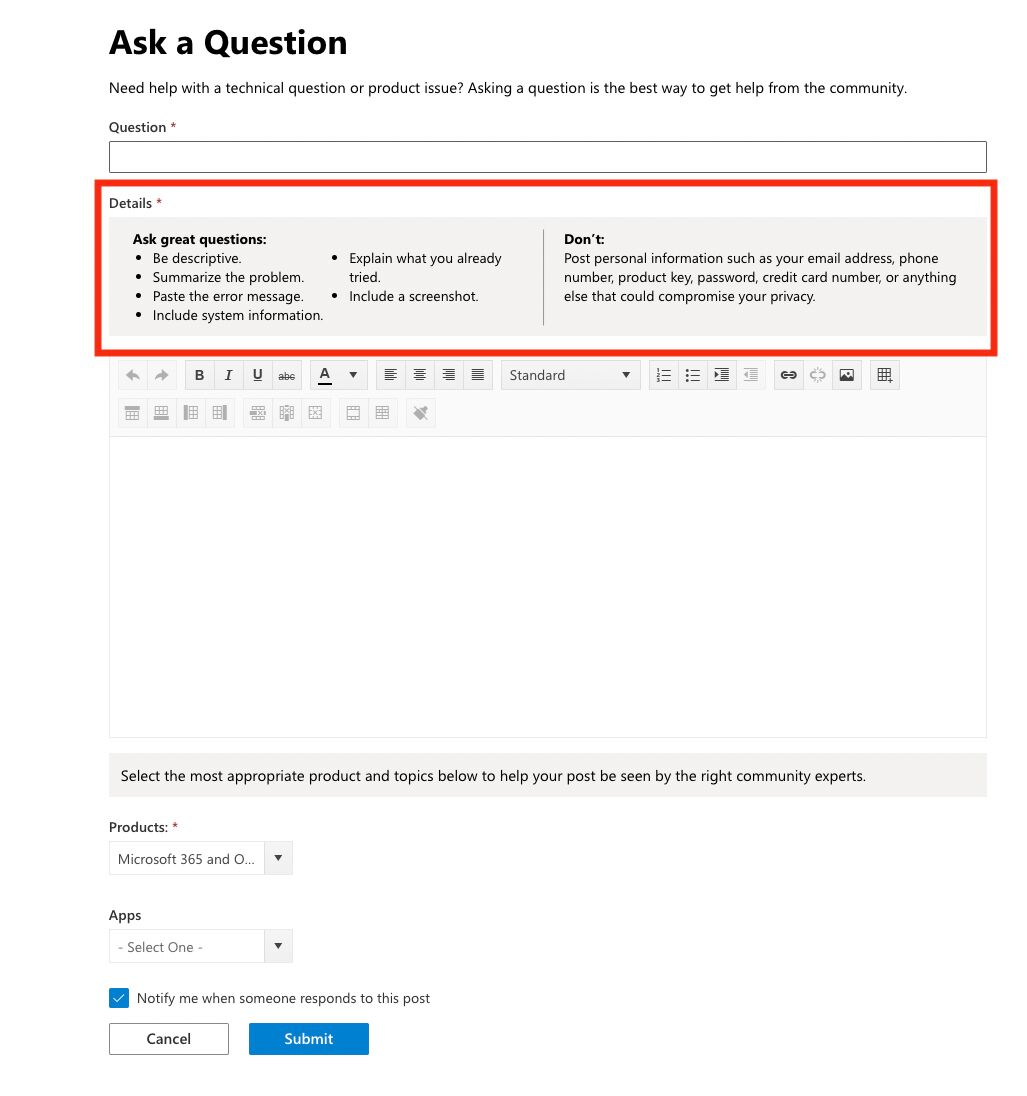
From Richard Millington’s linkedin post today: 

A while back we advised Microsoft on adding in-line recommendations to questions in their community.

The quality of questions has already markedly improved.

Again, there are a lot of easy wins out there.


Is this possible to do with Insided? If so, how? My hunch is maybe via a third party script. 


    Best answer by bas

    @olimarrio is completely correct, this will work just fine.
    For the sake of robustness I’d like to suggest one change, where you hide it by default and only show it on the specific page. That way, if the URL structure changes or the Javascript stops working, nothing it shown accidentally to the visitors.


    <div id="inline-question-recommendations" style="display:none;">
    <p>Before asking a question, make sure you search the community first</p>
    </div>

    And

    if (window.location.href === 'https://community.example.com/topic/new') {
    document.getElementById('inline-question-recommendations').style.removeProperty("display");
    }
    }

    18 replies

    revote
    VIP ⭐️⭐️⭐️⭐️⭐️
    December 20, 2022

    And one thing: Can there be several HTML widgets in use at the same time? I mean that to the topic page I would like to add certain widget and other widget to the Create topic page. Is this possible?

    DannyPancratz
    VIP ⭐️⭐️⭐️⭐️⭐️
    December 20, 2022

    @revote I just confirmed with a quick test that you can add multiple “HTML Block” widgets to your sidebar. 

    The key part of Oliver’s solution is this code that labels that html widget with an ID. 

    <div id="inline-question-recommendations" style="display:none;">
    <p>Before asking a question, make sure you search the community first</p>
    </div>


    FYI: I am no longer active in this community
    bas
    Helper ⭐️⭐️⭐️
    December 20, 2022

    @revote tried checking your test site, but couldn’t find the snippet anymore.

    What code did you see everywhere? Because you should see none

    If it was the second bit, keep in mind it needs to be surrounded by <script> tags :) 

    revote
    VIP ⭐️⭐️⭐️⭐️⭐️
    December 20, 2022


    If it was the second bit, keep in mind it needs to be surrounded by <script> tags :) 

    Haha, I think this is the reason! Thanks a lot.

    I try to be a developer and this is the hardest and longest way - learning by doing 😃

    revote
    VIP ⭐️⭐️⭐️⭐️⭐️
    December 20, 2022

    Now the code cant be seen anymore but I can display only the Title of the HTML Block in Create topic page. Not the content. 😅 @bas We have separate test site and stage, I have now added widget to the stage, is it possible to check it out?

    revote
    VIP ⭐️⭐️⭐️⭐️⭐️
    December 20, 2022

    It seems that with this code @olimarrio shared earlier then the content can be seen:

    <div id="inline-question-recommendations">
    <p>Before asking a question, make sure you search the community first</p>
    </div>

    With code what @bas shared the title of the HTML Block can be seen only:

    <div id="inline-question-recommendations" style="display:none;">
    <p>Before asking a question, make sure you search the community first</p>
    </div>

    But, this widget can be seen also in category page, not just in Create topic page. 

    bas
    Helper ⭐️⭐️⭐️
    December 20, 2022

    Ah yes indeed, problem was that the sidebar is also rendered by javascript and our TPS script was firing first :)


    I’ve now moved the script into the sidebar (and made the matching of the URL more robust), complete code for the sidebar now looks like this:

    <div id="inline-question-recommendations" style="display:none;">   <p>Before asking a question, make sure you search the community first</p> </div>

    <script>   if (window.location.href.includes('https://community.example.com/topic/new')) {       document.getElementById('inline-question-recommendations').style.removeProperty("display");  }  </script>

    Hope this helps! 😊

    revote
    VIP ⭐️⭐️⭐️⭐️⭐️
    January 9, 2023

    Thanks @bas, works nicely.

    I have few categories where I want to display their own widgets (widget per category). I mean the HTML widget. Is this possible somehow?