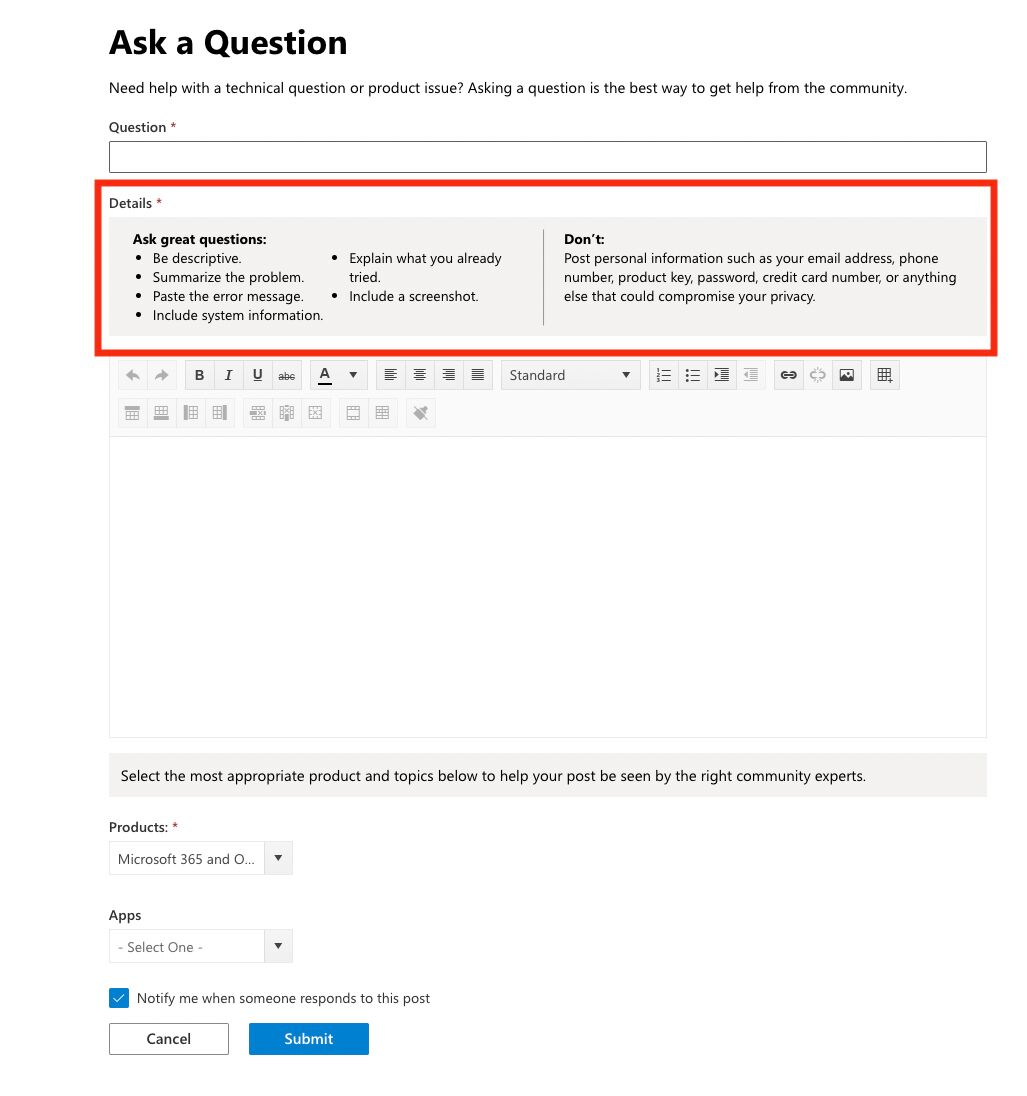
@olimarrio is completely correct, this will work just fine. For the sake of robustness I’d like to suggest one change, where you hide it by default and only show it on the specific page. That way, if the URL structure changes or the Javascript stops working, nothing it shown accidentally to the visitors.
<div id="inline-question-recommendations" style="display:none;">
  <p>Before asking a question, make sure you search the community first</p>
</div>
And
if (window.location.href === 'https://community.example.com/topic/new') {
  document.getElementById('inline-question-recommendations').style.removeProperty("display");
 }
}
I wanted to do the same thing sometime back, especially to ensure a certain quality to Idea submissions but it is not currently possible (easily) is the current understanding.
The nearest shot at this is to change the prefil text in the Description field that you can via
Yes, so this is something I’ve been also looking at with several customers in the past, I also believe that this would enhance the quality of content created, also reduce the overall Moderation effort.
I do see a challenge in displaying the right tips per category / content type, e.g. for ideas people would like to display a different guide than for a question.
But in general, something like this is possible with CSS. It should be possible to nest this somewhere in the center of the page, what might be easier though would be to display it in the sidebar. Below you can see a POC we did a while ago for GoFundMe. An HTML widget is only made visible on the “new topic” page and gives users helpful tips.
As we are working on offering guided tours for end users next year, I could also see this as a relatively easy to achieve enhancement that could take users by the hand and give them tips to create richer content, e.g. with a small pop-up message when users visit this page.
Yes, this would be possible via Third Party Scripts and Custom CSS, but I agree with what @anirbandutta and @Julian have mentioned, it would be cool if these in-line recommendations would change based on which topic type has been selected via the radio buttons - something that is definitely possible but would require some technical investment or a professional services project.
The method @Julian mentioned is probably the easiest and most stable to implement. By adding a custom HTML widget to the General Sidebar, which includes your recommendations, you could then add a script like the following to ensure that it only becomes visible on the ‘New Topic’ page:
if (window.location.href != 'https://community.example.com/topic/new') {
  document.getElementById('inline-question-recommendations').style.display("none");
 }
}
The method @Julian mentioned is probably the easiest and most stable to implement. By adding a custom HTML widget to the General Sidebar, which includes your recommendations, you could then add a script like the following to ensure that it only becomes visible on the ‘New Topic’ page:
if (window.location.href != 'https://community.example.com/topic/new') {
  document.getElementById('inline-question-recommendations').style.display("none");
 }
}
Sorry but I understand here that I should replace our community url to the code but what else I have to do to get this work?
@revote so this is an example of some JavaScript that can be added to your Third Party Scripts in order to display / hide a specific widget on a specific page.
You would also need to create a custom HTML widget and add it to your General Sidebar depending on what content you would like to include and how this content should be styled. A very basic example that would work in combination with this code would be something like:
<div id="inline-question-recommendations">
  <p>Before asking a question, make sure you search the community first</p>
</div>
Let us know what you have in mind or if you need any further help.
@olimarrio is completely correct, this will work just fine. For the sake of robustness I’d like to suggest one change, where you hide it by default and only show it on the specific page. That way, if the URL structure changes or the Javascript stops working, nothing it shown accidentally to the visitors.
<div id="inline-question-recommendations" style="display:none;">
  <p>Before asking a question, make sure you search the community first</p>
</div>
And
if (window.location.href === 'https://community.example.com/topic/new') {
  document.getElementById('inline-question-recommendations').style.removeProperty("display");
 }
}
If you already have a profile on Gainsight Community, there's no need to create another one. If your email address has changed or you can't remember your login, email community@gainsight.com.
Otherwise, continue with the registration below.