Solved

Is it possible to change the date format on posts

  • January 30, 2026
  • 4 replies
  • 24 views

AndrewK

Hi All,


We were wondering if there is a way to change the date format on community posts. For example, from “1 month ago” to “12-30-2025” or something similar. I could not find anything in control or on personal user settings. Thanks!


 

Best answer by atwhite

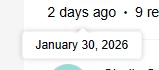
This doesn’t fully address the question, but when you are viewing the Topic itself, you can hover over the timeframe to see a pop-up with the exact date. 

That doesn’t help when viewing lists of topics (i.e., on a Knowledge Base landing page), but it’s something. 

I agree it would be nice to be able to choose how you prefer this information is displayed.

4 replies

Sanne van Opstal-Brakel
Forum|alt.badge.img

I have not found that option yet, but if it exists I am also curious. But perhaps also submit it as an idea? 


atwhite
Forum|alt.badge.img+1
  • Helper ⭐️⭐️
  • Answer
  • February 2, 2026

This doesn’t fully address the question, but when you are viewing the Topic itself, you can hover over the timeframe to see a pop-up with the exact date. 

That doesn’t help when viewing lists of topics (i.e., on a Knowledge Base landing page), but it’s something. 

I agree it would be nice to be able to choose how you prefer this information is displayed.


revathimenon
Forum|alt.badge.img+8
  • Gainsight Community Manager
  • February 3, 2026

This is currently not possible to my knowledge either.

Definitely something to submit as an idea.


AndrewK
  • Author
  • Contributor ⭐️⭐️
  • February 3, 2026

Thanks everyone! I posted an idea here Change date format for posts | Gainsight Community