

Question

Update Badging VIA API

  • December 8, 2025
  • 11 replies
  • 56 views

mitchell.gordon

Hello GS CC folks! Im looking to assign a few thousand badges to users within our community. Support recommend using the API to update the badging. I have not done this before and the only thing I given by support was a url of https://api2-us-west-2.insided.com/docs/user/#tag/User:-Badges/operation/awardBadge 


Has anyone done this before? Do you have any tips?


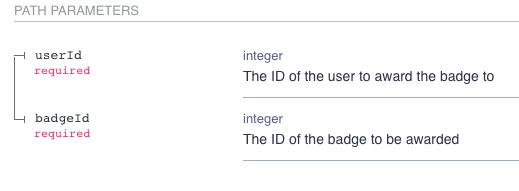
The system asks for IDs however there is no clarification on what the ID actually is. Is it a number? Is it a username? Is it a different ID you cannot see in admin?
Thanks for any advice!

11 replies

revathimenon
Forum|alt.badge.img+8
  • Gainsight Community Manager
  • December 8, 2025

Hey ​@mitchell.gordon 

Let me ask around internally and come back to you!


DannyPancratz
Forum|alt.badge.img+9
  • VIP ⭐️⭐️⭐️⭐️⭐️
  • December 8, 2025

badgeId is a number. It’ll be in the URL of the badge you want to assign when you are editing the badge in Control. 


DannyPancratz
Forum|alt.badge.img+9
  • VIP ⭐️⭐️⭐️⭐️⭐️
  • December 8, 2025

If you use Zapier, there’s a pre-built step that’s very helpful, as the UI helps you pick the badge you want to assign.

If not, using the standard APi call shouldn’t be much different. The trick is just mapping the badgeIds.


revathimenon
Forum|alt.badge.img+8
  • Gainsight Community Manager
  • December 8, 2025

Hey ​@mitchell.gordon 

Sharing a suggestion - please try this and let me know in case you are still facing any issues. 

ID is the Gainsight user ID. So…

  1. You should get a list of all the thousand users and their email addresses.
  2. Fetch users via email address to get the user IDs. This call.
  3. Then, use the user IDs to award the badges.

I remember we did something similar for Pulse attendee badges as well. You can get the ID in the user profile URL on Control as well, but it's better to do the API call to get all user IDs in one file


mitchell.gordon
  • Author
  • Helper ⭐️⭐️
  • December 8, 2025

badgeId is a number. It’ll be in the URL of the badge you want to assign when you are editing the badge in Control. 

Big thank you for that clarification!


mitchell.gordon
  • Author
  • Helper ⭐️⭐️
  • December 8, 2025

Hey ​@mitchell.gordon 

Sharing a suggestion - please try this and let me know in case you are still facing any issues. 

ID is the Gainsight user ID. So…

  1. He should get a list of all the thousand users and their email addresses.
  2. Fetch users via email address to get the user IDs. This call.
  3. Then, use the user IDs to award the badges.

I remember we did something similar for Pulse attendee badges as well. You can get the ID in the user profile URL on Control as well, but it's better to do the API call to get all user IDs in one file


Thank you ​@revathimenon I am going to give this a shot.


It would be extremely convenient if this information could be accessed via the User csv download in admin.


mitchell.gordon
  • Author
  • Helper ⭐️⭐️
  • December 8, 2025

Brennon helped me in support and sent me a file! I got my files created for the badges but struckout trying to connect to the server to do the task. Ill try it again tomorrow.


revathimenon
Forum|alt.badge.img+8
  • Gainsight Community Manager
  • December 9, 2025

@mitchell.gordon GREAT!

Please share what solution worked for you eventually — it’ll be helpful for other members referencing this thread in the future. :) 


mitchell.gordon
  • Author
  • Helper ⭐️⭐️
  • December 9, 2025

I never got the API to work or connect. I had a deadline so I built an excel spreadsheet to format everything into chunks of 50 so they could be manually assigned. Had to assign a little over 2,000 badges this way. 


Hopefully this excel doc can help others.


Important Note: Copy and paste into Award Badges doesnt work fully. The system says usernames are not valid when they are. If you manually type in the username, the badge can be awarded. Opened a ticket.


atwhite
Forum|alt.badge.img+1
  • Helper ⭐️⭐️
  • December 9, 2025

There’s an open Idea for adding User ID to the exports that just got updated this week to “Development.” 🙌🏻

@mitchell.gordon We used the API to fetch and populate a list of User IDs, like ​@revathimenon suggested, but we did ours by usernames. I referenced this in another thread recently, but I can go ahead and post the guide here if there are no objections (admins, please remove if needed!).

I’m not a developer and this was created with chatGPT and some trial and error. So...it’s not a definitive recommendation or anything, but it’s what worked for us; your mileage may vary. 

Update: I’ve attached a V2 of the guide based on some feedback I received.


mitchell.gordon
  • Author
  • Helper ⭐️⭐️
  • December 9, 2025

There’s an open Idea for adding User ID to the exports that just got updated this week to “Development.” 🙌🏻

@mitchell.gordon We used the API to fetch and populate a list of User IDs, like ​@revathimenon suggested, but we did ours by usernames. I referenced this in another thread recently, but I can go ahead and post the guide here if there are no objections (admins, please remove if needed!).

I’m not a developer and this was created with chatGPT and some trial and error. So...it’s not a definitive recommendation or anything, but it’s what worked for us; your mileage may vary. 

Ill give this a shot next time around! Thank you for the doc. Seems to go over everything well!