

Workaround for group invitation link

  • March 4, 2026
  • 8 replies
  • 57 views

sarahmasterton-brown
Forum|alt.badge.img+4

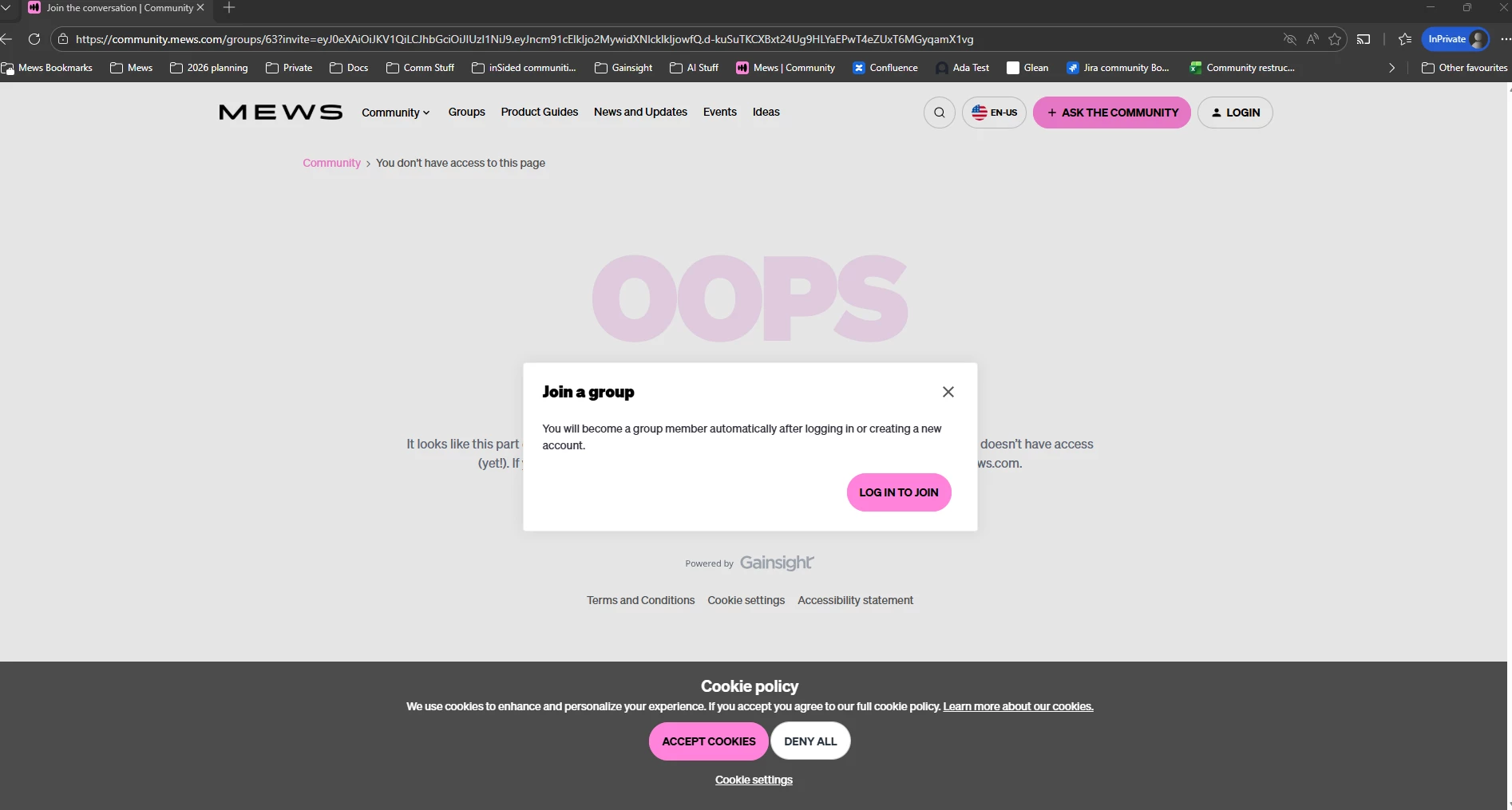
I’m sharing a hidden group invite link to customers who haven’t registered in my community. The UX isn’t great as the person will be shown the ‘You dont have access to this page’ placeholder - not the most welcoming first impression!
Any way I can change it so it displays our Community Homepage in the background instead?!
Thanks


8 replies

Alistair FIeld
Forum|alt.badge.img+4

Hi ​@sarahmasterton-brown 

I am doing the exact same thing as we speak. 

From our product users are directed to a group event BUT not everyone is registered in community or a member of the group.

I am landing on the 404 or 403 errors message page (much like yourself)

I am trying to modify the message based on user profile or referal url.


I would add to the question for any Gainsters.


Can we use document.referrer in Custom CSS to modify images or text on the Error Message?


mitchell.gordon
  • Helper ⭐️⭐️⭐️
  • March 4, 2026

Could you send out a group join code and then have the event posted inside of the private group for them to view once in the group?


atwhite
Forum|alt.badge.img+1
  • Helper ⭐️⭐️
  • March 4, 2026

All of our groups are private, too, so we run into this when sharing content, links to group resources, etc. I don’t know of a workaround, so we’ve started by adding extra context (e.g., pairing the link with something like “Register for the group here first...” or “Register for your Community account here, and then...”).

I agree that it would be great if group links shared with people who aren’t in the group or the Community would first redirect to the group landing page or the Community registration page, though. 


MeghanM
Forum|alt.badge.img
  • Helper ⭐️
  • March 9, 2026

Dealing with this right now as well! We’ve gotten a lot of feedback from partners that the join experience is “jarring” and likely is what is contributing to the low join rate for some of our groups. 

For now I’ve added the below CSS to at least hide the image from the the page. Not the best solve, but it makes it look less like an error page and then they can then actually read the text on the page. 

.destination_error_image[src*="404.png"],
.destination_error_image[src*="403.png"] {
display: none;
}

Also trying to figure out how to edit the “Join the group” pop-up but haven’t been successful, in case anyone has figured that out too. 


Alistair FIeld
Forum|alt.badge.img+4

I have modified our error page with the CSS above and some Javascripts. to try and encourage users to continue their journey. The javascript only shows the join group button to users with the custom role associated to that segment.


atwhite
Forum|alt.badge.img+1
  • Helper ⭐️⭐️
  • March 11, 2026

I have modified our error page with the CSS above and some Javascripts. to try and encourage users to continue their journey. The javascript only shows the join group button to users with the custom role associated to that segment.

This looks really nice! Double-checking how it works...so if someone is already a member of the Community and attempts to access a link from within a private group that they are not a member of, the error page now detects their role and gives them the opportunity to join the group from the error page?


Alistair FIeld
Forum|alt.badge.img+4

@atwhite that is correct.


This are the scripts used in the before body Tag section of control.

<script>
// Hide Connect Invite from NON Connect Users
if (inSidedData?.user && !inSidedData.user.role.includes("Connect")) {
$('.destination_error_image').css("display", "none");
}
</script>

<script>
// Error page link to CONNECT Users group
document.addEventListener('DOMContentLoaded', function () {
document.querySelectorAll('.destination_error_image[src*="403.png"]').forEach(function(img) {
// Create anchor
var a = document.createElement('a');
a.href = 'https://community.zonal.com/groups/219?invite=xxxxxxxxx12345xxxxxxxx';
a.target = '_blank';
a.rel = 'noopener';

// Insert anchor before the image and move the image inside it
img.parentNode.insertBefore(a, img);
a.appendChild(img);
});
});
</script>


atwhite
Forum|alt.badge.img+1
  • Helper ⭐️⭐️
  • March 12, 2026

@Alistair FIeld Thanks for sharing! I’ll definitely look into adapting this for our situation. Much appreciated!