ray_r
Contributor ⭐️⭐️
March 30, 2016
Question

Can't create "No CTA" rule to raise health score

  • March 30, 2016
  • 11 replies
  • 129 views
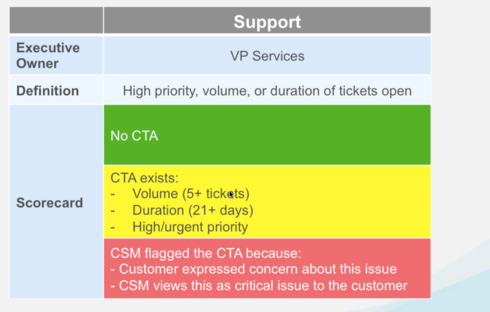
I'm sure many of you have attended the Express workshop and/or webinars and therefore will find this next graphic familiar...


The problem I'm having is I can't seem to put together a simple rule to indicate that no CTA's exist. When I came across this problem my first instinct was to place the following in the filter field:

CTA type includes Risk
Count of CTA equals 0

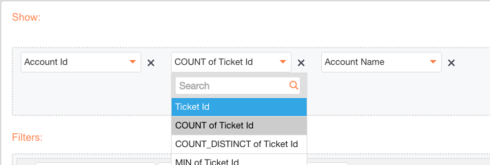
But I realized that we cannot pivot around "count" when an object is in the "filter" field of a rule, however we can pivot around "count" in the "show" field as shown below...


So my question to anyone else who's run into this same issue before, how did you structure your rule to indicate that no risk CTA's exist? I've created a work around but it's not sufficient. I had to create a rule that says "if a Risk CTA exists AND open tasks equals zero THEN set score to Green". I won't get into the different reasons on why this isn't a sufficient work around, but nevertheless I wanted to share and see if anyone else had this issue and found a successful work around for it.

To any employees who are reading this, is there a reason we can't select count when an object is in the filter field? It seems as though it would make sense to have that ability.
11 replies

seth
Expert ⭐️
March 30, 2016
My understanding of the best practices (and the way I've set up our own instance) is to have a crop of rules that run first thing in the morning to reset all health scores to green or N/A, as appropriate for each score. Then, you have your rules run that will set the scores to yellow or red.
AI Transformation @ Gainsight
seth
Expert ⭐️
March 30, 2016
For what it's worth, the reason it isn't doable is that you'd be telling Gainsight to:
  1. Find me all the data on open Risk CTAs
  2. Count up how many of them there are for each Account
  3. Now show me only the records where there are zero Risk CTAs
No matter how much you want to do step 3, you've shot yourself in the foot in step 1 :-)

There's no way in Gainsight's "Setup Rule" interface to say "Find me all the data for all accounts, then compare that with all the data for open Risk CTAs, and keep only the Account data where there are zero open Risk CTAs." (If you're familiar with SQL: that would require a "left outer join", but Gainsight's interface only does "inner joins".)
AI Transformation @ Gainsight
dstokowski
Gainsight Employee ⭐️⭐️
March 31, 2016
We are working and plan to add this capability to set a rule that would support the "absence of data" condition.  For now, the workaround suggested by Seth works - you have a "reset" rule that runs before your evaluation rule that sets the scorecard value to the default that exists for "no data/no CTA".  So for Support Risk, that is Green; for sentiment, we set it to Yellow (no promoters or detractors or no NPS at all)
matthew_lind
VIP ⭐️⭐️⭐️⭐️⭐️
March 31, 2016
I am so excited about the "absence of data" possibilities.
Making people their best....currently disguised as a CS Ops Architect. How can I contribute to your success?
lane_h
Helper ⭐️
April 5, 2016
You could also write a couple rules to help. First, you would need to create a field for number of open/closed CTAs that would load the count of how many open/closed CTAs. You would then need to write a rule to populate this field on the cadence you would like (Weekly, daily, monthly). Next, you would need to write a rule that would run right before this one to write 0 for each customer. When the rule runs to load how many there have been, it will only write to those that have had one. 

Then you can pull into the scorecard any that have 0. 
Director of CX and Scale Programs
scott_superko
Helper ⭐️
April 5, 2016
Would this effect the historical tracking of scorecards? From what I can tell, every day the previous score value/label would be green, so it would show a daily shift of green -> yellow/red for accounts that are yellow/red.

I would go Lane's route but I need scorecards live ASAP and we have a 3 week release cycle on SFDC fields.
dstokowski
Gainsight Employee ⭐️⭐️
April 5, 2016
Me too Matt, me too!
seth
Expert ⭐️
April 5, 2016
Hi Scott,
When you set up your historical scorecard snapshotting, there is a specific time of the day and week that the scorecard gets stored. (Documentation here: https://support.gainsight.com/hc/en-us/articles/202987566-Configure-Scorecard-History-)  So, the score can swing wildly this-and-that'a'way between the snapshots, and the only thing that matters is where the score is [i]when the snapshot is taken.

In our case, our scorecard snapshots are only stored weekly. So, Gainsight doesn't end up showing the score as shifting versus the most recent historical snapshot, even though, early every morning, some scores are set from Red or Yellow, to Green or N/A, and then back to Red or Yellow. If you score your snapshots daily or more frequently, I imagine you could take advantage of the same approach, if you're just more thoughtful than I need to be about exactly what time of day those score-setting rules run.
AI Transformation @ Gainsight
lane_h
Helper ⭐️
April 5, 2016
Hi Scott,

If you load the data to Usage you could do historicals by week.
Director of CX and Scale Programs
scott_superko
Helper ⭐️
April 5, 2016
Hi Seth/Lane,

I just realized that our version of historical tracking was set up by my administrative predecessor and is different than default historical tracking provided by Gainsight.  

We have tens of thousands of accounts and 5 planned scorecards, which would take up a huge amount of Salesforce storage, and we are already close to our limit.  To circumvent this he had written out rules to load historical scorecard data to MDA.  

I dug into our rules and it doesn't look like this will be an issue, as it captures the historical data in a similar snapshot fashion on a weekly basis.

Thank you both for your insight.