

Question
Can't create "No CTA" rule to raise health score
I'm sure many of you have attended the Express workshop and/or webinars and therefore will find this next graphic familiar...
The problem I'm having is I can't seem to put together a simple rule to indicate that no CTA's exist. When I came across this problem my first instinct was to place the following in the filter field:
CTA type includes Risk
Count of CTA equals 0
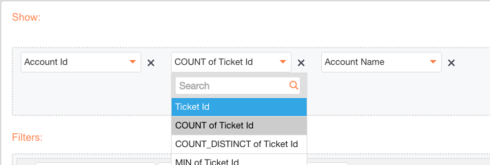
But I realized that we cannot pivot around "count" when an object is in the "filter" field of a rule, however we can pivot around "count" in the "show" field as shown below...
So my question to anyone else who's run into this same issue before, how did you structure your rule to indicate that no risk CTA's exist? I've created a work around but it's not sufficient. I had to create a rule that says "if a Risk CTA exists AND open tasks equals zero THEN set score to Green". I won't get into the different reasons on why this isn't a sufficient work around, but nevertheless I wanted to share and see if anyone else had this issue and found a successful work around for it.
To any employees who are reading this, is there a reason we can't select count when an object is in the filter field? It seems as though it would make sense to have that ability.
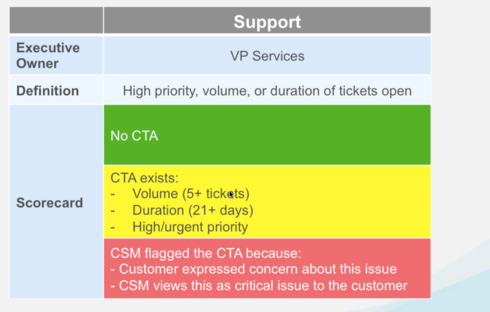
The problem I'm having is I can't seem to put together a simple rule to indicate that no CTA's exist. When I came across this problem my first instinct was to place the following in the filter field:
CTA type includes Risk
Count of CTA equals 0
But I realized that we cannot pivot around "count" when an object is in the "filter" field of a rule, however we can pivot around "count" in the "show" field as shown below...
So my question to anyone else who's run into this same issue before, how did you structure your rule to indicate that no risk CTA's exist? I've created a work around but it's not sufficient. I had to create a rule that says "if a Risk CTA exists AND open tasks equals zero THEN set score to Green". I won't get into the different reasons on why this isn't a sufficient work around, but nevertheless I wanted to share and see if anyone else had this issue and found a successful work around for it.
To any employees who are reading this, is there a reason we can't select count when an object is in the filter field? It seems as though it would make sense to have that ability.