
Question

P360 - Bulk upload "at risk" Activities

  • January 8, 2026
  • 6 replies
  • 63 views

We are launching to a new CS team soon, and we would like to update a large number of “people” in P360 that in our previous solution were marked as at risk.

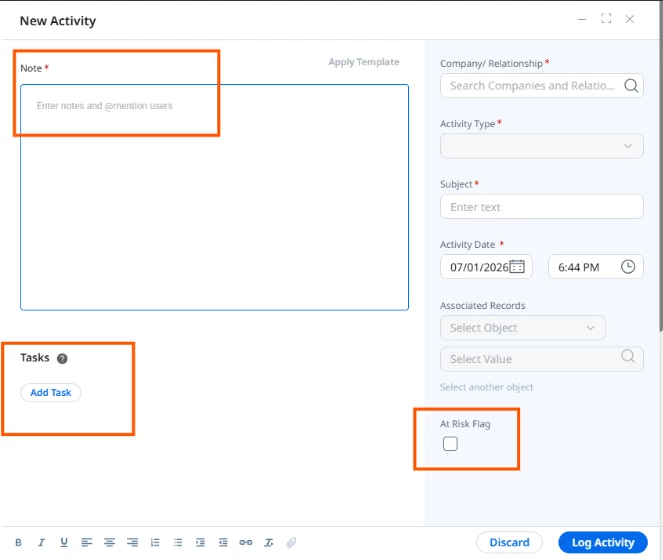
I know that in P360 you can create an Activity related to the contact and mark the “at risk” checkbox.

Is there a way to do the update more at once?

Note: right now no contact in P360 has any activities created yet.
 

6 replies

link_black
Forum|alt.badge.img+2
  • Gainsight Employee ⭐️⭐️
  • January 8, 2026

Thanks for posting to Community ​@cinquecristina !


Your question should be moved to our Customer Success section, not Product Experience.  ​@danny_hallgren 


alizee
Forum|alt.badge.img+13
  • VIP ⭐️⭐️⭐️⭐️⭐️
  • January 12, 2026

@cinquecristina Let’s take a step back.

The risk is associated to the person in relation to their company / relationship, correct ? Not to the individual outside of its work function? 

Is the risk considered to be a state for that company / relationship person ? How do you know / track / record when that state changes ? 

I’m not sure that recording this as a timeline activity is that helpful. A timeline activity is a point in time. A risk sounds more like a state that can last.

With some of those answers we can work out the best way to approach tracking “at risk” contacts in your system (and the best way to bulk upload that state).


  • Author
  • Contributor ⭐️
  • January 12, 2026

Hello ​@alizee , thank you for commenting.

Yes, the risk is associated with the person in relation to their company. In our model, marking a “Person at Risk” is a way to flag that this individual represents a potential partial or full churn risk for the company.

While we do identify the risk at a specific moment (for example, after a meeting), the “at risk” status is intended to persist as a state until mitigation actions are taken or the risk is cleared. The activity serves more as the trigger or evidence for entering that state, rather than the full history of the risk itself.

The reason we initially looked at Activities is that they’re visible to CSMs in context and easy to act on, but we are open to modeling this as a relationship-level state or attribute if that’s a better fit, especially since we need to bulk mark a large number of people at this initial stage


Thank you


alizee
Forum|alt.badge.img+13
  • VIP ⭐️⭐️⭐️⭐️⭐️
  • January 12, 2026

Does the activity in itself contain/would it contain contextual information that is not stored elsewhere, such as in the meeting activity etc.?


  • Author
  • Contributor ⭐️
  • January 13, 2026

For the first upload no, as it has been already classified as at risk on another tool. After the first upload CSMs will use the integrations we have with Gaisight and mark the At Risk checkbox themselves


alizee
Forum|alt.badge.img+13
  • VIP ⭐️⭐️⭐️⭐️⭐️
  • January 13, 2026

Thanks ​@cinquecristina 

In this case, my go-to approach would be:

  1. Create the risk flag (probably as a boolean (tick box)) at the company person level, ensure default value = false
  2. Bulk set the flag with a rule (create a CSV, upload to S3, create a rule that merges your CSV data with company persons and load to company person)

I’d also consider a snapshot object to track when this field is becoming true and back to false (and while being at it, other fields that may be relevant to track historically), detect the change in status to trigger a risk management process (probably technically as a CTA + playbook) so it can be managed in a structured, traceable way. 

That’d be easier than creating a ton of timeline entries for that, including for reporting.