

seth
Expert ⭐️
September 21, 2016
Question

VisualForce widget in Salesforce Account is now too tall

  • September 21, 2016
  • 14 replies
  • 210 views
With the UI revamp, the Gainsight VisualForce widget for the Salesforce Account page is now to tall.

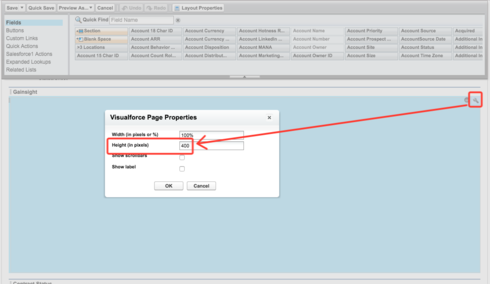
Firstly, I had to make the section in the Page Layout taller, doubling it from 200px to 400px:


However, the information in the widget is still being cropped:
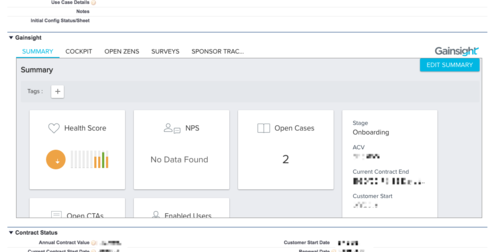


However, if I make the page section even taller, the Gainsight box does not continue to expand to fill it; I just end up with a bunch of empty space in the section.

Even if it [i]did expand, that would probably not be the best approach, since screen real estate on the Account page is at a premium, and I don't want to drop a 1000-pixel app into the middle of it. The content of the VisualForce page would ideally be drastically condensed, removing as much whitespace as possible.

Thanks, as always!

14 replies

karl_rumelhart
Expert ⭐️
September 22, 2016
I agree with you Seth.  I have experienced the same.  Expanding the size is the obvious answer but interesting that you prefer to have it smaller.  Would 600 pixels be too big in your view?
azhar_uddin
Helper ⭐️⭐️
September 22, 2016
HI Seth,
Did you try enabling scroll ? Yes the widget isn't responsive to fit into small viewports. However enabling scroll lets you see content on scrolling. 
seth
sethAuthor
Expert ⭐️
September 22, 2016
Hi Karl -- I think that 600 pixels would come across to our team as "Pretty darn large, but not quite large enough that I'm going to tell Seth to just remove it from the page entirely."

So, acceptable, but not ideal, and maybe not an improvement on having the scrollbar within the module.

To give you a sense of things, our customer success team works on 13" MacBooks, and 400px already takes up more than half of the screen:

AI Transformation @ Gainsight
seth
sethAuthor
Expert ⭐️
September 22, 2016
Thanks for mentioning it, Azhar! Yes, I do have that enabled, so the module is still functional at this point, just not as suave as it could be.
AI Transformation @ Gainsight
aviv_caspi
Contributor ⭐️⭐️⭐️⭐️
November 13, 2016
@Seth, Karl - is there a way to direct the users from this SF section to Gainsight?
karl_rumelhart
Expert ⭐️
November 13, 2016
Yea. If you click on the Gainsight Logo in the upper right you get to the full 360 page. 
aviv_caspi
Contributor ⭐️⭐️⭐️⭐️
November 14, 2016
Thanks much Karl!
nora_soza
Helper ⭐️
December 19, 2016
Would love to see (at minimum) the Summary cards layout adjusted to properly fit the recommended height implementation. (per documentation - 400 pixels)

Agree with Seth that adjusting the height to 600 pixels is okay.
kraig
Contributor ⭐️⭐️⭐️⭐️⭐️
February 8, 2017
Our team is annoyed with the fact that they have to vertically scroll to see the widget information on every tab.  We would prefer the widget to be tall enough so that they never have to scroll to see the information.  Thanks!
karl_rumelhart
Expert ⭐️
February 8, 2017
I agree.  This is being fixed in the upcoming release.  700px will work nicely.